Hi Akshit Agarwal,
i always see run and debug option and I want to change it to run option only
"Run and debug" option is belong to C/C++ extension. You can turn it off by go to setting an untick C_Cpp: Debug Shortcut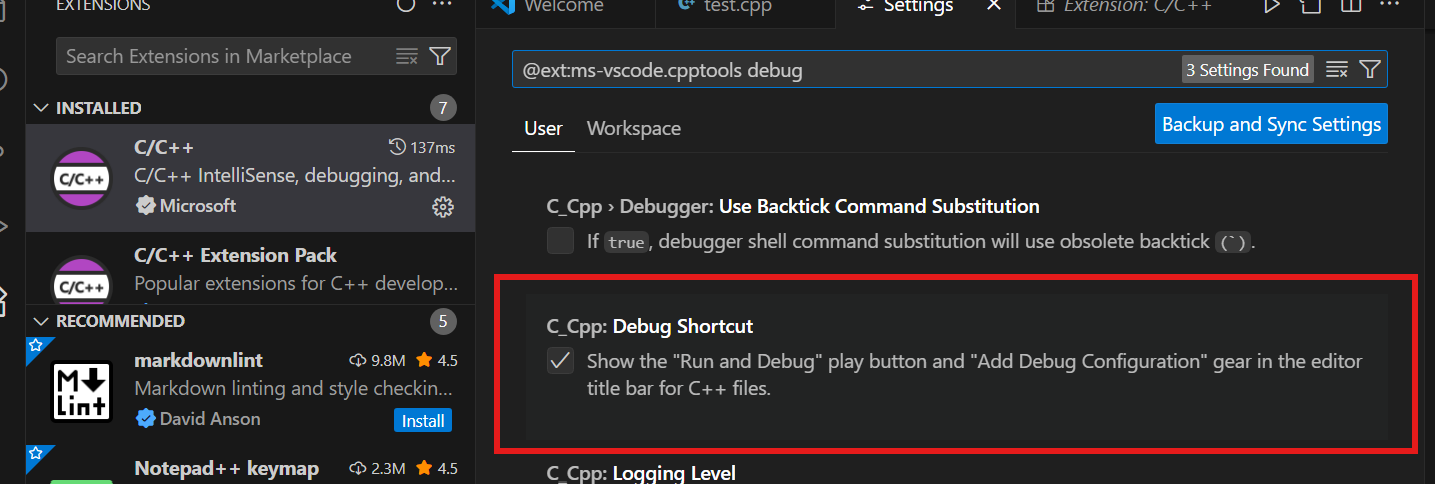
how to run the cpp file without using code runner
Here are some simple steps to compile and run:
- Press Ctrl+Shift+P, search: “Configure Default Build Task” and Choose:
C/C++: g++ build active file. This creates .vscode/tasks.json.
- Press Ctrl+Shift+B to compile while in a cpp file to produces an
.exe (Windows).
- Run it manually in terminal with this command:
./a.exe
I hope my response is useful to you. If you find it helpful, please kindly mark it as final answer! Thanks!
' cx='32' cy='32' r='32' /%3E%3Ctext x='50%25' y='55%25' dominant-baseline='middle' text-anchor='middle' fill='%23FFF' %3EAA%3C/text%3E%3C/svg%3E)
' cx='32' cy='32' r='32' /%3E%3Ctext x='50%25' y='55%25' dominant-baseline='middle' text-anchor='middle' fill='%23FFF' %3EA%3C/text%3E%3C/svg%3E)
' cx='32' cy='32' r='32' /%3E%3Ctext x='50%25' y='55%25' dominant-baseline='middle' text-anchor='middle' fill='%23FFF' %3EEC%3C/text%3E%3C/svg%3E)