Note
Access to this page requires authorization. You can try signing in or changing directories.
Access to this page requires authorization. You can try changing directories.
This article compares the three primary options for connecting an on-premises network to an Azure virtual network: Azure VPN Gateway, Azure ExpressRoute, and non-Microsoft IPsec or SD-WAN solutions hosted in Azure. For each option, it summarizes the connectivity model, when the option is appropriate, the main benefits and tradeoffs, and links to a detailed reference architecture.
This article targets network and cloud architects who evaluate site-to-site connectivity between a corporate or datacenter network and one or more Azure virtual networks. Separate documentation covers point-to-site VPN and Vnet–to–Vnet connectivity, which are out of scope here.
Azure VPN connectivity
An Azure VPN gateway is a type of virtual network gateway that sends encrypted traffic between an Azure virtual network and an on-premises location, typically over the public internet.
This architecture suits hybrid applications where traffic between on-premises and Azure is light, or where higher latency is acceptable in exchange for flexibility and cloud scalability.
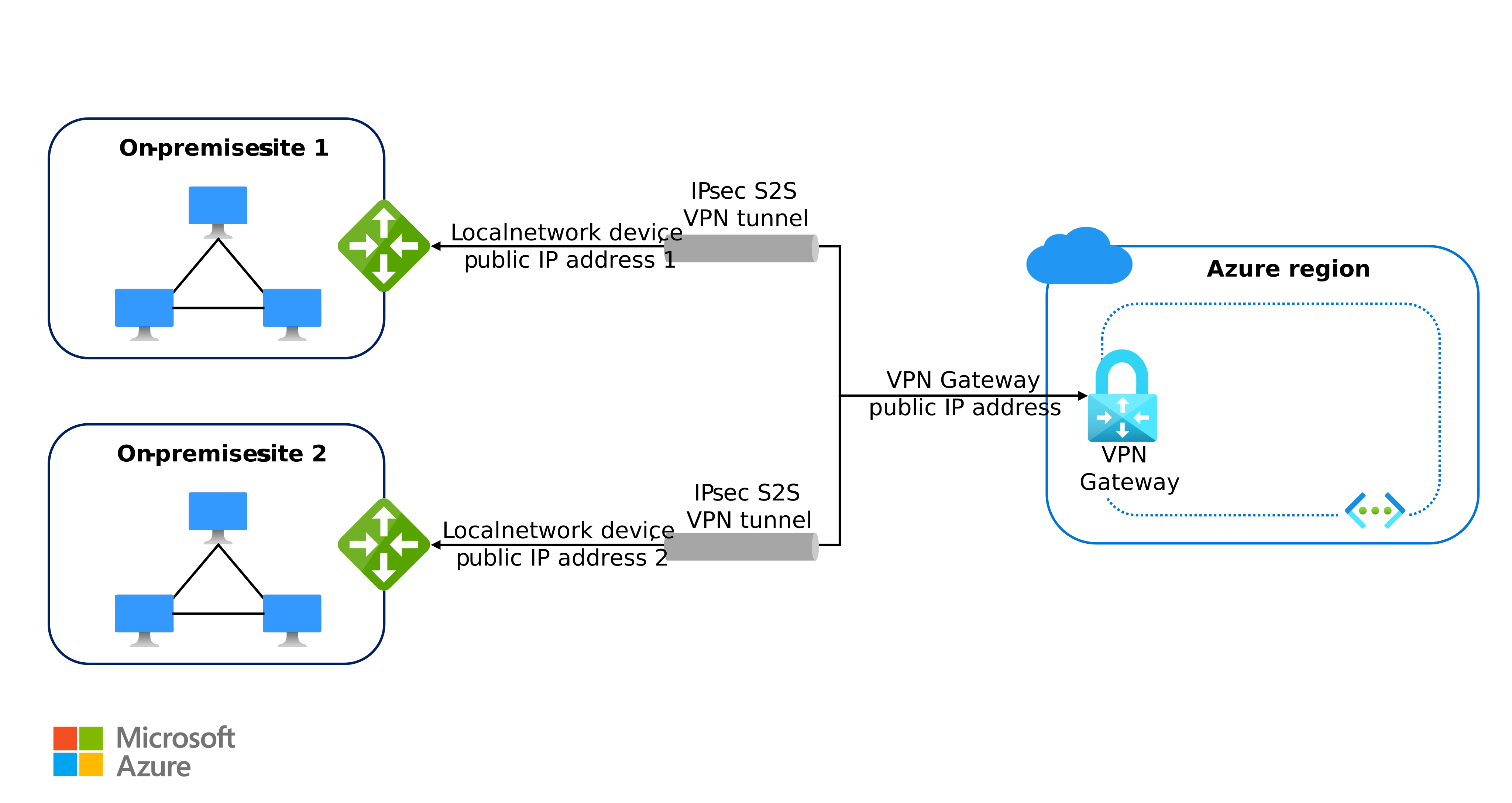
Azure VPN is most commonly used for site-to-site (S2S) VPN connectivity, which provides encrypted, routed connectivity between an on-premises network and Azure virtual networks over IPsec/IKE tunnels. Azure VPN also supports point-to-site (P2S) and VNet-to-VNet scenarios, but those scenarios address remote user access and inter-VNet connectivity respectively, and aren't the primary focus here.
Benefits
The following capabilities make Azure VPN a good fit for hybrid scenarios that don't require dedicated connectivity.
- Simpler configuration. Setup is simpler than dedicated connectivity options such as ExpressRoute, because the connection travels over the public internet and doesn't require a connectivity provider or a circuit provisioning workflow.
- Encrypted in transit. Site-to-site connections use IPsec/IKE tunnels, so traffic between the on-premises VPN device and the Azure VPN gateway is encrypted at the network layer by default.
- High aggregate bandwidth. VPN Gateway supports up to 10 Gbps aggregate in standard hub-and-spoke topologies. With Azure Virtual WAN, each virtual hub supports up to 20 Gbps aggregate. Both the aggregate throughput and zone redundancy depend on the VPN Gateway SKU you choose, so size the SKU for the throughput and resiliency you need. (See Reliability.) For details, see VPN Gateway topology and design and Virtual WAN FAQ.
Challenges
Consider the following constraints before choosing Azure VPN for a hybrid workload.
- On-premises VPN device required. You operate and maintain a compatible on-premises VPN device, which is located outside the Azure-managed boundary.
- SLA covers the gateway only. Microsoft offers a 99.9% availability SLA for VPN Gateway. The higher availability SLA depends on the SKU. For SKU-level details, see Reliability in Azure virtual network gateways. The SLA covers the VPN gateway only and doesn't cover the public internet path between on-premises and the gateway.
Reference architecture
For a full implementation walkthrough of this option, see the following reference architecture.
Azure ExpressRoute connectivity
ExpressRoute is a private, redundant, and dedicated connection between your on-premises network and Azure. A non-Microsoft connectivity provider delivers the circuit, or you use ExpressRoute Direct for a direct cross-connect between Microsoft and your network. For an overview of how the circuit can be delivered, see ExpressRoute connectivity models.
ExpressRoute suits hybrid applications that run large-scale, mission-critical workloads that require high bandwidth and predictable performance.

Note
In the context of ExpressRoute, the Microsoft Enterprise Edge (MSEE) refers to the edge routers on the Microsoft side of the ExpressRoute circuit. These routers are the entry point into the Microsoft network.
ExpressRoute is most commonly used with ExpressRoute private peering, which provides private connectivity to Azure virtual networks. It also supports Microsoft peering for connectivity to Microsoft public services such as Microsoft 365 and Azure public service endpoints. This article focuses on private peering.
Benefits
The following capabilities make ExpressRoute a good fit for hybrid workloads that need dedicated, predictable connectivity.
- High bandwidth. ExpressRoute provides up to 10 Gbps per circuit through connectivity providers, and dual 10-Gbps, 100-Gbps, or 400-Gbps port options with ExpressRoute Direct. The in-Azure throughput is also gated by the ExpressRoute virtual network gateway SKU, which has its own per-SKU bandwidth ceiling, so the workload throughput is the minimum of the circuit, the gateway SKU, and the on-premises edge devices.
- Predictable latency. A dedicated circuit avoids the path variability of the public internet and the per-packet IPsec processing overhead of a VPN tunnel. This design makes round-trip latency lower and more consistent than internet-based connections.
- Dynamic bandwidth scaling. You can increase circuit bandwidth without removing the connection, when this capability is supported by the connectivity provider.
- National cloud access. ExpressRoute supports direct access to national clouds, depending on the connectivity provider.
- Circuit-level SLA. ExpressRoute provides a high-availability SLA on the dedicated ExpressRoute circuit between the Microsoft network edge and the connectivity provider or partner infrastructure. The SLA doesn't cover the on-premises path to the provider or the ExpressRoute virtual network gateway in Azure.
Challenges
Consider the following constraints before choosing ExpressRoute for a hybrid workload.
- Provider coordination required. Provisioning a circuit other than ExpressRoute Direct requires coordination with a connectivity provider, which adds lead time and a dependency outside the Azure-managed boundary.
- High-capacity on-premises routers. You can size your on-premises edge devices for the chosen circuit bandwidth, including redundant BGP sessions to both MSEEs.
- Private peering not encrypted by default. ExpressRoute private peering provides a private circuit but doesn't encrypt traffic at the network layer by default. For workloads that require encryption in transit, use MACsec on ExpressRoute Direct or IPsec over ExpressRoute to add an encryption layer.
Reference architecture
For a full implementation walkthrough of this option, see the following reference architecture.
Non-Microsoft SD-WAN or IPsec connectivity
Azure supports hosting non-Microsoft SD-WAN or IPsec solutions to extend an existing network architecture into the cloud. These non-native options let you use a preferred connectivity technology while integrating with Azure, typically by running the vendor's appliance as a network virtual appliance (NVA) in a hub virtual network or by attaching it to a Virtual WAN hub.

Benefits
The following capabilities make a non-Microsoft SD-WAN or IPsec deployment a good fit when you want to keep an existing connectivity stack.
- Architecture continuity. Extend an existing network architecture into Azure by using preferred connectivity technologies, so the on-premises and cloud sides share the same operational and routing model.
- Azure reach and scale. Maintain a consistent network design while taking advantage of the global reach and scalability of Azure.
Challenges
Consider the following constraints before choosing a non-Microsoft SD-WAN or IPsec deployment for a hybrid workload.
- Implementation complexity. Non-native solutions require more design and integration steps than Azure-native connectivity options. Validate proposed architectures with both Microsoft and the SD-WAN or IPsec partner before deployment.
- Vendor-defined high availability and scale. High availability, throughput, and scaling behavior depend on the vendor's reference design and on the SKU and instance sizing of the NVA in Azure. The platform SLAs for VPN Gateway and ExpressRoute don't extend to a non-Microsoft NVA running in your subscription. The runtime, patching, and failover behavior of that appliance remain your responsibility and your partner's responsibility.
Reference architectures
For full implementation walkthroughs of these options, see the following reference architectures.
- SD-WAN integration with Azure hub-and-spoke network topologies
- SD-WAN connectivity architecture with Azure Virtual WAN
Considerations
These reliability considerations apply the Reliability pillar of the Azure Well-Architected Framework to hybrid connectivity. The other pillars (Security, Cost Optimization, Operational Excellence, and Performance Efficiency) each have their own considerations for VPN, ExpressRoute, and non-Microsoft connectivity. For a full pillar review, see Microsoft Azure Well-Architected Framework.
Reliability
Reliability helps ensure that your application can meet the commitments you make to your customers. For more information, see Design review checklist for Reliability.
Reliability for hybrid connectivity depends on the resiliency of both the Azure-side gateway or circuit and the on-premises and network paths that connect to it.
- Zone-redundant gateways. When the region supports availability zones, deploy VPN Gateway and ExpressRoute gateways on zone-redundant SKUs so Azure spreads the gateway VMs across availability zones and the gateway survives a single-zone outage. For more information, see Reliability in Azure virtual network gateways (VPN) and Design and architect Azure ExpressRoute for resiliency.
- Active-active VPN gateways. For workloads that need higher resiliency and aggregate throughput from a VPN connection, deploy the Azure VPN gateway in active-active mode so both gateway instances carry traffic and a tunnel from each instance terminates on the on-premises VPN device. Pair this configuration with two on-premises VPN devices to remove the on-premises single point of failure.
- Redundant BGP sessions for ExpressRoute. ExpressRoute provisions a redundant pair of BGP sessions per peering against two Microsoft Enterprise Edge (MSEE) routers in an active-active configuration. Size on-premises customer edge devices to terminate both sessions, and consider Bidirectional Forwarding Detection (BFD) to shorten link-failure detection below the default BGP timeout.
- VPN as a failover path for ExpressRoute. For workloads that require a secondary path, configure a site-to-site VPN as a coexisting backup for an ExpressRoute private peering circuit. The ExpressRoute circuit remains primary, and traffic uses the VPN path only when the circuit is unavailable. Configure on-premises routing (for example, local preference) to prefer the ExpressRoute path and avoid asymmetric routing.
- Regional failover. The preceding items address zone-scoped and path-scoped resiliency within a single Azure region. Workloads that require continuity during a regional outage need a second gateway or circuit in the failover region, and DNS-level or routing-level path selection to direct traffic to the surviving region. See Designing for disaster recovery with ExpressRoute private peering.
- Components you manage. The on-premises VPN device, on-premises edge routers, and any non-Microsoft SD-WAN or IPsec NVAs running in Azure are outside the Azure platform SLA. Plan device-level redundancy, patching, and failover for those components in line with the vendor's reference design.
Contributors
Microsoft maintains this article. The following contributors wrote this article.
Principal author:
- Cynthia Treger | Solution Engineer Global Black Belt
To see nonpublic LinkedIn profiles, sign in to LinkedIn.
Next steps
For implementation guidance on the connectivity option you select, see the matching reference architecture:
- Azure VPN Gateway site-to-site connectivity for hybrid networks. Detailed topology for site-to-site VPN connectivity into an Azure hub-and-spoke network.
- Connect an on-premises network using Azure ExpressRoute. Detailed topology for ExpressRoute private peering into Azure.
Related resources
The following articles cover related Azure networking topologies that often accompany hybrid connectivity designs: