Note
Access to this page requires authorization. You can try signing in or changing directories.
Access to this page requires authorization. You can try changing directories.
In this sprint, the Azure DevOps Remote MCP Server is now generally available, with expanded support for Microsoft Foundry and Copilot Studio. In addition, we've expanded auditing to provide greater visibility into administrative and security-related activities. New audit events now track service hook changes and licensing updates, while audit streaming to Azure Monitor logs now uses Microsoft Entra-based authorization to improve security and align with modern authentication practices.
Check out the release notes for details.
General
- Azure DevOps Remote MCP Server is now generally available
- Azure Monitor Logs audit streaming now uses Microsoft Entra authentication for workspace authorization
- Audit events for expired Visual Studio subscriptions and GitHub Enterprise licenses
- Audit events for service hooks
Azure Pipelines
- Pipeline builds are moving to Microsoft Entra-issued access tokens
- Support for ARM64 with VSTest v3 task
- Improved code coverage experience for Azure Pipelines
Wiki
General
Azure DevOps Remote MCP Server is now generally available
The Azure DevOps Remote MCP Server is now generally available, making it easier to securely connect AI agents and copilots to Azure DevOps without managing local infrastructure. The general availability release also expands support to Microsoft Foundry and Copilot Studio, enabling developers to build AI-powered experiences that can securely access Azure DevOps work items, repositories, pipelines, and more through a hosted MCP endpoint.
Learn more about the Azure DevOps Remote MCP Server.
Azure Monitor Logs audit streaming now uses Microsoft Entra authentication for workspace authorization
Azure DevOps now validates Azure Monitor Logs audit streaming workspace access by using the signed-in user's Microsoft Entra identity. During setup and certain reconfiguration scenarios, users might be prompted to sign in to Azure so Azure DevOps can verify access to the target Azure Monitor Logs workspace through Azure Resource Manager.
This change supports the ongoing deprecation of Workspace ID and Shared Key-based authorization and helps ensure that only users with the appropriate Azure permissions can configure or re-enable Azure Monitor Logs audit streams.
Audit events for expired Visual Studio subscriptions and GitHub Enterprise licenses
When a user's Visual Studio subscription or GitHub Enterprise license is no longer valid, Azure DevOps now emits a Licensing.Modified audit event, followed by a Licensing.Assigned event if a fallback access level is applied. These system-initiated changes are attributed to "Azure DevOps Services" and appear in the auditing UI, exports, and audit streaming. Learn more about licensing audit events.
Audit events for service hooks
Service hook subscription changes are now captured in the Azure DevOps audit log, including creation, deletion, configuration changes, changes to subscribed events, enable/disable status changes, and when a subscription is throttled. These events are available in the audit log UI, audit streaming, and the auditing APIs. See Audit events for the full list.
Azure Pipelines
Pipeline builds are moving to Microsoft Entra-issued access tokens
Pipeline builds are transitioning to authenticate with a Microsoft Entra-issued access token instead of an Azure DevOps-issued one. This change puts pipeline identity on the same platform that already governs the rest of your Microsoft cloud, with consistent issuance and validation and a single place where identity policy is applied and audited.
The change is transparent to pipelines: same builds, same authentication behavior, and no configuration to update. In the rare case that your pipeline decodes the build token and takes a direct dependency on its contents, that step might fail. If you have such a dependency, move it to the supported Azure DevOps REST APIs, as described in Authentication Tokens Are Not a Data Contract.
Support for ARM64 with VSTest v3 task
The VSTest v3 task now supports execution on Windows ARM64 agents. When running your pipelines on an ARM64 agent, the task automatically uses the native ARM64 vstest.console executable, allowing you to build and validate ARM64 applications and workloads more efficiently.
Improved code coverage experience for Azure Pipelines
Azure Pipelines now has an enhanced code coverage experience that helps teams better understand coverage across complex builds, including multiconfiguration and multitarget-framework scenarios. Based on customer feedback, the new experience provides a clearer view of overall coverage while preserving the ability to drill into detailed results.
The new experience includes the following improvements:
Files view provides code coverage at the folder and file level, including aggregated coverage across modules and build configurations, making it easier to understand overall project coverage.

Source code coverage visualization lets you drill into individual files and quickly identify covered, partially covered, and uncovered code directly from the code coverage experience.
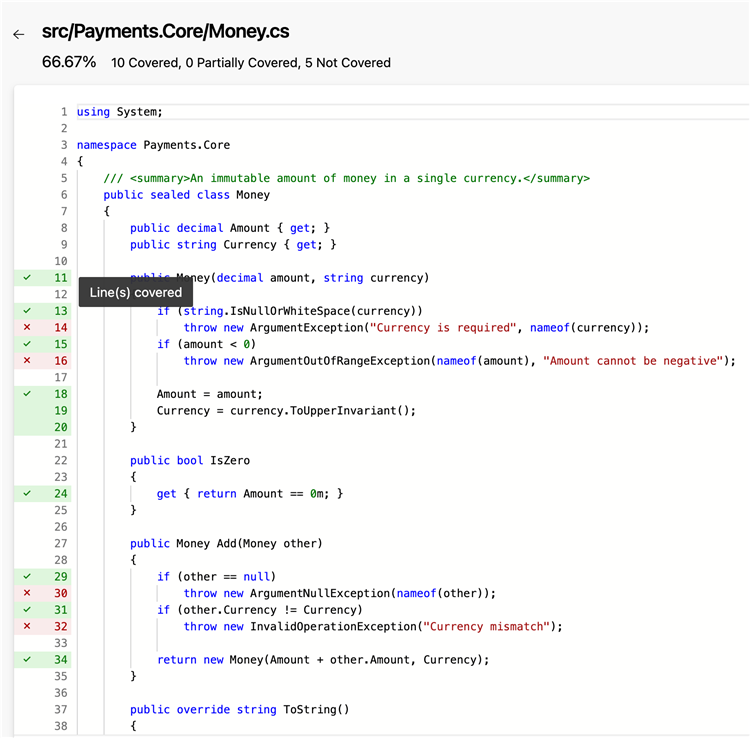
Details view allows you to drill into configuration-specific and module-level coverage data when you need deeper insights.

HTML coverage reports remain available through the Show coverage report toggle, allowing you to switch to the full report experience when you need more advanced coverage analysis.

This experience is available for supported VSTest and Publish Code Coverage Results v2 coverage scenarios.
Wiki
Improved Wiki page recovery
We've improved Azure DevOps Wiki to make recovering accidentally deleted pages more reliable. If a wiki page is deleted and then recreated at the same path within 30 days, it now retains its original page ID instead of receiving a new one.
This change preserves existing links to the page, helping prevent broken URLs after a page is restored. In most cases, the change is transparent to users, but it makes recovering deleted wiki pages much smoother.
Next steps
Note
These features will roll out over the next two to three weeks. Go to Azure DevOps and take a look.
How to provide feedback
We want to hear what you think about these features. Use the help menu to report a problem or provide a suggestion.
You can also get advice and your questions answered by the community on Stack Overflow.