Note
Access to this page requires authorization. You can try signing in or changing directories.
Access to this page requires authorization. You can try changing directories.
Azure DevOps Services
Use failure types to categorize failed test results, such as Regression issue or Known issue. Assign a built-in failure type from the Test Run Hub, or use the Test Results REST API to manage custom values for your project.
Prerequisites
| Category | Requirement |
|---|---|
| Project access | Project member. |
| Access levels | - To view test-related work items or run test cases: At least Basic access. Users with Stakeholder access have no access to Test Plans. - To exercise the full range of test-related features: Basic + Test Plans access level or one of the following Visual Studio subscriptions: - Enterprise - Test Professional - MSDN Platforms |
| Permissions | Area Path permissions: - To add or modify test plans, test suites, test cases, or other test-based work item types: Edit work items in this node set to Allow. - To modify test plan properties such as build and test settings: Manage test plans set to Allow. - To create and delete test suites, add and remove test cases from test suites, or change test configurations associated with test suites: Manage test suites set to Allow. Project-level permissions: - To view, create, or delete test runs: View test runs, Create test runs, and Delete test runs set to Allow. - To manage test configurations or test environments: Manage test configurations and Manage test environments set to Allow. - To add new tags to test-based work items: Create tag definition set to Allow. - To permanently delete test-based work items: Permanently delete work items set to Allow. |
For more information, see Manual test access and permissions.
Assign a failure type
Failure type categorization is available for failed test results.
In your Azure DevOps project, select Test Plans > Runs.
Select the test run that contains the failed result.
In the test case results list, select the failed test case.
In Analysis, select a value from Failure type. You can also assign an analysis owner, select a resolution, and enter a comment.
Select Save.
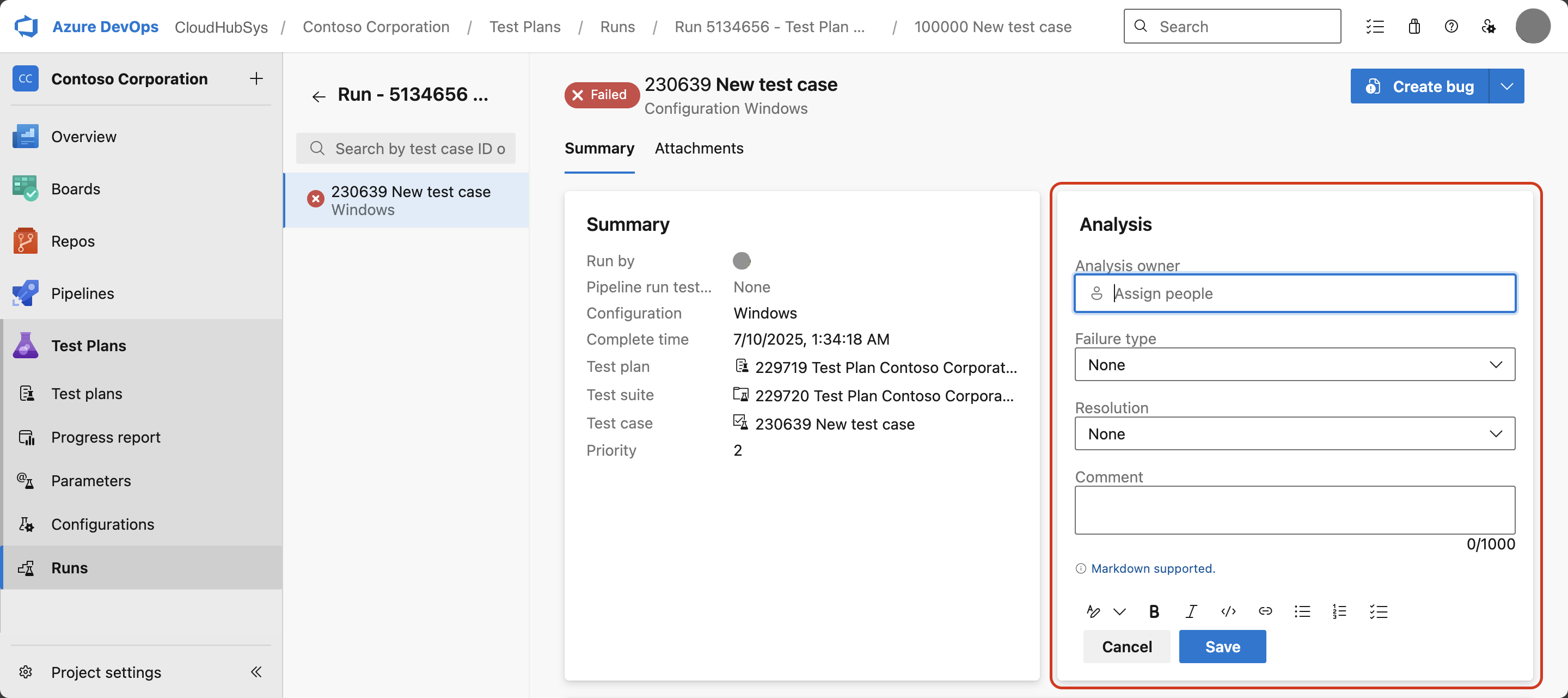
For more information about result details and analysis, see Manage test runs in Azure DevOps Test Plans.
Manage custom failure types
Use the Test Results REST API to create, delete, or list custom failure types for a project: