Note
Access to this page requires authorization. You can try signing in or changing directories.
Access to this page requires authorization. You can try changing directories.
The service catalog enables you to quickly deploy tailored Azure Resource Manager (ARM) templates of Azure services into Azure Enclave while staying compliant with policy guardrails and enclave isolation requirements. The service catalog helps you accelerate the creation of your workloads within the secure boundary of Azure Enclave without being impeded by the security controls that protect your environment.
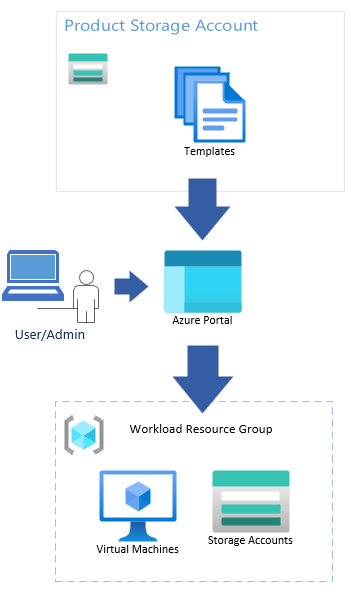
What is in the service catalog?
Browse the Service Catalog List to view the available templates in the service catalog. Review the documentation for each service catalog template you wish to deploy to determine if there are any prerequisite steps.
Note
You can edit the service catalog template itself but edits might change the parameter inputs view.
Service catalog setup
Since Azure Enclave deploys with connections denied by default, you need to create a community endpoint to allow access to the storage account that contains service catalog templates.
{
    endpointRuleName: 'service-catalog'
    destinationType: 'FQDN'
    #disable-next-line no-hardcoded-env-urls
    destination: 'veservicecatalogprod.z22.web.core.windows.net'
    protocols: ['HTTPS']
    ports: '443'
  }
To update the destination for other clouds, use the values in Deploy service catalog templates using Azure CLI.
Create a new Azure service template
You can create a service catalog template for an Azure service that isn't currently listed in the catalog. Use an Azure Resource Manager template in JSON format and make sure that every resource and property complies with Azure Enclave policy and isolation requirements.
- Define the resources that the template deploys and add parameters for values that the administrator must provide.
- Add secure defaults wherever possible. Don't include secrets, credentials, or environment-specific values in the template.
- Deploy and test the template in an Azure Enclave workload. Verify that the template creates only the intended resources and that the resulting workload can access the required dependencies. Repeat the validation for each Azure cloud environment where the template will be available.
- Create a how-to article that documents prerequisites, required permissions, parameter values, deployment steps, and cleanup instructions. Use the existing service catalog template articles as examples.
- Add the template and its documentation to a location where your administrators can access it (for example, an Azure Container Registry).
Request new service catalog templates
If you need to deploy an Azure service that's not in the service catalog, you can create a new Azure service template or submit a request for future templates through the Azure Enclave feedback or support methods.