Note
Access to this page requires authorization. You can try signing in or changing directories.
Access to this page requires authorization. You can try changing directories.
Hybrid connectivity connects your on-premises networks to your Azure resources so that systems in your datacenter and in the cloud can work together as one network. Many organizations run workloads across both environments—for example, applications in Azure that depend on databases, identity, or file shares that stay on-premises—and those workloads need a secure, reliable path between the two.
Azure provides three services for hybrid connectivity: Azure VPN Gateway, Azure ExpressRoute, and Azure Virtual WAN. This article introduces these services, compares them, and helps you decide which one fits your requirements.
Compare VPN Gateway and ExpressRoute
Most hybrid connectivity decisions come down to a choice between Azure VPN Gateway and Azure ExpressRoute. Use the following table to compare them across the factors that matter most.
| Consideration | Choose VPN Gateway | Choose ExpressRoute |
|---|---|---|
| Budget | Lower cost. Per-hour gateway fee plus data transfer charges. | Higher cost. Provider circuit fee, gateway fee, and data transfer charges. |
| Bandwidth needed | Up to 10 Gbps aggregate throughput (VpnGw5 SKU). Individual tunnel throughput is lower. | Up to 100 Gbps per circuit. ExpressRoute Direct supports up to 400 Gbps. |
| Latency tolerance | Higher latency acceptable. Traffic traverses the public internet. | Low, predictable latency required. Traffic follows a private path. |
| Reliability SLA | Higher with an active-active gateway configuration. | Higher for the circuit, and highest with a zone-redundant gateway deployment (AZ SKU). See Azure service-level agreements. |
| Privacy and compliance | Traffic is encrypted but traverses the public internet. | Traffic never traverses the public internet. |
| Implementation speed | Hours to days. Gateway provisioning takes about 45 minutes. | Weeks to months. Provider circuit procurement requires physical infrastructure provisioning. |
| Existing ExpressRoute circuit | Use VPN Gateway as a backup path alongside ExpressRoute. | Use as the primary connectivity path. |
Tip
For deeper planning guidance—including gateway placement, resilience options, SKU comparisons, and cost modeling—see the hybrid connectivity design guide.
Azure services and features
Azure provides several services for hybrid connectivity. Each service addresses different bandwidth, latency, cost, and security requirements.
| Service | What it provides | When to use it |
|---|---|---|
| Azure VPN Gateway (site-to-site) | Encrypted IPsec/IKE tunnel over the public internet. Connects on-premises VPN devices to Azure. | Smaller organizations, dev/test environments, backup connectivity path, or budget-constrained hybrid scenarios. |
| Azure VPN Gateway (point-to-site) | Individual client connections to an Azure virtual network. Supports OpenVPN, SSTP, and IKEv2 protocols. | Remote administrators or developers who need individual access to Azure resources. See the remote access article for detailed P2S guidance. |
| Azure ExpressRoute | Private dedicated connection through a connectivity provider. Traffic doesn't traverse the public internet. | Production hybrid workloads, latency-sensitive applications, large data transfers, and regulatory or compliance requirements. |
| ExpressRoute with VPN failover | ExpressRoute as the primary path with VPN Gateway as a failover backup. | High-availability requirements where ExpressRoute downtime isn't tolerable. |
| ExpressRoute Global Reach | Connects two on-premises locations to each other through the Azure backbone by using their respective ExpressRoute circuits. | Multi-site enterprise networks that use Azure as a transit backbone. See the multi-cloud and cross-region article for details. |
| ExpressRoute Direct | 10 Gbps, 100 Gbps, or 400 Gbps dedicated connectivity direct to Microsoft's network edge. Supports MACsec Layer 2 encryption. | Highest bandwidth needs, MACsec encryption requirements, or when you need to bypass connectivity provider overhead. The 400 Gbps option is available in limited locations and requires enrollment. |
Choose a hybrid connectivity solution
Choosing the right hybrid connectivity solution depends on your specific requirements and constraints. For example, if you're a small business with limited bandwidth requirements, Azure VPN Gateway might be a cost-effective option. As your business grows and requires higher bandwidth and lower latencies, you might consider upgrading to Azure ExpressRoute. As your network expands to multiple branches, it can become complex and challenging to manage connectivity. In this case, Azure Virtual WAN can simplify the deployment and management of branch connectivity.
When choosing a hybrid connectivity solution, consider the following factors:
- Bandwidth: The amount of data to transfer between on-premises and Azure resources.
- Latency: The time it takes for data to travel between on-premises and Azure resources.
- Cost: The cost of the solution, including setup, maintenance, and data transfer costs.
- Security: The level of security that the solution provides, including encryption, authentication, and access control.
- Resiliency: The ability of the solution to maintain connectivity during a failure or outage.
- Scalability: The ability of the solution to scale to meet changing business requirements.
- Compliance: The solution must comply with relevant regulations and standards.
Establishing and maintaining connectivity between on-premises resources and Azure resources is essential for many organizations. Azure offers three primary hybrid connectivity services to match these requirements: Azure VPN Gateway, Azure ExpressRoute, and Azure Virtual WAN.
Azure VPN Gateway
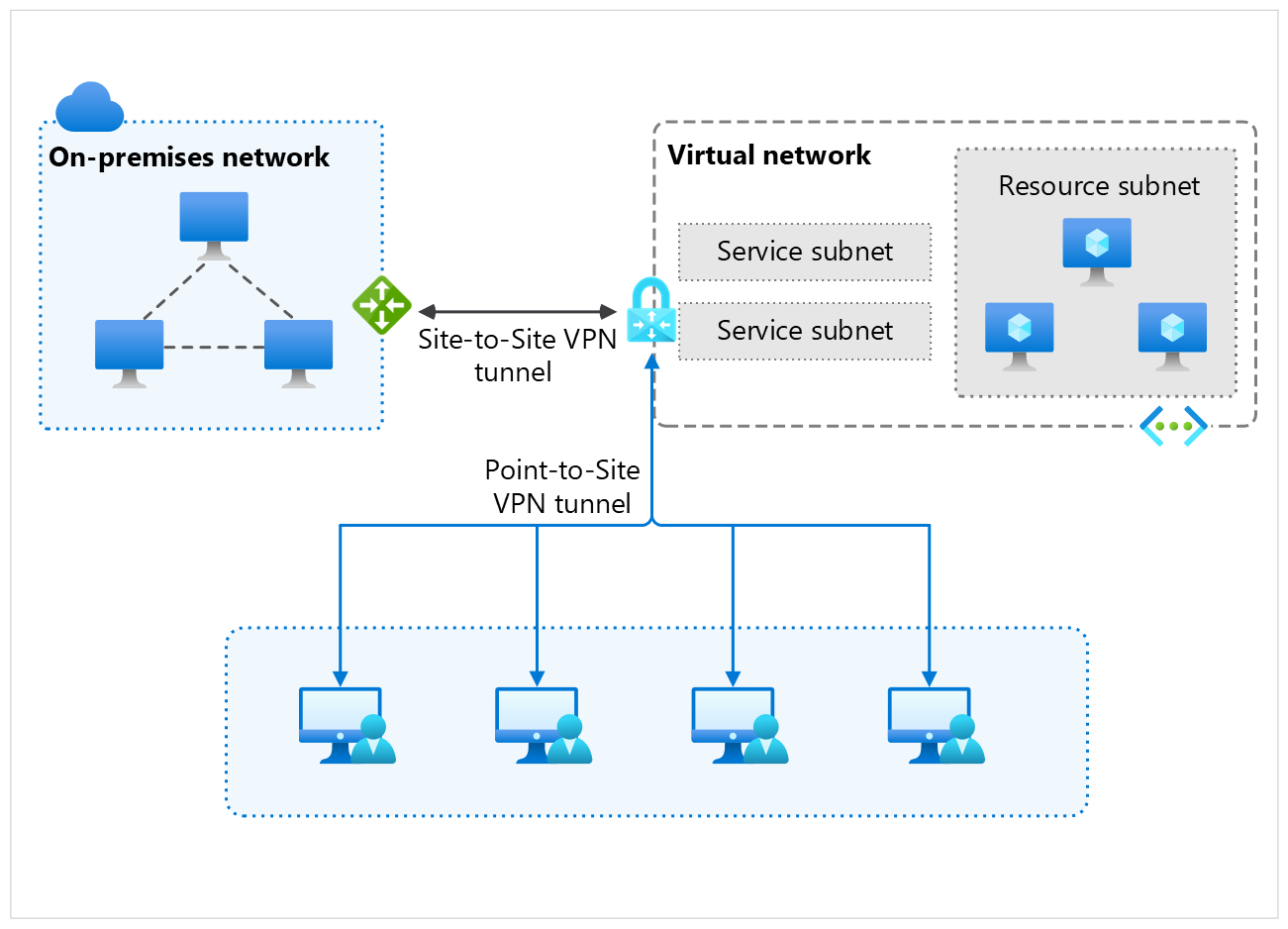
Azure VPN Gateway provides secure, site-to-site connectivity between on-premises networks and Azure virtual networks. It also supports point-to-site connectivity for individual devices. Azure VPN Gateway uses IPsec and IKE (Internet Key Exchange) protocols to establish encrypted connections over the public internet. It's a cost-effective solution for smaller-scale deployments and is suitable for scenarios where latency isn't a critical factor.
VPN Gateway use cases
- Site-to-site connectivity: Connect on-premises networks to Azure virtual networks by using IPsec VPN protocols.
- Point-to-site connectivity: Connect individual devices, such as laptops or mobile devices, to Azure virtual networks by using VPN protocols.
- Remote access: Provide remote access to Azure resources for employees working from home or on the go.
- Hybrid applications: Build hybrid applications that require secure connections between on-premises and Azure resources.
For more information about Azure VPN Gateway, see VPN Gateway overview.
Azure ExpressRoute
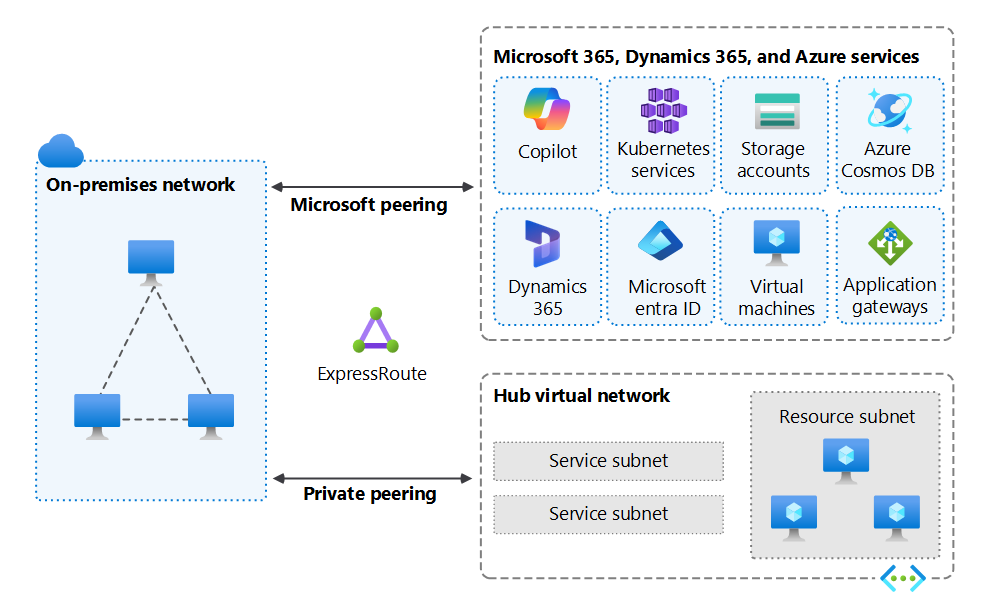
Azure ExpressRoute provides private, dedicated connectivity between on-premises networks and Azure datacenters. It offers higher reliability, faster speeds, and lower latencies compared to connections over the public internet. You can establish ExpressRoute connections through an ExpressRoute circuit, which is a dedicated connection between your on-premises network and an Azure datacenter. ExpressRoute is suitable for scenarios that require low-latency connections and high bandwidth.
ExpressRoute use cases
- Hybrid applications: Build hybrid applications that require low latency and high bandwidth connections between on-premises and Azure resources.
- Data transfer: Transfer large amounts of data between on-premises and Azure resources without using the public internet.
- Disaster recovery: Establish a reliable and secure connection for disaster recovery solutions, such as Azure Site Recovery.
- Compliance: Meet regulatory and compliance requirements by using private connections instead of public internet connections.
- Big data analytics: Transfer large datasets to Azure for analysis and processing without using the public internet.
- Backup and archiving: Use ExpressRoute to transfer backup data to Azure Blob Storage or Azure Archive Storage for long-term retention.
For more information about ExpressRoute, see ExpressRoute overview.
Azure Virtual WAN
Azure Virtual WAN is a networking service that provides optimized and automated branch-to-branch, branch-to-Azure, and Azure-to-Azure connectivity. It simplifies the deployment and management of branch connectivity by providing a unified hub-and-spoke architecture. Virtual WAN supports multiple connectivity options, including VPN, ExpressRoute, and SD-WAN.

Virtual WAN use cases
- Branch connectivity: Connect multiple branch offices to Azure resources by using a unified hub-and-spoke architecture.
- SD-WAN integration: Integrate with third-party SD-WAN solutions to optimize branch connectivity and performance.
- Automated branch management: Simplify the deployment and management of branch connectivity with automated provisioning and configuration.
- Global connectivity: Connect multiple Azure regions and on-premises networks by using a single Virtual WAN hub.
- Optimized routing: Use Azure's global backbone network to optimize routing and performance for branch-to-branch and branch-to-Azure connectivity.
- Security: Use Azure Firewall and other security services to protect branch connectivity and enforce security policies.
For more information about Azure Virtual WAN, see Virtual WAN overview.
Match your scenario to a service
Use the following scenarios to route to the service that best fits your need. Select a service to go to its documentation.
| Scenario | Recommended service |
|---|---|
| Connect an on-premises network to Azure over an encrypted tunnel on a limited budget | Azure VPN Gateway |
| Give individual remote users or admins secure access to Azure resources | Azure VPN Gateway |
| Get private, low-latency, high-bandwidth connectivity for production workloads | Azure ExpressRoute |
| Meet compliance requirements that prohibit traffic over the public internet | Azure ExpressRoute |
| Connect many branch offices and Azure regions through a managed backbone | Azure Virtual WAN |
| Integrate third-party SD-WAN appliances with Azure connectivity | Azure Virtual WAN |
Manage hybrid connectivity in the Azure portal
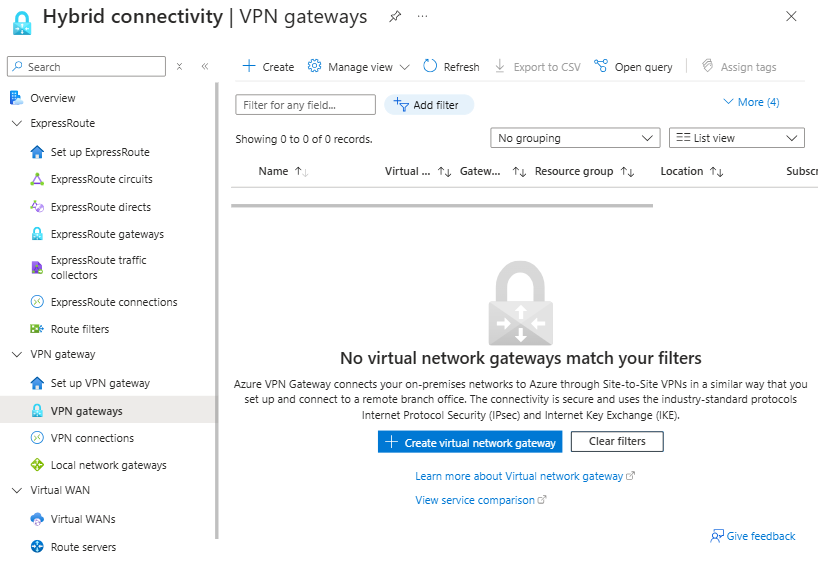
The Azure portal provides a unified experience for managing hybrid connectivity services. The portal provides a guided experience for setting up a site-to-site VPN connection and an ExpressRoute connection from your on-premises network to Azure.

The hybrid connectivity hub page provides a consolidated view of all Azure VPN Gateway, Azure ExpressRoute, and Azure Virtual WAN resources deployed in your subscription. From this single view, you can select and manage the specific resource you need.
Related content
- Hybrid connectivity design guide: Compare VPN Gateway and ExpressRoute in depth, and plan gateway placement, resilience, and cost.
- What is Azure VPN Gateway?: Site-to-site and point-to-site VPN concepts, SKUs, and configuration.
- What is Azure ExpressRoute?: Private connectivity, peering types, and circuit options.
- What is Azure Virtual WAN?: Unified hub-and-spoke connectivity for branches and Azure regions.
- Azure hybrid connectivity documentation: Browse the full set of hybrid connectivity articles.