Note
Access to this page requires authorization. You can try signing in or changing directories.
Access to this page requires authorization. You can try changing directories.
Azure Application Gateway, Azure Load Balancer, and Azure Front Door are the core Azure services for load balancing and content delivery. Load balancing distributes incoming network traffic across multiple servers or services so that no single server becomes overwhelmed. Content delivery caches and distributes content across multiple locations to reduce latency.
Together, these services distribute traffic across your backends so that applications stay highly available, responsive, and secure under varying load.
This article compares the three services and helps you choose the right one—or the right combination—for your workload.

Which load balancing service do I need?
Use the following tables to match your scenario to an Azure load balancing service. Each service targets a different traffic type and geographic scope. Select the service in the Use column to go to its overview.
| I need to… | Use |
|---|---|
| Load balance TCP/UDP traffic within a single region | Azure Load Balancer: Layer 4 distribution with health probes, zone redundancy, and HA ports. |
| Terminate SSL/TLS, route by URL path or hostname, and add WAF for a regional web app | Azure Application Gateway: Layer 7 regional load balancing with integrated WAF (v2 SKU). |
| Route HTTP/HTTPS traffic globally, reduce latency with edge caching, or fail over across regions | Azure Front Door: Global anycast with CDN, WAF, and multiregion origin health probes. |
Tip
For deeper planning guidance—including zone redundancy, autoscaling, health probes, and multiservice architectures—see Application delivery and performance in the Azure networking design guide.
Compare key constraints
| Service | Layer | Scope | Key limitation |
|---|---|---|---|
| Azure Load Balancer | Layer 4 (TCP/UDP) | Regional | No application awareness: can't inspect HTTP headers, URLs, or cookies. |
| Application Gateway | Layer 7 (HTTP/HTTPS) | Regional | Requires a dedicated subnet (/24 recommended); can't route traffic globally. |
| Front Door | Layer 7 (HTTP/HTTPS) | Global | Origins must be public or accessed through Private Link (Premium tier only); no TCP/UDP support. |
Compare routing capabilities
| Capability | Azure Load Balancer | Application Gateway | Front Door |
|---|---|---|---|
| URL path-based routing | No | Yes | Yes |
| Multi-site (host-header) routing | No | Yes | Yes |
| Cookie-based session affinity | No | Yes | Yes |
| Weighted traffic splitting | No | No | Yes |
| Geographic routing | No | No | Yes |
| SSL/TLS offload | No | Yes | Yes |
| WebSocket support | Pass-through | Yes | Yes |
| HTTP/2 support | No | Yes | Yes |
What factors should I consider?
When you select a load balancing or content delivery solution, weigh the following factors:
- Traffic type: Is it a web HTTP/HTTPS application? Is it public facing or a private application?
- Global vs. regional: Do you need to load balance VMs or containers within a single virtual network, or load balance scale unit/deployments across regions, or both?
- Availability: What's the service-level agreement required for your solution?
- Cost: For more information, see Azure pricing. In addition to the cost of the service itself, consider the operations cost for managing a solution built on that service.
- Features: What features does your solution require? For example, do you need SSL offload, URL-based routing, or web application firewall?
Azure offers several load balancing and content delivery services, each suited to different needs and scenarios.
Azure Application Gateway
Azure Application Gateway provides application delivery controller as a service, offering various Layer 7 load balancing capabilities and web application firewall functionality. Use it to transition from public network space into your web servers hosted in private network space within a region.
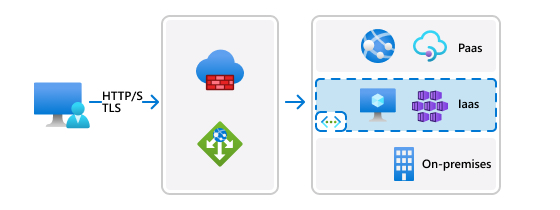
Azure Application Gateway use cases
- Web traffic load balancing: Acts as a web traffic load balancer at the application layer (OSI layer 7), making routing decisions based on HTTP request attributes such as URL path or host headers.
- SSL termination: Offloads SSL decryption from backend servers, reducing their load and improving performance.
- Web Application Firewall (WAF): Protects against common web vulnerabilities and attacks, such as SQL injection and cross-site scripting.
- URL-based routing: Routes traffic to different backend pools based on the URL, which is useful for microservices architectures.
Get started: Create an application gateway by using the Azure portal
Azure Load Balancer
Azure Load Balancer is a high-performance, ultra-low-latency Layer 4 load balancing service (inbound and outbound) for all UDP and TCP protocols. Azure Load Balancer handles millions of requests per second while ensuring your solution is highly available. Azure Load Balancer is zone redundant, ensuring high availability across availability zones. It supports both a regional deployment topology and a global topology.
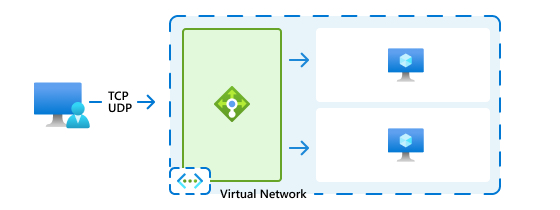
Azure Load Balancer use cases
- Distributing traffic: Distributes incoming network traffic across a group of backend resources, such as virtual machines (VMs) or virtual machine scale sets, by using a hash-based load distribution algorithm.
- High availability: Enhances the availability of your applications by distributing traffic within and across zones.
- Internal or public load balancing: Supports both internal (within a virtual network) and public (internet-facing) load balancing scenarios.
- Low latency and high throughput: Ideal for applications requiring low latency and high throughput, such as gaming or real-time communication apps.
Note
Clustering technologies, such as Azure Container Apps or Azure Kubernetes Service, contain load balancing constructs that operate mostly within their own cluster boundary, routing traffic to available application instances based on readiness and health probes. This article doesn't cover those load balancing options.
Get started: Create a public load balancer by using the Azure portal
Azure Front Door
Azure Front Door is an application delivery network that provides global load balancing and site acceleration service for web applications. It offers Layer 7 capabilities for your application like SSL offload, path-based routing, fast failover, and caching to improve performance and high availability of your applications.
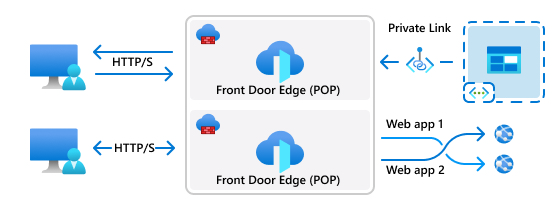
Azure Front Door use cases
- Global content delivery: Delivers content and applications globally with low latency by using Microsoft's global edge network.
- Application acceleration: Improves application performance by using features such as split TCP connections and unicast network routing.
- Security: Provides platform-level protection against DDoS attacks and integrates with web application firewalls for enhanced security.
- Modern internet-first architectures: Supports modern architectures with dynamic, high-quality digital experiences, and automated, secure platforms.
Get started: Create an Azure Front Door by using the Azure portal
Combining services
You can combine Azure Load Balancer, Azure Application Gateway, and Azure Front Door to build a comprehensive load balancing and content delivery solution. Because each service targets a different layer and scope, combining them addresses global routing, regional web delivery, and backend distribution in a single architecture:
- Multi-tier applications: Use Azure Application Gateway for Layer 7 web-tier routing and WAF, then Azure Load Balancer for Layer 4 distribution across the backend VM or database tier.
- Global web applications with regional backends: Use Azure Front Door for global HTTP/HTTPS routing, edge caching, and cross-region failover, with Azure Application Gateway providing regional WAF and URL-based routing at each origin.
- E-commerce platforms: Combine Azure Front Door for global acceleration and DDoS protection with Azure Application Gateway and Azure Load Balancer to scale regional web and application tiers during peak traffic.
- Media streaming services: Use Azure Front Door to cache and deliver content close to users, with Azure Load Balancer distributing traffic across regional streaming servers.
Azure portal experience
The Azure portal provides a centralized experience for choosing load balancing and content delivery services. You can create and manage load balancers, application gateways, and front doors from the portal. The portal provides a guided experience for configuring the services, including setting up routing rules, health probes, and other settings.

You can deploy and manage each service from the portal. You can see all the application gateways, load balancers, and front door resources deployed in your subscription in a single view. Then you can choose the resources to manage.
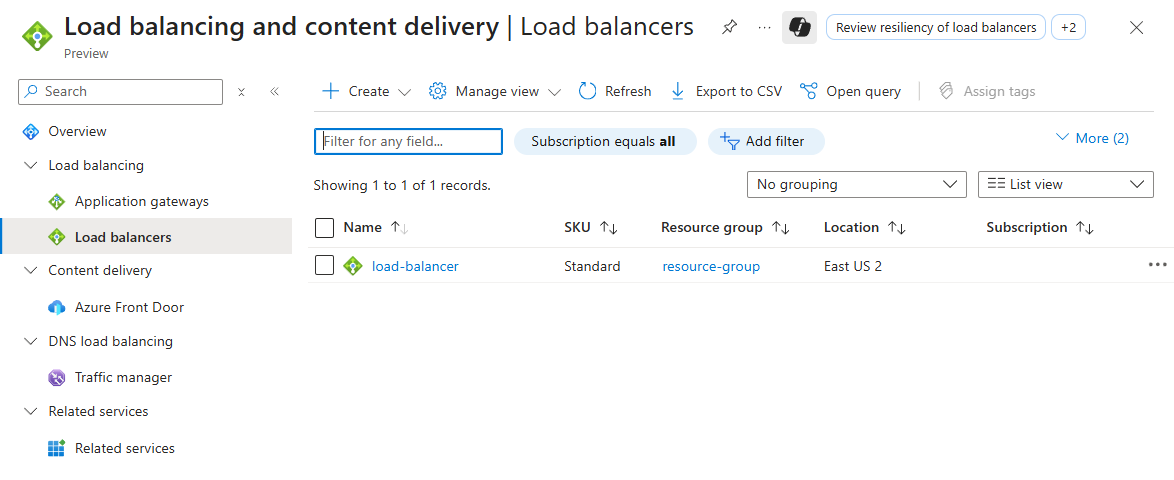
Related content
- Application delivery and performance: Planning guidance for choosing and combining Azure load balancing services.
- Load balancing options in the Azure Architecture Center
- How an application gateway works
- What is Azure Load Balancer?
- What is Azure Front Door?