Note
Access to this page requires authorization. You can try signing in or changing directories.
Access to this page requires authorization. You can try changing directories.
By using Azure Managed Redis, you can use Redis modules to add more data structures and functionality to the core Redis software. These modules extend the use cases of Redis by adding functionality like search capabilities and data structures like bloom and cuckoo filters. By using Redis 7.4 (the default), you select modules when you create your Azure Managed Redis instance. By using Redis 8.2 (preview), all modules are already included for the Memory Optimized, Balanced, and Compute Optimized tiers.
For more information on creating an AMR cache, see Quickstart: Create an Azure Managed Redis Instance.
Scope of Redis modules
For Redis 7.4, the following modules are available by tier:
| Module | Memory Optimized | Balanced | Compute Optimized | Flash Optimized |
|---|---|---|---|---|
| RediSearch | Yes | Yes | Yes | No |
| RedisBloom | Yes | Yes | Yes | No |
| RedisTimeSeries | Yes | Yes | Yes | No |
| RedisJSON | Yes | Yes | Yes | Yes |
For Redis 8.2 (preview), all four modules are included in the Memory Optimized, Balanced, and Compute Optimized tiers. Redis 8.2 isn't supported with Flash Optimized SKUs, geo-replication, or custom data access policies. It's supported only for new instances. Upgrading existing instances to Redis 8.2 isn't supported.
To try Redis 8.2, sign up for the Redis 8 preview.
Note
Currently, you can't manually load any modules into Azure Managed Redis. Manually updating modules version is also not possible.
Using modules with active geo-replication
By using Redis 7.4, only the RediSearch and RedisJSON modules can be used concurrently with active geo-replication. Redis 8.2 (preview) doesn't support active geo-replication.
Using these modules, you can implement searches across groups of caches that are synchronized in an active-active configuration. Also, you can search JSON structures in your active-active configuration.
Client library support
The standard Redis client libraries have a varying amounts of support for each module. Some modules have specific libraries that add client support. Check the Redis documentation pages for each module to see more detail on which client libraries support them.
Adding modules to your cache
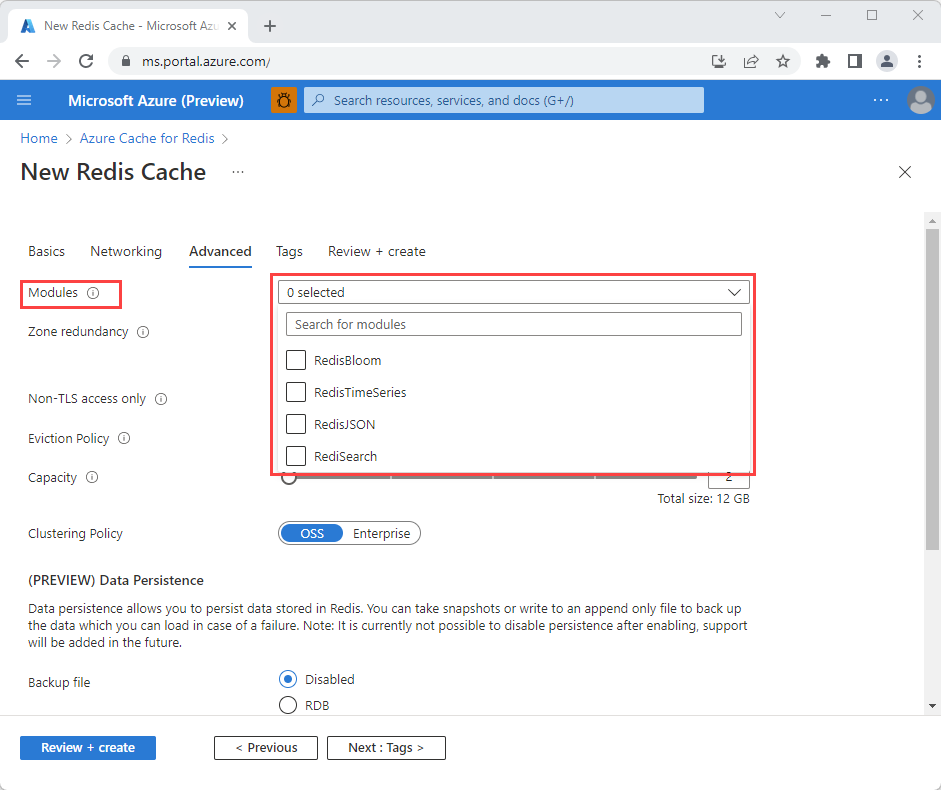
On the Advanced tab during instance creation, select a version from the Redis version dropdown:
- 7.4 (default): Select all available modules or only the specific modules you want to enable.
- 8.2 (preview): All modules are included for the Memory Optimized, Balanced, and Compute Optimized tiers. You don't need to select modules individually.
The following screenshot shows module selection for Redis 7.4.
Important
With Redis 7.4, you must enable modules when you create an Azure Managed Redis instance. You can't add or change modules after creation. With Redis 8.2 (preview), all modules are already included.
For more information, see Quickstart: Create an Azure Managed Redis Instance.
Modules
You can select the following modules when creating a Redis 7.4 instance. Redis 8.2 (preview) on supported tiers automatically includes these modules.
RediSearch
The RediSearch module adds a real-time search engine to your cache combining low latency performance with powerful search features.
Features include:
- Multi-field queries
- Aggregation
- Prefix, fuzzy, and phonetic-based searches
- Auto-complete suggestions
- Geo-filtering
- Boolean queries
Additionally, RediSearch can function as a secondary index, expanding your cache beyond a key-value structure and offering more sophisticated queries.
RediSearch also includes functionality to perform vector similarity queries such as K-nearest neighbor (KNN) search. This feature allows Azure Managed Redis to be used as a vector database, which is useful in AI use-cases like semantic answer engines or any other application that requires the comparison of embeddings vectors generated by machine learning models.
You can use RediSearch is used in a wide variety of use-cases, including real-time inventory, enterprise search, and in indexing external databases. For more information, see the RediSearch documentation page.
Important
The RediSearch module supports the Enterprise (EnterpriseCluster) and non-clustered (NoCluster) clustering policies, but not the OSS (OSSCluster) clustering policy. For more information, see Clustering.
RedisBloom
RedisBloom adds four probabilistic data structures to a Redis server: bloom filter, cuckoo filter, count-min sketch, and top-k. Each of these data structures offers a way to sacrifice perfect accuracy in return for higher speed and better memory efficiency.
| Data structure | Description | Example application |
|---|---|---|
| Bloom and Cuckoo filters | Tells you if an item is either (a) definitely not in a set or (b) potentially in a set. | Checking if an email has already been sent to a user |
| Count-min sketch | Determines the frequency of events in a stream | Counting how many times an IoT device reported a temperature under 0 degrees Celsius. |
| Top-k | Finds the k most frequently seen items |
Determine the most frequent words used in War and Peace. (for example, setting k = 50 returns the 50 most common words in the book) |
Bloom and Cuckoo filters are similar to each other, but each has a unique set of advantages and disadvantages that are beyond the scope of this documentation.
For more information, see RedisBloom.
RedisTimeSeries
The RedisTimeSeries module adds high-throughput time series capabilities to your cache. This data structure is optimized for high volumes of incoming data and contains features to work with time series data, including:
- Aggregated queries (for example, average, maximum, standard deviation, etc.)
- Time-based queries (for example, start-time and end-time)
- Down sampling/decimation
- Data labeling for secondary indexing
- Configurable retention period
This module is useful for many applications that involve monitoring streaming data, such as IoT telemetry, application monitoring, and anomaly detection.
For more information, see RedisTimeSeries.
RedisJSON
The RedisJSON module adds the capability to store, query, and search JSON-formatted data. This functionality is useful for storing document-like data within your cache.
Features include:
- Full support for the JSON standard
- Wide range of operations for all JSON data types, including objects, numbers, arrays, and strings
- Dedicated syntax and fast access to select and update elements inside documents
The RedisJSON module is also designed for use with the RediSearch module to provide integrated indexing and querying of data within a Redis server. Using both modules together can be a powerful tool to quickly retrieve specific data points within JSON objects.
Some common use-cases for RedisJSON include applications such as searching product catalogs, managing user profiles, and caching JSON-structured data.
For more information, see RedisJSON.
Note
The FT.CONFIG command is not supported for updating module configuration parameters. However, this can be achieved by passing in arguments configuring the modules when using management APIs. For instance, you can see samples of configuring the ERROR_RATE and INITIAL_SIZE properties of the RedisBloom module using the args parameter with the REST API, Azure CLI, or PowerShell.