Note
Access to this page requires authorization. You can try signing in or changing directories.
Access to this page requires authorization. You can try changing directories.
Microsoft hosts Dynamics 365 and Power Platform online services in datacenters across an increasing number of regions. When Microsoft makes these services available in a new region, new organizations get a datacenter that aligns with the macro region you select during environment creation.
For information about datacenter regions for Dynamics 365 and Power Platform, see Product availability and Where your data is located.
The following list shows regions and their URLs for Dynamics 365 (Dynamics 365 Sales, Dynamics 365 Customer Service, Dynamics 365 Field Service, and Dynamics 365 Marketing).
| Region | URL |
|---|---|
| NAM | crm.dynamics.com |
| DEU | crm.microsoftdynamics.de |
| SAM | crm2.dynamics.com |
| CAN | crm3.dynamics.com |
| EUR | crm4.dynamics.com |
| APJ | crm5.dynamics.com |
| OCE | crm6.dynamics.com |
| JPN | crm7.dynamics.com |
| IND | crm8.dynamics.com |
| GCC | crm9.dynamics.com |
| GCC High | crm.microsoftdynamics.us |
| GBR | crm11.dynamics.com |
| FRA | crm12.dynamics.com |
| ZAF | crm14.dynamics.com |
| UAE | crm15.dynamics.com |
| GER | crm16.dynamics.com |
| CHE | crm17.dynamics.com |
| CHN | crm.dynamics.cn |
| NOR | crm19.dynamics.com |
| SGP | crm20.dynamics.com |
| SWE | crm22.dynamics.com |
| KOR | crm21.dynamics.com |
Macro region
A macro region represents the data residency boundary that aligns with data residency laws for the given geography. Learn more about the regions available in a specific macro region.
For more information, see Power Platform and Dynamics 365 macro regions.
Migration process
This section describes the overall process for migrating to a new datacenter.
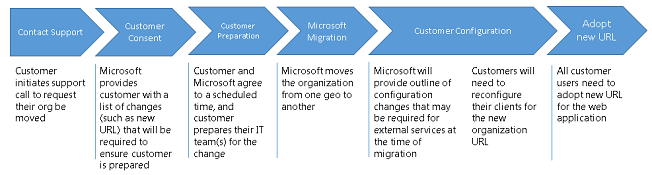
Depending on the type of transition, you might need to complete more steps.