Note
Access to this page requires authorization. You can try signing in or changing directories.
Access to this page requires authorization. You can try changing directories.
Power Query evaluates an M query to determine the data and transformations required for its result. During evaluation, query folding attempts to translate supported transformations into operations that a data source can perform. Transformations that can't be folded run in the Power Query engine.
What is a Power Query M script?
An M script, also called M code, is the set of Power Query M formula language functions and syntax that Power Query evaluates to produce a query result. Every query has an M script, whether Power Query creates it, you write it in the advanced editor, or you enter it in a blank query.
Tip
You can think of the M script as a recipe that describes how to prepare your data.
The most common way to create an M script is by using the Power Query editor. For example, when you connect to a data source, such as a SQL Server database, notice on the right side of your screen that there's a section called applied steps. This section shows all the steps or transforms used in your query. In this sense, the Power Query editor serves as an interface to help you create the appropriate M script for the transforms that you want and ensures that the code you use is valid.
Note
The M script is used in the Power Query editor to:
- Show the query as a series of steps and let you create or modify steps.
- Show a diagram view.

In this SQL Server example, the Applied steps pane contains the following steps:
- Source: Makes the connection to the data source. In this case, it's a connection to a SQL Server database.
- Navigation: Navigates to a specific table in the database.
- Removed other columns: Selects which columns from the table to keep.
- Sorted rows: Sorts the table using one or more columns.
- Kept top rows: Filters the table to only keep some rows from the top of the table.
View and edit an M script in Power Query
This set of step names is a friendly way to view the M script that Power Query created for you. You can view the full M script in several ways. In Power Query, select Advanced Editor in the View tab. You can also select Advanced Editor from the Query group in the Home tab. In some versions of Power Query, you can also change the view of the formula bar to show the query script by going into the View tab and from the Layout group, select Script view > Query script.

Most of the names you find in the Applied steps pane are also used as is in the M script. You name steps of a query by using identifiers in the M language. Sometimes extra characters wrap around step names in M, but these characters don't show in the applied steps. An example is #"Kept top rows", which is categorized as a quoted identifier because of these extra characters. A quoted identifier allows any sequence of zero or more Unicode characters to be used as an identifier, including keywords, whitespace, comments, operators, and punctuators. To learn more about identifiers in the M language, see lexical structure.
Any changes that you make to your query through the Power Query editor automatically update the M script for your query. For example, if you change the Kept top rows step name to Top 20 rows, the name also changes in the query script view.

While we recommend that you use the Power Query editor to create all or most of the M script for you, you can manually add or modify pieces of your M script. To learn more, see the M language reference.
In this article, M script refers to the Power Query M code in a query, which you can access through the advanced editor or the query script view in the formula bar.
How Power Query evaluates an M query
Power Query evaluates an M script by determining the required output and how to produce it. For queries that use an external data source, evaluation includes requesting data from the source, processing any transformations that run in the Power Query engine, and loading the result to a destination.
The following diagram explores the process that occurs when a query is evaluated in Power Query.

- The M script, found inside the advanced editor, is submitted to the Power Query engine. Other important information is also included, such as credentials and data source privacy levels.
- Power Query determines what data needs to be extracted from the data source and submits a request to the data source.
- The data source responds to the request from Power Query by transferring the requested data to Power Query.
- Power Query receives the incoming data from the data source and does any transformations using the Power Query engine if necessary.
- Power Query loads the transformed result to a destination.
Note
This flow shows a query that reads from a SQL Server database. For a query without an external data source, Power Query still evaluates the M script and produces a result, but the data source request and transfer stages don't apply.
How query folding optimizes query evaluation
When Power Query reads your M script, it runs the script through an optimization process to more efficiently evaluate your query. In this process, it determines which steps (transforms) from your query can be offloaded to your data source. It also determines which other steps need to be evaluated using the Power Query engine.
This optimization process is called query folding. Query folding translates supported M transformations into operations that the data source can perform. Power Query tries to run as much of the query as possible at the data source and evaluates any remaining transformations in the Power Query engine.
Important
All rules from the Power Query M formula language (also known as the M language) are followed. Most notably, lazy evaluation plays an important role during the optimization process. In this process, Power Query understands what specific transforms from your query need to be evaluated. Power Query also understands what other transforms don't need to be evaluated because they're not needed in the output of your query.
Furthermore, when multiple sources are involved, the data privacy level of each data source is taken into consideration when evaluating the query. More information: Behind the scenes of the Data Privacy Firewall
The following diagram demonstrates the steps that take place in this optimization process.
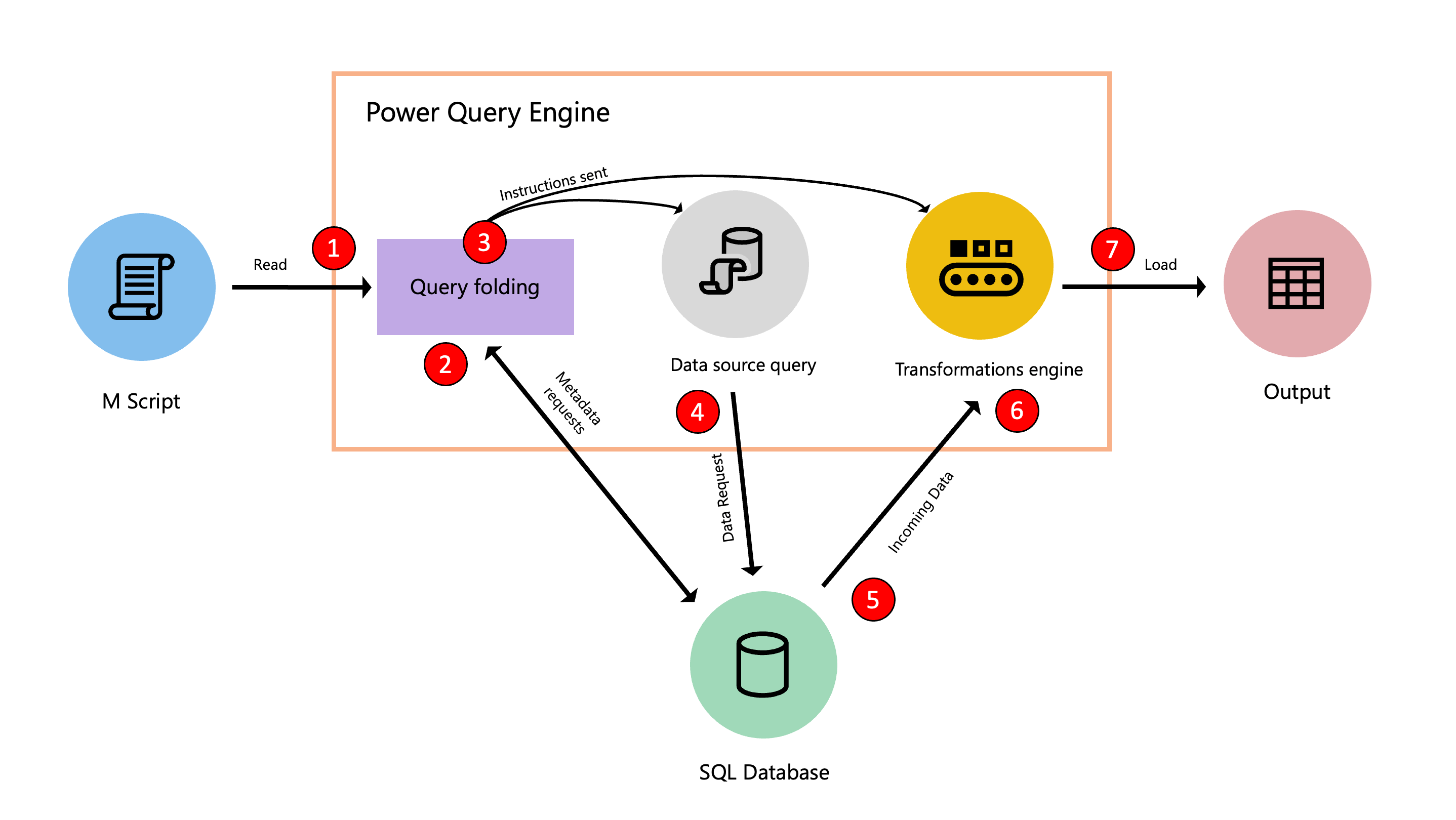
- The M script, found inside the advanced editor, is submitted to the Power Query engine. Other important information is also supplied, such as credentials and data source privacy levels.
- The query folding mechanism submits metadata requests to determine the capabilities of the data source, table schemas, relationships between tables at the data source, and other metadata.
- Based on the metadata it receives, the query folding mechanism determines what information to extract from the data source and which transformations must occur inside the Power Query engine. It sends instructions to two other components that retrieve data from the data source and transform the incoming data in the Power Query engine if necessary.
- After the internal components of Power Query receive the instructions, Power Query sends a request to the data source using a data source query.
- The data source receives the request from Power Query and transfers the data to the Power Query engine.
- After the data is inside Power Query, the transformation engine inside Power Query (also known as mashup engine) does the transformations that couldn't be folded back or offloaded to the data source.
- Power Query loads the transformed result to a destination.
Note
Depending on the transformations and data source used in the M script, Power Query determines whether to stream or buffer the incoming data.
What query folding does in Power Query
The goal of query folding is to offload or push as much of the evaluation of a query to a data source that can compute the transformations of your query.
The query folding mechanism accomplishes this goal by translating your M script to a language that your data source can interpret and execute. It then pushes the evaluation to your data source and sends the result of that evaluation to Power Query.
This operation often provides a faster query execution than extracting all the required data from your data source and running all transforms required in the Power Query engine.
When you use the get data experience, Power Query guides you through the process that ultimately lets you connect to your data source. When doing so, Power Query uses a series of functions in the M language categorized as accessing data functions. These specific functions use mechanisms and protocols to connect to your data source using a language that your data source can understand.
For transformations after the data source function, the query folding mechanism checks whether it can offload them to the data source instead of processing them in the Power Query engine.
Important
Data source functions, commonly shown as the Source step of a query, query data at the data source in its native language. For transformations after the data source function, Power Query attempts query folding only when the connector and transformations support it. The mechanism can translate and combine supported transformations into a single data source query.
Query folding outcomes in Power Query
Depending on how the query is structured, there could be three possible outcomes to the query folding mechanism:
| Query folding outcome | Processing at the data source | Processing in the Power Query engine |
|---|---|---|
| Full query folding | The data source processes all query transformations. | Minimal processing occurs in the Power Query engine. |
| Partial query folding | The data source processes the transformations that Power Query can translate into the native query language. | The Power Query engine processes the remaining transformations. |
| No query folding | The data source returns the requested source data without processing query transformations. | The Power Query engine processes all required transformations. |
Data sources that support query folding
Query folding support depends on the connector, the data source, and the transformations in the query. Connectors for structured data sources with query-processing capabilities, such as SQL Server and OData Feed, commonly support query folding. Sources without a query engine, such as CSV and Excel files, don't support query folding.
During optimization, the Power Query engine might reorder query steps. Using a data source with more processing resources and query folding capabilities can reduce query load times because processing occurs at the data source instead of in the Power Query engine.
Verify query folding in Power Query Online
In Power Query Online, use query folding indicators beside the applied steps to identify which steps fold. You can also use the query plan to see which operations run at the data source and which operations run in the Power Query engine. These features are available only in Power Query Online.
When available, use View Native Query or View data source query to inspect the request that Power Query sends to the data source. Availability depends on the connector.