Muistiinpano
Tämän sivun käyttö edellyttää valtuutusta. Voit yrittää kirjautua sisään tai vaihtaa hakemistoa.
Tämän sivun käyttö edellyttää valtuutusta. Voit yrittää vaihtaa hakemistoa.
This article is intended to help architects and developers make sound design decisions when they implement integration scenarios to and from Business Central.
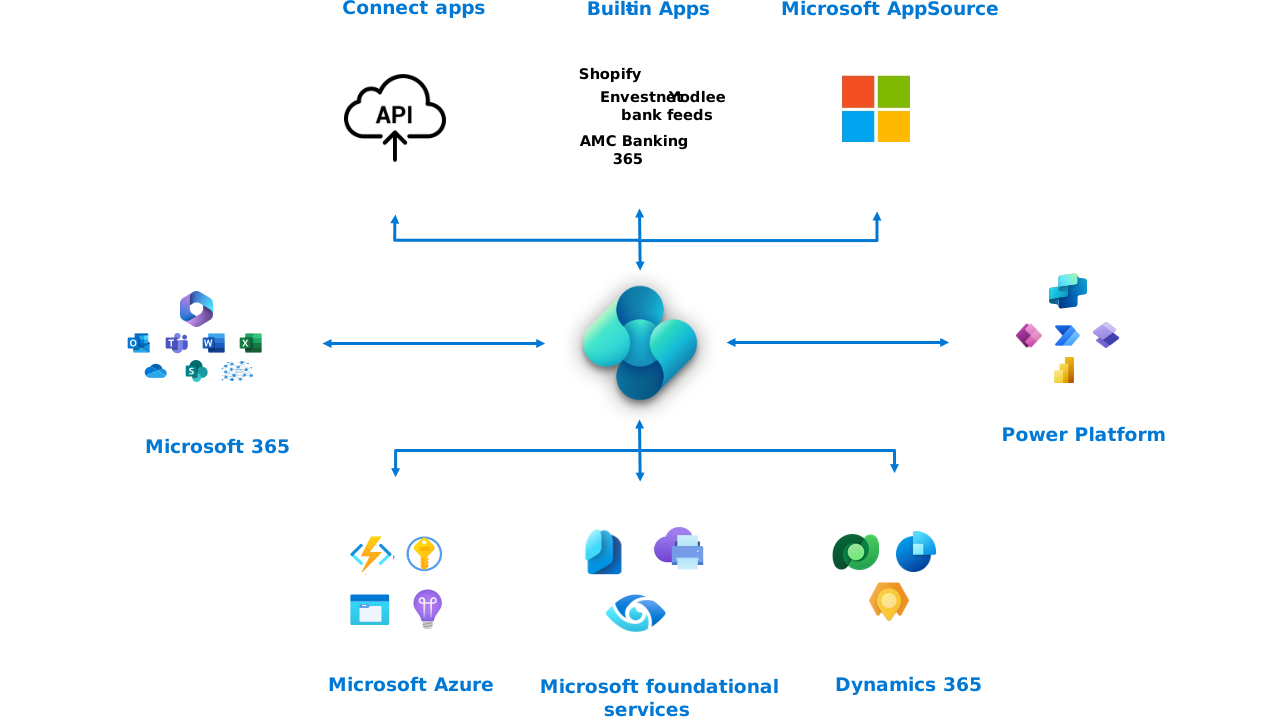
The article describes integration patterns, integration scenarios, and integration solutions. However, it doesn't include technical details about how to use or set up every integration pattern. It also doesn't include sample integration code.
Note
Some integrations require a separate subscription or license. Please consult the documentation for that subscription for requirements and details.
Choose between web services and built-in integrations
Most integrations to and from Business Central use web services. Built-in integrations can provide a managed alternative for specific scenarios. For example, Microsoft Fabric data mirroring replicates selected data for analytics without requiring you to build a table-by-table API extraction pipeline.
Business Central supports three types of web services: REST API, SOAP, and OData.
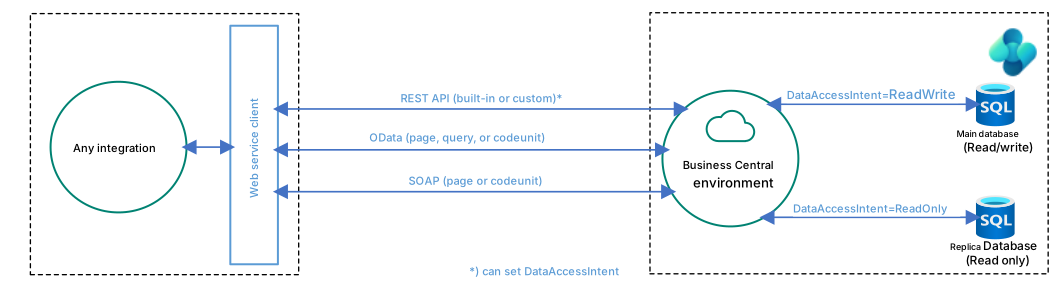
The recommended way to use web services for Business Central is by using the REST API stack.
Learn more in Web services overview.
How to explore and develop against Business Central REST APIs
For request-response integrations with Business Central, use REST APIs, either built-in or custom. If your goal is to replicate data to Fabric for analytics, consider the built-in mirroring integration.
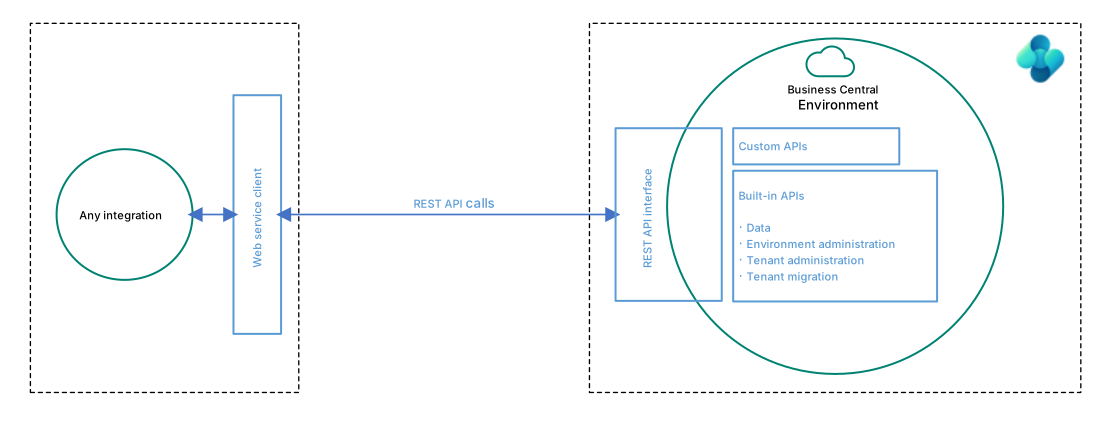
For more information on how to explore and develop against APIs, best practices, and which built-in APIs exist, see REST API overview.
Integrating to Office apps and Microsoft 365
Business Central supports multiple integrations to Microsoft 365. Enabling integrations to Microsoft 365 augments the functionality in Business Central with extra features. It also augments Microsoft 365 apps with new features so that users can stay in the flow of work and get access to the right data at the right time from the app they prefer working with. Along with built-in integration, Business Central offers more ways for you to integrate with Microsoft 365 apps using APIs.

Business Central integrates to the following Microsoft 365 products and services:
- Microsoft Excel
- Field Service
- Microsoft Graph
- OneDrive for Business
- Microsoft Outlook
- Microsoft SharePoint
- Microsoft Teams
- Microsoft Word
Learn more in Integrating Business Central with Microsoft 365.
Integrating Business Central with Power Platform
Business Central supports multiple integrations to Power Platform. Enabling integrations to Power Platform augments the functionality in Business Central with more features.
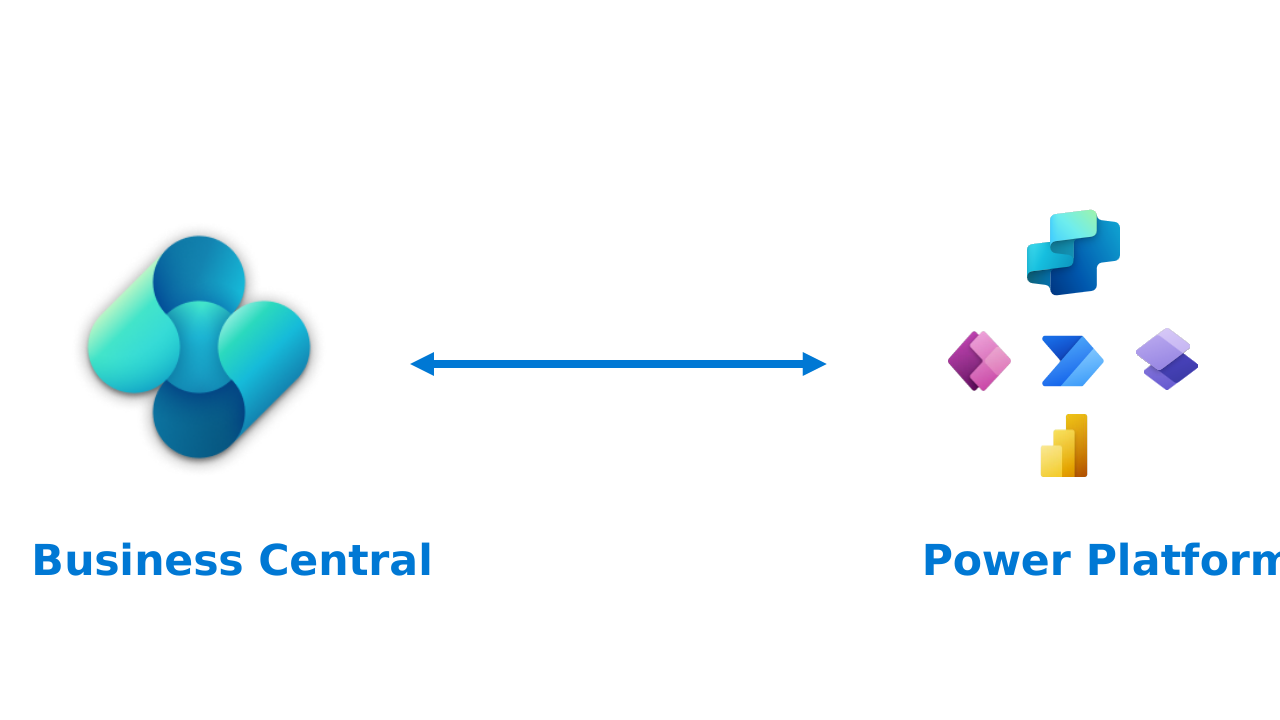
Business Central integrates to the following Power Platform products and services:
- Power Apps
- Power Automate
- Power BI
- Power Pages
- Copilot Studio
Learn more in Integrating Business Central with Power Platform.
Built-in: Mirror Business Central data to Microsoft Fabric
[This article is prerelease documentation and is subject to change.]
Important
- This is a production-ready preview feature.
- Production-ready previews are subject to supplemental terms of use.
The Microsoft Fabric Mirroring (Preview) app provides a managed connection from Business Central online to an open mirrored database in Microsoft Fabric. An administrator selects the companies and tables to synchronize. The integration supports an initial snapshot and ongoing changes to OneLake in Delta Parquet format.
Use this integration for analytics and data engineering scenarios that need data from one or more Business Central companies. You can monitor synchronization in the Business Central client, through the Fabric Export APIs, or from Fabric.
The app supports up to 1,000 selected tables across manual selections and configuration packages. The lookup excludes tables that aren't eligible for export.
Connection setup and synchronization run asynchronously. Connect to Fabric prepares the connection; Start synchronization requests continuous export. The APIs manage configuration and expose operational results rather than exposing the selected business data as API entities.
Data mirroring is a preview. Check the app's compatibility requirements and setup prerequisites for your environment. Learn more in Data mirroring to Microsoft Fabric from Business Central and Microsoft Fabric Export APIs.
Built-in: Integrating Business Central with Dataverse
Business Central has four built-in ways to integrate with Dataverse:
- Data synchronization that replicates data between Business Central and Dataverse.
- Data virtualization with virtual tables in Dataverse via Business Central API for (Create/Read/Update/Delete) operations.
- Data change (CUD) events using webhooks.
- Business events (preview).

Learn more in Integrating Business Central with Microsoft Dataverse.
Built-in: Integrating Business Central with Dynamics 365 Sales
You can integrate Business Central with Dynamics 365 Sales by first setting up integration to Dataverse and then doing more setup from the Business Central application. Integrating to Dynamics 365 Sales lets users view information from Business Central while they're working in Dynamics 365 Sales. For example, when preparing a sales quote it could be useful to know whether you have enough inventory to fulfill the order.
Learn more in Integrating Business Central with Dynamics 365 Sales.
Built in: Integrating Business Central with Dynamics 365 Field Service
Service organizations require a front-to-back application in which financials, inventory, and procurement are tightly coupled with service delivery. They generate financial data with every transaction. Every work order represents cost and revenue, and every resource generates profit and loss. Customer interactions add entries on the general ledger. The integration between Business Central and Field Service streamlines the end-to-end process of managing service operations and ensures a smooth flow of information between the two systems.
Learn more in Integrate with Microsoft Dynamics 365 Field Service.
Built-in: Integrating Business Central with Shopify
You can integrate Business Central with Shopify by installing and configuring the Shopify Connector app. By connecting your Shopify store (or stores) with Business Central, you can maximize your business productivity and manage and view insights from your business and your Shopify store as one unit.
Learn more in Get started with the Shopify connector.
Integrating to external systems from AL code: calling external services
You can integrate Business Central apps and extensions with external systems by using the HttpClient data type in AL code.
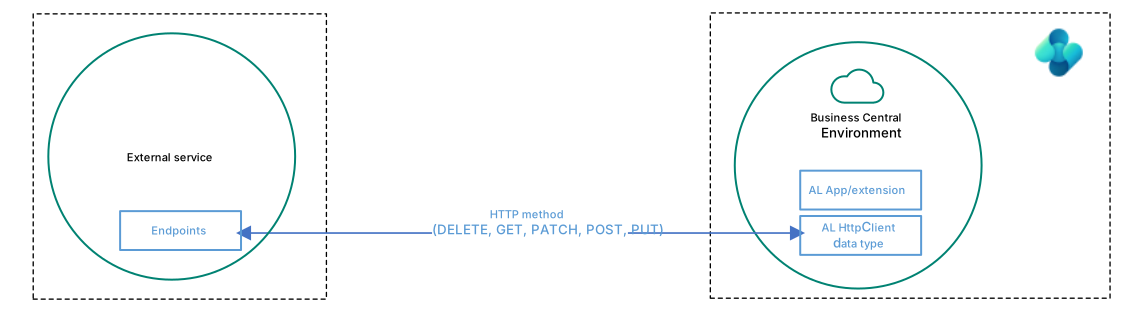
Learn more in Call external services with the HttpClient data type.
Integrating to external systems from AL code: Azure services
You can integrate Business Central apps and extensions with Azure services such as Azure Blob Storage, Azure Files, Azure Functions, or Azure Key Vault.

Learn more in Integrating Business Central with Azure services.
Integrating Business Central with infrastructure services
Business Central integrates to a few fundamental infrastructure services for operations such as authentication, authorization, auditing, telemetry, and printing.
Here are some supported integrations between Business Central and fundamental services:
- Authentication and authorization: Microsoft Entra
- Network security: Azure security service tags
- Telemetry: Azure Application Insights
- Local printers: Microsoft 365 Universal Print
Learn more in Integrating Business Central with infrastructure services.
Integrating AI by extending Copilot in Business Central
You can integrate Business Central apps and extensions with the Azure OpenAI Service to extend Copilot in Business Central with new generative AI capabilities.
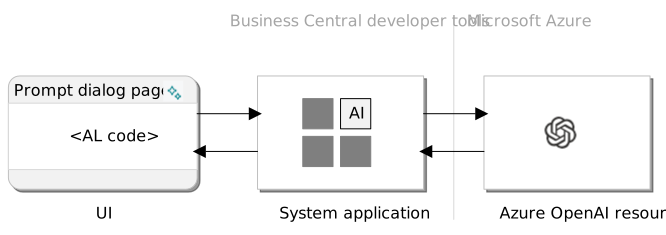
Learn more in Integrating AI using Developer Tools for Copilot.
Related information
Web services overview
Developing Connect apps
Integrating Business Central with Office apps and Microsoft 365
Integrating Business Central with Power Platform
Integrating Business Central with Microsoft Dataverse
Integrating Business Central with Dynamics 365 Sales
Integrating Business Central with Shopify
Call external services with the HttpClient data type
Integrating Business Central with Azure services
Integrating AI using developer tools for Copilot
Envestnet Yodlee Bank Feeds extension
AMC Banking 365 Fundamentals extension