Lingua
Nota
L'accesso a questa pagina richiede l'autorizzazione. È possibile provare ad accedere o modificare le directory.
L'accesso a questa pagina richiede l'autorizzazione. È possibile provare a modificare le directory.
Importante
Non usare System.Data.SqlClient per il nuovo sviluppo. Usare Microsoft.Data.SqlClient per il nuovo codice di accesso ai dati SQL Server. Questi esempi mantengono System.Data.SqlClient perché il provider LINQ to SQL predefinito di .NET Framework lo richiede. La modifica del tipo di connessione da sola non esegue la migrazione di LINQ to SQL.
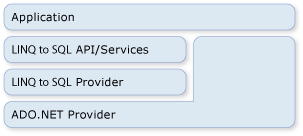
LINQ to SQL fa parte della famiglia di tecnologie ADO.NET. Si basa sui servizi forniti dal modello di provider ADO.NET. È quindi possibile combinare codice LINQ to SQL con le applicazioni di ADO.NET esistenti ed eseguire la migrazione delle soluzioni di ADO.NET correnti a LINQ to SQL. La figura seguente fornisce una visualizzazione generale della relazione.
Connessioni
È possibile fornire una connessione ADO.NET esistente quando si crea una connessione LINQ to SQL DataContext. Tutte le operazioni sull'oggetto DataContext (incluse le query) usano questa connessione fornita. Se la connessione è già aperta, LINQ to SQL lo lascia invariato al termine dell'operazione.
// Do not use System.Data.SqlClient for new development; use Microsoft.Data.SqlClient.
// LINQ to SQL's built-in provider requires System.Data.SqlClient.
string connString = @"Data Source=.\SQLEXPRESS;AttachDbFilename=c:\northwind.mdf;
    Integrated Security=True; Connect Timeout=30; User Instance=True";
SqlConnection nwindConn = new SqlConnection(connString);
nwindConn.Open();

Northwnd interop_db = new Northwnd(nwindConn);

SqlTransaction nwindTxn = nwindConn.BeginTransaction();

try
{
    SqlCommand cmd = new SqlCommand(
        "UPDATE Products SET QuantityPerUnit = 'single item' WHERE ProductID = 3");
    cmd.Connection = nwindConn;
    cmd.Transaction = nwindTxn;
    cmd.ExecuteNonQuery();

    interop_db.Transaction = nwindTxn;

    Product prod1 = interop_db.Products
        .First(p => p.ProductID == 4);
    Product prod2 = interop_db.Products
        .First(p => p.ProductID == 5);
    prod1.UnitsInStock -= 3;
    prod2.UnitsInStock -= 5;

    interop_db.SubmitChanges();

    nwindTxn.Commit();
}
catch (Exception e)
{
    Console.WriteLine(e.Message);
    Console.WriteLine("Error submitting changes... all changes rolled back.");
}

nwindConn.Close();
' Do not use System.Data.SqlClient for new development; use Microsoft.Data.SqlClient.
' LINQ to SQL's built-in provider requires System.Data.SqlClient.
Dim conString = "Data Source=.\SQLEXPRESS;AttachDbFilename=c:\northwind.mdf; Integrated Security=True;Connect Timeout=30;User Instance=True"
Dim northwindCon = New SqlConnection(conString)
northwindCon.Open()

Dim db = New Northwnd(northwindCon)
Dim northwindTransaction = northwindCon.BeginTransaction()

Try
    Dim cmd = New SqlCommand( _
            "UPDATE Products SET QuantityPerUnit = 'single item' " & _
            "WHERE ProductID = 3")
    cmd.Connection = northwindCon
    cmd.Transaction = northwindTransaction
    cmd.ExecuteNonQuery()

    db.Transaction = northwindTransaction

    Dim prod1 = (From prod In db.Products _
                 Where prod.ProductID = 4).First
    Dim prod2 = (From prod In db.Products _
                 Where prod.ProductID = 5).First
    prod1.UnitsInStock -= 3
    prod2.UnitsInStock -= 5

    db.SubmitChanges()

    northwindTransaction.Commit()

Catch e As Exception

    Console.WriteLine(e.Message)
    Console.WriteLine("Error submitting changes... " & _
"all changes rolled back.")
End Try

northwindCon.Close()
È sempre possibile accedere alla connessione e chiuderla usando la Connection proprietà , come nel codice seguente:
// Do not use System.Data.SqlClient for new development; use Microsoft.Data.SqlClient.
// LINQ to SQL's built-in provider requires System.Data.SqlClient.
db.Connection.Close();
' Do not use System.Data.SqlClient for new development; use Microsoft.Data.SqlClient.
' LINQ to SQL's built-in provider requires System.Data.SqlClient.
db.Connection.Close()
Transazioni
È possibile fornire la propria transazione di database a DataContext quando l'applicazione ha già avviato la transazione e si desidera coinvolgere DataContext.
Il metodo preferito per eseguire transazioni con .NET Framework consiste nell'usare l'oggetto TransactionScope . Usando questo approccio, è possibile eseguire transazioni distribuite che funzionano tra database e altri gestori di risorse residenti in memoria. Gli ambiti delle transazioni richiedono poche risorse per avviarsi. Si alzano di livello alle transazioni distribuite solo quando sono presenti più connessioni all'interno dell'ambito della transazione.
// Do not use System.Data.SqlClient for new development; use Microsoft.Data.SqlClient.
// LINQ to SQL's built-in provider requires System.Data.SqlClient.
using (TransactionScope ts = new TransactionScope())
{
    db.SubmitChanges();
    ts.Complete();
}
' Do not use System.Data.SqlClient for new development; use Microsoft.Data.SqlClient.
' LINQ to SQL's built-in provider requires System.Data.SqlClient.
Using ts As New TransactionScope()
    db.SubmitChanges()
    ts.Complete()
End Using
Non è possibile utilizzare questo approccio per tutti i database. Ad esempio, la connessione SqlClient non può alzare di livello le transazioni di sistema quando funziona su un server SQL Server 2000. Viene invece inserita automaticamente in una transazione distribuita completa ogni volta che viene visualizzato un ambito di transazione in uso.
Comandi SQL diretti
A volte è possibile riscontrare situazioni in cui la possibilità di DataContext eseguire query o inviare modifiche non è sufficiente per l'attività specializzata che si vuole eseguire. In questi casi è possibile usare il ExecuteQuery metodo per eseguire comandi SQL nel database e convertire i risultati della query in oggetti .
Si supponga, ad esempio, che i dati per la Customer classe siano distribuiti su due tabelle (customer1 e customer2). La query seguente restituisce una sequenza di Customer oggetti:
            // Do not use System.Data.SqlClient for new development; use Microsoft.Data.SqlClient.
            // LINQ to SQL's built-in provider requires System.Data.SqlClient.
            IEnumerable<Customer> results = db.ExecuteQuery<Customer>(
    @"select c1.custid as CustomerID, c2.custName as ContactName
        from customer1 as c1, customer2 as c2
        where c1.custid = c2.custid"
);
    ' Do not use System.Data.SqlClient for new development; use Microsoft.Data.SqlClient.
    ' LINQ to SQL's built-in provider requires System.Data.SqlClient.
    Dim results As IEnumerable(Of Customer) = _
db.ExecuteQuery(Of Customer)( _
"SELECT [c1].custID as CustomerID," & _
    "[c2].custName as ContactName " & _
    "FROM customer1 AS [c1], customer2 as [c2] " & _
    "WHERE [c1].custid = [c2].custid")
Per materializzare le entità mappate Customer , restituire colonne corrispondenti alle proprietà mappate e includere CustomerID, la chiave primaria.
Parametri
Il ExecuteQuery metodo accetta parametri. Il codice seguente esegue una query con parametri:
            // Do not use System.Data.SqlClient for new development; use Microsoft.Data.SqlClient.
            // LINQ to SQL's built-in provider requires System.Data.SqlClient.
            IEnumerable<Customer> results = db.ExecuteQuery<Customer>(
    "select CustomerID, ContactName from customers where city = {0}",
    "London"
);
    ' Do not use System.Data.SqlClient for new development; use Microsoft.Data.SqlClient.
    ' LINQ to SQL's built-in provider requires System.Data.SqlClient.
    Dim results As IEnumerable(Of Customer) = _
db.ExecuteQuery(Of Customer)( _
    "SELECT CustomerID, ContactName FROM customers WHERE city = {0}", _
    "London")
End Sub
Annotazioni
I parametri vengono espressi nel testo della query usando la stessa notazione curly usata da Console.WriteLine() e String.Format().
String.Format() prende la stringa di query specificata e sostituisce i parametri nelle parentesi graffe con nomi di parametri generati, come ad esempio @p0, @p1 ..., @p(n).