Nota
L'accesso a questa pagina richiede l'autorizzazione. È possibile provare ad accedere o modificare le directory.
L'accesso a questa pagina richiede l'autorizzazione. È possibile provare a modificare le directory.
Note
Il flusso di codice del dispositivo non è supportato da Azure AD B2C.
Perché è consigliabile usare Il flusso di codice del dispositivo?
L'autenticazione interattiva con Microsoft Entra ID richiede un Web browser (per informazioni dettagliate, vedere Utilizzo dei Web browser). Tuttavia, nel caso di dispositivi e sistemi operativi che non forniscono un Web browser, Device Code Flow consente all'utente di usare un altro dispositivo (ad esempio un altro computer o un telefono cellulare) per accedere in modo interattivo. Usando il flusso di codice del dispositivo, l'applicazione ottiene i token tramite un processo in due passaggi appositamente progettato per questi dispositivi/sistemi operativi. Esempi di tali applicazioni sono applicazioni in esecuzione in IoT o Command-Line tools (CLI). L'idea è la seguente:
Ogni volta che è necessaria l'autenticazione utente, l'app fornisce un codice e chiede all'utente di usare un altro dispositivo (ad esempio uno smartphone connesso a Internet) per passare a un URL (ad esempio,
https://microsoft.com/devicelogin), in cui all'utente verrà richiesto di immettere il codice. A tale scopo, la pagina Web porterà l'utente tramite una normale esperienza di autenticazione, incluse le richieste di consenso e l'autenticazione a più fattori, se necessario.Al termine dell'autenticazione, l'app della riga di comando riceverà i token necessari tramite un canale back e lo userà per eseguire le chiamate API Web necessarie.
Vincoli
- Il flusso di codice del dispositivo è disponibile solo nelle applicazioni client pubbliche
- L'autorità fornita in PublicClientApplicationBuilder deve essere:
- Con tenant, nel formato
https://login.microsoftonline.com/{tenant}/, dovetenantpuò essere il GUID che rappresenta l'ID del tenant oppure un dominio associato al tenant.
- Con tenant, nel formato
Flusso di codice del dispositivo con account personali Microsoft
A partire da MSAL.NET versione 4.5, il flusso del codice del dispositivo è possibile con Microsoft account personali. Ciò significa che il flusso del codice del dispositivo funzionerà con:
- Tutti gli account aziendali e scolastici (
https://login.microsoftonline.com/organizations/) e - Microsoft account personali (
/commono/consumerstenant)
Come usarlo?
Registrazione dell'applicazione
Durante la registrazione dell'app , nella sezione Autenticazione per l'applicazione:
L'URI di risposta deve essere
https://login.microsoftonline.com/common/oauth2/nativeclientÈ necessario scegliere Sì per la domanda Considerare l'applicazione come client pubblico (nel paragrafo Tipo di client predefinito )

Code

IPublicClientApplicationcontiene un metodo denominato AcquireTokenWithDeviceCode
 AcquireTokenWithDeviceCode(IEnumerable<string> scopes,
                            Func<DeviceCodeResult, Task> deviceCodeResultCallback)
Questo metodo accetta come parametri:
Oggetto
scopesper il quale richiedere un token di accessoUn callback che riceverà
DeviceCodeResult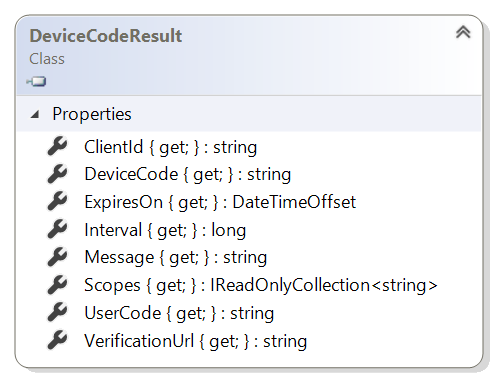
È possibile passare parametri facoltativi chiamando:
-
.WithExtraQueryParameters(Dictionary{string, string})per passare parametri di query aggiuntivi. Può essere utile per definire come destinazione gli ambienti di test o per la globalizzazione (vedere di seguito). È possibile passarestring.Empty. -
.WithAuthority(string, bool)per eseguire l'override dell'autorità predefinita impostata nella costruzione dell'applicazione. Si noti che l'autorità con precedenza deve far parte delle autorità note aggiunte durante la compilazione dell'applicazione.
Frammento di codice
Il codice di esempio seguente presenta il caso più recente, con spiegazioni del tipo di eccezioni che è possibile ottenere e la relativa mitigazione.
private const string ClientId = "<client_guid>";
private const string Authority = "https://login.microsoftonline.com/contoso.com";
private readonly string[] Scopes = new string[] { "user.read" };

static async Task<AuthenticationResult> GetATokenForGraph()
{
    IPublicClientApplication pca = PublicClientApplicationBuilder
            .Create(ClientId)
            .WithAuthority(Authority)
            .WithDefaultRedirectUri()
            .Build();

    var accounts = await pca.GetAccountsAsync();

    // All AcquireToken* methods store the tokens in the cache, so check the cache first
    try
    {
        return await pca.AcquireTokenSilent(Scopes, accounts.FirstOrDefault())
            .ExecuteAsync();
    }
    catch (MsalUiRequiredException ex)
    {
        // No token found in the cache or Azure AD insists that a form interactive auth is required (e.g. the tenant admin turned on MFA)
        // If you want to provide a more complex user experience, check out ex.Classification

        return await AcquireByDeviceCodeAsync(pca);
    }
}

private async Task<AuthenticationResult> AcquireByDeviceCodeAsync(IPublicClientApplication pca)
{
    try
    {
        var result = await pca.AcquireTokenWithDeviceCode(scopes,
            deviceCodeResult =>
            {
                    // This will print the message on the console which tells the user where to go sign-in using
                    // a separate browser and the code to enter once they sign in.
                    // The AcquireTokenWithDeviceCode() method will poll the server after firing this
                    // device code callback to look for the successful login of the user via that browser.
                    // This background polling (whose interval and timeout data is also provided as fields in the
                    // deviceCodeCallback class) will occur until:
                    // * The user has successfully logged in via browser and entered the proper code
                    // * The timeout specified by the server for the lifetime of this code (typically ~15 minutes) has been reached
                    // * The developing application calls the Cancel() method on a CancellationToken sent into the method.
                    //   If this occurs, an OperationCanceledException will be thrown (see catch below for more details).
                    Console.WriteLine(deviceCodeResult.Message);
                return Task.FromResult(0);
            }).ExecuteAsync();

        Console.WriteLine(result.Account.Username);
        return result;
    }
    // TODO: handle or throw all these exceptions
    catch (MsalServiceException ex)
    {
        // Kind of errors you could have (in ex.Message)

        // AADSTS50059: No tenant-identifying information found in either the request or implied by any provided credentials.
        // Mitigation: as explained in the message from Azure AD, the authoriy needs to be tenanted. you have probably created
        // your public client application with the following authorities:
        // https://login.microsoftonline.com/common or https://login.microsoftonline.com/organizations

        // AADSTS90133: Device Code flow is not supported under /common or /consumers endpoint.
        // Mitigation: as explained in the message from Azure AD, the authority needs to be tenanted

        // AADSTS90002: Tenant <tenantId or domain you used in the authority> not found. This may happen if there are
        // no active subscriptions for the tenant. Check with your subscription administrator.
        // Mitigation: if you have an active subscription for the tenant this might be that you have a typo in the
        // tenantId (GUID) or tenant domain name.
    }
    catch (OperationCanceledException ex)
    {
        // If you use a CancellationToken, and call the Cancel() method on it, then this *may* be triggered
        // to indicate that the operation was cancelled.
        // See /dotnet/standard/threading/cancellation-in-managed-threads
        // for more detailed information on how C# supports cancellation in managed threads.
    }
    catch (MsalClientException ex)
    {
        // Possible cause - verification code expired before contacting the server
        // This exception will occur if the user does not manage to sign-in before a time out (15 mins) and the
        // call to `AcquireTokenWithDeviceCode` is not cancelled in between
    }
}
Esempio che illustra l'acquisizione di token tramite il flusso di codice del dispositivo con MSAL.NET
| Sample | Platform | Description |
|---|---|---|
| active-directory-dotnetcore-devicecodeflow-v2 | Console (.NET Core) | Applicazione console .NET Core 2.1 che consente a un utente di ottenere, con l'endpoint Azure AD v2.0, un token per Microsoft Graph effettuando l'accesso tramite un altro dispositivo dotato di browser Web  |
Informazioni aggiuntive
Nel caso in cui si desideri ottenere altre informazioni sul flusso del codice del dispositivo: