.NET プロジェクト用の早期バインド クラスを作成する:
- コードの可読性と保守性が向上します。
- コンパイル時に型チェックが行われるため、エラーのリスクが軽減されます。
- 開発者は IntelliSense を使用してテーブル、列、選択オプションを検出できるため、開発者の生産性が向上します。
- LINQ やその他の機能を使用してデータを処理して Dataverse クエリを記述できるように 、OrganizationServiceContext クラスを提供します。
詳細情報:
Power Platform CLI pac modelbuilder ビルド コマンド を使用して、早期バインド コード クラスを生成します。
CrmSvcUtil.exe コード生成ツールを使用することもできますが、Dataverse の場合は pac modelbuilder build コマンドを使用することをお勧めします。
CrmSvcUtil.exe を使用して SDK for .NET の事前バインド クラスを生成する方法について学びます
多くの Power Platform CLI コマンドと同様、pac modelbuilder build には結果を制御するために使用できるパラメータが多数あります。 この記事では、ほとんどのユースケースで --settingsTemplateFile パラメータの使用から始めることをお勧めします。 このパラメーターを使用して JSON ファイルを参照し、使用可能なその他すべての設定を制御できます。 これにより、パラメーターの長いリストを作成する必要はありません。また、必要なときにクラスを再生成できるように、プロジェクトに適した構成を更新できます。
必要に応じて、パラメーターを指定してビルド コマンドを使用することもできます。 パラメーターを使用する を参照します。
概要
開始する前に:
- Power Platform CLI のインストール。
- Power Platform CLI pac 認証コマンドを使用して環境に接続します。
開始するには、以下の手順に従ってください:
.NET プロジェクトで、 NuGet パッケージ参照を次のいずれかに追加します。
- クライアント アプリケーションの場合: Microsoft.PowerPlatform.Dataverse.Client
- Dataverse プラグイン プロジェクトの場合: Microsoft.CrmSdk.CoreAssemblies
modelというフォルダーを作成します。modelフォルダーに、次の設定を含むbuilderSettings.jsonファイルを追加します。{ "emitentityetc-comment": "Generate a constants structure that contains all of the field names by entity at the time of code generation.", "emitEntityETC": false, "emitfieldsclasses-comment": "Generate a constants structure that contains all of the field names by entity at the time of code generation.", "emitFieldsClasses": false, "emitvirtualattributes-comment": "When set, includes the Virtual Attributes of entities in the generated code.", "emitVirtualAttributes": false, "entitynamesfilter-comment": "Filters the list of entities are retrieved when reading data from Dataverse.", "entityNamesFilter": [ "account", "contact" ], "entitytypesfolder-comment": "Folder name that contains entities.", "entityTypesFolder": "Entities", "generateGlobalOptionSets-comment": "Emit all Global OptionSets. Note: If an entity contains a reference to a global optionset, it is emitted even if this switch is not present.", "generateGlobalOptionSets": false, "generatesdkmessages-comment": "When set, emits Sdk message classes as part of code generation", "generateSdkMessages": true, "language-comment": "The language to use for the generated proxy code. This value can be either 'CS' or 'VB'. The default language is 'CS'.", "language": "CS", "logLevel-comment": "Log level. The default value is 'Off'.", "logLevel": "Off", "messagenamesfilter-comment": "Filters the list of messages that are retrieved when reading data from Dataverse.", "messageNamesFilter": [ "searchautocomplete", "searchquery", "sample_*" ], "messagestypesfolder-comment": "Folder name that contains messages.", "messagesTypesFolder": "Messages", "namespace-comment": "The namespace for the generated code.", "namespace": "ExampleProject", "optionsetstypesfolder-comment": "Folder name that contains option sets.", "optionSetsTypesFolder": "OptionSets", "serviceContextName-comment": "The name for the generated service context. If a value is passed in, it's used for the Service Context. If not, no Service Context is generated.", "serviceContextName": "OrgContext", "suppressGeneratedCodeAttribute-comment": "When set, this suppress all generated objects being tagged with the code generation engine and version", "suppressGeneratedCodeAttribute": true, "suppressINotifyPattern-comment": "When enabled, doesn't write the INotify wrappers for properties and classes.", "suppressINotifyPattern": true }注
このファイルは、
--writesettingsTemplateFileパラメーターでpac modelbuilder buildを使用して生成できるファイルの変更バージョンです。 パラメータの使用 でコメントなしでファイルを生成する方法についてご覧ください。次のコマンドを使用して、
builderSettings.jsonで定義されている設定を使用して、接続環境の早期バインド クラスを生成します。C:\projects\exampleproject\パスはプロジェクトへのパスを表し、modelは作成したフォルダーです。PS C:\projects\exampleproject\model> pac modelbuilder build -o . -stf .\builderSettings.jsonこのコマンドには、これらのパラメーターを使います。
- 現在のディレクトリを示すための、値が
.の必須の--outdirectoryパラメーター に対する-oのショートカット。 - 現在のディレクトリを示すための、値 を持つ パラメーター用の ショートカット。
exampleprojectディレクトリから次のコマンドを使用することもできます。PS C:\projects\exampleproject>pac modelbuilder build -o model -stf model\builderSettings.json- 現在のディレクトリを示すための、値が
どのようなファイルが書き込まれるかを理解する
いずれかのコマンドを使用すると、次の出力が表示されます。
Connected to... Your Organization
Connected as you@yourorganization.onmicrosoft.com
Begin reading metadata from MetadataProviderService
      Begin Reading Metadata from Server
      Read 2 Entities - 00:00:00.732
      Read 0 Global OptionSets - 00:00:00.000
      Read 12 SDK Messages - 00:00:00.889
      Completed Reading Metadata from Server - 00:00:01.694
Completed reading metadata from MetadataProviderService - 00:00:01.697
Begin Writing Code Files
      Processing 2 Entities
      Wrote 2 Entities - 00:00:00.0625873
      Processing 12 Messages
      Wrote 3 Message(s). Skipped 9 Message(s) - 00:00:00.0091589
      Processing 0 Global OptionSets
      Wrote 0 Global OptionSets - 00:00:00.0000045
      Code written to C:\projects\exampleproject\model\Entities\account.cs.
      Code written to C:\projects\exampleproject\model\Entities\contact.cs.
      Code written to C:\projects\exampleproject\model\Messages\searchquery.cs.
      Code written to C:\projects\exampleproject\model\Messages\searchautocomplete.cs.
      Code written to C:\projects\exampleproject\model\OrgContext.cs.
      Code written to C:\projects\exampleproject\model\EntityOptionSetEnum.cs.
Completed Writing Code Files - 00:00:00.116
Generation Complete - 00:00:01.815
PS C:\projects\exampleproject\model>
出力を検査すると、 entityNamesFilter で指定されたテーブルのクラスのみが生成され、 messageNamesFilterで指定されたメッセージのみが生成されることがわかります。 プロジェクトで使用するテーブル (エンティティ) とメッセージを指定します。 それ以外の場合、コマンドはすべてのテーブルとメッセージのクラスを生成します。
messageNamesFilterの場合は、これらの値にワイルドカード文字として*を使用します。 この フィルター は、ソリューション内のメッセージが共通のカスタマイズ プレフィックスを共有する場合に便利です。
pac modelbuilder build は、設定ファイルで制御する名前を持つフォルダーにファイルを書き込みます。
- エンティティ クラスは、
entityTypesFolder設定で指定されたフォルダーに移動します。 - メッセージ クラスは、
messagesTypesFolder設定で指定されたフォルダーに移動します。 -
OrganizationServiceContext クラスは、
serviceContextName設定で指定された名前のファイルに渡されます。 - すべてのクラスは、
namespace設定で設定した名前空間の一部です。
注
メッセージ クラスを生成する場合は、常に serviceContextName 設定の名前を含めます。
メッセージ・クラスの生成時にserviceContextNameを含めるを参照してください。
Visual Studio ではファイルとフォルダーが次のように表示されます。
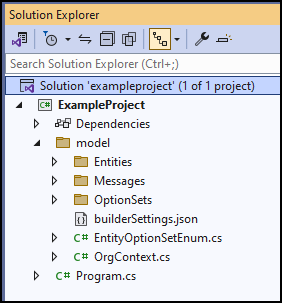
これらのファイルをプロジェクトに追加すると、アーリーバインド クラスを使用できるようになります。
変更したい場合は、model 以外の builderSettings.jsonフォルダ内のファイルを削除し、builderSettings.jsonの設定を変更して再生成してください。
パラメーターの使用
--settingsTemplateFile では、pac modelbuilder build 設定ファイルや builderSettings.json パラメーターを使用する必要はありません。 パラメーターを直接使用してコマンドを呼び出すことができます。 リファレンス ドキュメントと例については、 pac modelbuilder ビルドのリファレンス ドキュメントを参照してください。
builderSettings.json設定ファイルと --settingsTemplateFile パラメーターを使用する場合は、コマンド ライン パラメーターを使用してこれらの設定をオーバーライドできます。
パラメーターを使用して 「はじめ に」セクションの例と同じ設定を使用してファイルを生成する方法を示す例を次に示します。
PS C:\>pac modelbuilder build `
   --outdirectory C:\projects\exampleproject\model `
   --entitynamesfilter 'account;contact' `
   --generatesdkmessages `
   --messagenamesfilter 'searchautocomplete;searchquery;sample_*' `
   --namespace ExampleProject `
   --serviceContextName OrgContext `
   --suppressGeneratedCodeAttribute `
   --suppressINotifyPattern `
   --writesettingsTemplateFile
この例では、既定のオプションを使用しているため、すべての設定が含まれているわけではありません。
--writesettingsTemplateFile パラメータ を使用して builderSettings.json ファイルを生成する場合、この記事の はじめに セクション に例のコメントは含まれていません。 パラメーターを使用する例では、model フォルダーに次のbuilderSettings.json ファイルが書き込まれます。
{
  "suppressINotifyPattern": true,
  "suppressGeneratedCodeAttribute": true,
  "language": "CS",
  "namespace": "ExampleProject",
  "serviceContextName": "OrgContext",
  "generateSdkMessages": true,
  "generateGlobalOptionSets": false,
  "emitFieldsClasses": false,
  "entityTypesFolder": "Entities",
  "messagesTypesFolder": "Messages",
  "optionSetsTypesFolder": "OptionSets",
  "entityNamesFilter": [
    "account",
    "contact"
  ],
  "messageNamesFilter": [
    "searchautocomplete",
    "searchquery",
    "sample_*"
  ],
  "emitEntityETC": false,
  "emitVirtualAttributes": false
}
メッセージ クラスの生成時に serviceContextName を含める を参照してください
メッセージ クラスを生成する場合は、コードで OrganizationServiceContext クラスが生成されるように、常に serviceContextName パラメーターの名前を含めます。
このクラスには、生成されたメッセージ クラスの使用を可能にする重要なプロパティが含まれています。
OrganizationServiceContextを含めない場合は、生成されたメッセージ クラスを使用しようとすると、次のエラーが発生します。
The formatter threw an exception while trying to deserialize the message:
There was an error while trying to deserialize parameter http://schemas.microsoft.com/xrm/2011/Contracts/Services:request.
The InnerException message was 'Error in line 1 position 700. Element 'http://schemas.microsoft.com/xrm/2011/Contracts/Services:request' contains data from a type that maps to the name 'http://schemas.microsoft.com/xrm/2011/new/:<your generated class name>'.
The deserializer has no knowledge of any type that maps to this name.
Consider changing the implementation of the ResolveName method on your DataContractResolver to return a non-null value for name '<your generated class name>' and namespace 'http://schemas.microsoft.com/xrm/2011/new/'.'.
Please see InnerException for more details.
コミュニティ ツール
Early Bound Generator V2 は、コミュニティによって作成された XrmToolBox プラグインで、適切なbuilderSettings.json ファイルを生成し、ユーザーに対して pac modelbuilder build コマンドを呼び出すユーザー インターフェイスを提供します。 UI は builderSettings.json ファイルのみを生成し、 pac modelbuilder build コマンドを呼び出すので、XrmToolBox に依存せずにパイプラインでコマンドを実行できます。 プラグインには、 pac modelbuilder にはない構成オプションも用意されています。 たとえば、クラスとプロパティの大文字と小文字の区別、および文字の言語固有の音訳を明示的に制御する機能が提供されます。 早期バインド ジェネレーター V2 は、 pac modelbuilderの機能拡張機能を使用してこれを行うことができます。
注
Microsoftでは、コミュニティが開発したツールに対するサポートは拡張されません。 ツールに関する質問がある場合は、発行元にお問い合わせください。 詳細については、XrmToolBox を参照してください。
Model-driven apps オンプレミスの場合
Power Platform CLI は、Model-driven apps (オンプレミス) では利用できません。
CrmSvcUtil.exe コード生成を使用して事前バインドクラスを生成する必要があります。
CrmSvcUtil.exe を使用して SDK for .NET の事前バインド クラスを生成する方法について学びます
関連記事
遅延バインディングと事前バインディングによるプログラミング
サンプル: 事前バインディング テーブル操作
開発者のツールとリソース
Dataverse 開発ツール
CrmSvcUtil.exe を使用して SDK for .NET の事前バインド クラスを生成する方法について学びます