Merk
Tilgang til denne siden krever autorisasjon. Du kan prøve å logge på eller endre kataloger.
Tilgang til denne siden krever autorisasjon. Du kan prøve å endre kataloger.
The Azure Copilot Resiliency Agent is an AI-powered assistant integrated into Azure Copilot that helps you design, assess, and improve the resiliency of your Azure workloads through natural language. Instead of navigating multiple tools and interpreting raw signals, you can interact with the agent conversationally to understand your resiliency posture, get actionable recommendations, and execute remediation. You can use the full agent experience in the Azure portal and a focused set of capabilities in GitHub Copilot.
Important
The Azure Copilot Resiliency Agent is currently in PREVIEW. See the Supplemental Terms of Use for Microsoft Azure Previews for legal terms that apply to Azure features that are in beta, preview, or otherwise not yet released into general availability.
To use the Resiliency Agent, select Resiliency from the New chat options in Azure Copilot.
Note
Administrators can enable or disable access to the Azure Copilot Resiliency Agent and other Azure Copilot agents. If you don't see the Resiliency Agent as an option when starting a new chat, check with your administrator.
The agent supports two primary capability areas:
Start Resilient for new applications
Provide application context in any of the following ways:
- Describe your proposed application in natural language.
- Upload an architecture diagram.
- Upload existing infrastructure-as-code (IaC) templates for review.
The agent analyzes the architecture, identifies relevant resilience practices, and generates recommendations tailored to your resources. Ask it to generate Bicep, Azure Resource Manager (ARM) JSON, or Terraform templates with recommended resilience configurations enabled. Review the proposed architecture and validate the generated templates before deployment.
Sample prompts include:
- My app has a VM, a PostgreSQL database, and a load balancer. Help me start my resilient journey.
- I'm building an application with AKS, Redis, Storage, and Cosmos DB. What should I do to make it resilient?
- Generate a Bicep template for a zone-resilient VM setup.
- Create Bicep templates for a resilient architecture with VMs, AKS, and Storage.
- Review the uploaded architecture diagram and generate resilient Terraform for this application.
- Review my existing IaC templates and recommend zone resilience improvements.
Get Resilient for existing applications
Use the agent to assess and improve the zone resilience of workloads that are already running in Azure.
Discover application resources and dependencies (preview)
If you don't know which resources belong to an application, use automatic application discovery. The agent uses resource metadata and relationships to propose application boundaries, including shared resources and a catch-all boundary for resources it couldn't associate with an application. Review these suggestions before using them to define service groups; they might not match your organization's application boundaries.
To discover applications:
- Provide the complete resource ID of a subscription or resource group, such as
/subscriptions/<subscription-id>/resourceGroups/<resource-group-name>. - Choose Automatic application discovery, and select an existing discovery agent or ask the agent to create one. A discovery agent is an Azure resource that reads the scope through a system-assigned managed identity.
- Ensure that the discovery agent's managed identity has Reader access on the subscription or resource group. Assign the role manually, or ask the agent to assign it after confirmation if you have role-assignment permissions.
- Review the proposed boundaries, grouping explanations, resource counts, shared resources, and catch-all resources.
- Ask the agent to create service groups from the reviewed boundaries or add resources to existing service groups. Confirm the proposed changes before they're applied.
The discovery agent supports only system-assigned managed identities. Discovery scopes must be complete subscriptions or resource groups; management groups, individual resources, partial names, tags, resource types, and locations aren't supported as discovery scopes. You can alternatively identify service-group resources by Azure Resource Graph criteria or a list of resource IDs.
If you want the agent to assign Reader, you need permission to create role assignments, such as User Access Administrator or Role Based Access Control Administrator. Creating service groups and adding members also requires the Service Group Contributor permission.
Sample prompts include:
- Discover all application resources in /subscriptions/<subscription-id>.
- Discover all application resources in /subscriptions/<subscription-id>/resourceGroups/<resource-group-name>.
- Create service groups for the discovered applications.
When you request the same scope in a new conversation, the agent can offer previous discovery results instead of rerunning discovery. Resource discovery doesn't determine the recovery order for a recovery plan; you must specify that order.
Check resilience and prerequisites
Ask whether an individual resource or an entire service group is zone-resilient. The agent returns the current resilience status and relevant configuration details. It can also identify blockers such as regional limitations, permissions, and configuration dependencies.
Sample prompts include:
- Is my VM zone-resilient?
- Get the zone resilience posture of my service group.
- What are the prerequisites to make my VM zone-resilient?
Enable resilience and generate scripts
For resource types that support in-place conversion, the agent can enable zone resilience after you confirm the change. For resources that require redeployment, such as virtual machines, the agent provides migration guidance and scripts instead of changing the resource.
The agent can generate enablement scripts in Azure PowerShell, Azure CLI, Bicep, Terraform, and Azure Resource Manager template formats.
Sample prompts include:
- Enable zone resilience for my PostgreSQL server.
- How do I make my storage account zone-redundant?
- Give me scripts to enable zone resilience for my resources.
Important
Review and validate all recommendations, scripts, templates, and proposed changes before you use them in a production environment. Resource-changing operations require your confirmation.
Organize resources and track goals
The agent can create service groups, add resources to them, set zone resilience goals, check goal compliance, exclude resources, and refresh compliance after configuration changes.
For an end-to-end workflow, ask the agent to:
- Create a service group for your application.
- Set zone resilience goals.
- Check the resilience posture.
- Fix identified problems or generate scripts for remediation.
Stay resilient for ongoing validation and recovery readiness
Use the agent to assess applications as they change, prepare recovery orchestration, and configure zone-down drills before an outage.
Prerequisites for drills and recovery plans
- Enroll the service group in a usage plan before using drills or recovery plans.The Resiliency Agent can guide you through this process.
- Ensure that you have the required drill roles and permissions. The Resiliency Agent can help you identify the required set of permissions.
- Before executing a drill, configure a service-level indicator (SLI) or an Azure Monitor health model. The agent can list existing options and attach your selection, but can't create them.
- If drill resources require manual failover, such as Azure Site Recovery-protected VMs, prepare a ready recovery plan.
- Use existing Azure Automation runbooks for custom drill faults and recovery group pre-scripts or post-scripts. The agent doesn't create runbooks.
Reassess your application
Ask the agent to run a resilience assessment for a service group. The assessment summarizes resource counts and zone resilience, explains risks, and recommends actions for observability, drills, and recovery-plan gaps. Rerun it after application changes and after drills.
Sample prompts include:
- Run a resilience assessment for my service group.
- What should I fix first?
- Download the assessment report.
You can download the report as Markdown. The service doesn't save reports, and it doesn't support comparison with previous reports. Retain downloaded reports externally if you need a historical record.
Prepare a recovery orchestration plan
Ask the agent to create a recovery plan, explain resource protection and inclusion states, and investigate resources that need attention. You can organize resources into groups, specify recovery order, add manual steps and pre-scripts or post-scripts from existing runbooks, and check readiness.
A recovery plan orchestrates recovery; it doesn't protect resources. In the recovery-plan workflow, the agent can direct you to the appropriate page to enable protection such as Azure Site Recovery, but it doesn't enable it for you. The agent doesn't infer dependencies or choose the recovery order.
Sample prompts include:
- Create a recovery plan for my service group.
- Which resources in my recovery plan need attention?
- Add a pre-script to the first group in my recovery plan.
- Is my recovery plan ready?
Perform failover and reprotect operations from the portal, not through the agent.
Prepare and validate a zone-down drill
Ask the agent to create a drill with suggested defaults, explain included and excluded resources, and configure native faults or custom faults from existing runbooks. The agent can help resolve onboarding and permission blockers, attach an existing SLI or health model that you select, and check readiness. If manual-failover resources need a recovery plan, it can offer to help create one.
Sample prompts include:
- Create a zone down drill for my service group.
- Why are some resources excluded from my drill?
- Attach a health model to my drill.
- Why is my drill not ready?
Review the proposed configuration and confirm resource-changing operations. When readiness checks pass, execute the drill in the Azure portal. The agent doesn't execute drills. After execution, review the results and rerun the resilience assessment to identify further improvements.
Manage data resiliency with Azure Backup
Use the Resiliency Agent to manage backups as well as infrastructure resilience. You can review your protection estate, configure backup for Azure VMs with guided vault and policy creation or selection, improve vault security, monitor recovery points and jobs, and troubleshoot backup failures.
Open the agent from Azure Copilot, or select a contextual nudge on a backup-related portal page. Try prompts such as Help me configure backup for my VM, Show the security level of all my vaults, or Show job failures for this vault.
How to Access the Resiliency Agent
There are two ways to launch the Resiliency Agent in the Azure portal:
Option 1: Via Azure Copilot
- Open the Azure portal.
- Navigate to the Resiliency overview page.
- Select the Copilot icon in the top-right corner of the Azure portal header bar. This action opens the Copilot side panel.
- In the Copilot panel, locate the agent selector dropdown near the top of the panel.
- Select the dropdown and choose "Resiliency" from the list of available agents. Other options include Copilot, Troubleshooting, Deployment, and Optimization.
- The panel header updates to show "Resiliency agent" and you see suggested starter prompts to begin your interaction.
Option 2: Via top actions on the Resiliency screen
When you're on the Resiliency overview page, you see top action buttons that provide quick entry points into common resiliency workflows. When you select any of these actions, the portal automatically opens the Copilot panel with the Resiliency Agent selected and prepopulated with a relevant prompt.
Tip
After the agent loads, you can interact with it by using the suggested prompts or by typing your own questions in natural language. The agent maintains context across multiple turns, so you can have a continuous conversation that progresses from assessment to remediation.
Use Azure Resiliency Agent in GitHub Copilot (Limited Preview)
Use the Azure Resiliency Agent plugin while working in a local repository with GitHub Copilot. The plugin provides a focused set of capabilities:
Note
Agent plugins bundle related GitHub Copilot customizations, such as custom agents, skills, and MCP servers, into one installation. For more information about discovering, installing, and managing agent plugins, see Agent plugins in Visual Studio Code.
- Ask general questions about Azure resiliency, high availability, availability zones, zone resilience, and zone redundancy.
- Assess a described application architecture or approved local architecture files.
- Generate new zone-resilient Bicep, ARM JSON, or Terraform.
- Review and correct existing Bicep, ARM JSON, or Terraform and related local files.
The plugin connects to the same hosted Azure Resiliency Agent used by Azure Copilot. When you submit a request, Azure MCP uses the default Azure tenant to determine the appropriate Azure data boundary and then sends the request to Azure Resiliency Agent.
Supported GitHub Copilot experiences
- GitHub Copilot in Visual Studio Code.
- GitHub Copilot CLI.
Before you begin
- For Visual Studio Code workflows, install the latest Visual Studio Code, and make sure GitHub Copilot Chat and Agent Plugins are enabled.
- For terminal workflows, install or update to the latest GitHub Copilot CLI. If your organization manages GitHub Copilot, the Copilot CLI policy must be enabled.
- Only Azure public cloud is currently supported.
- Install Node.js 22 or later, with
node,npm, andnpxavailable on yourPATH. - Use Windows, Linux, or macOS on an x64 or ARM64 device. The npm package downloads the matching Azure MCP binary and its runtime dependencies. You don't need a .NET SDK.
- Sign in to Azure by using Visual Studio Code, Azure CLI (
az login), Azure PowerShell, Azure Developer CLI, or Visual Studio. - Open the application repository or folder that contains the architecture documents or infrastructure-as-code files you want to assess.
After installing Node.js, restart Visual Studio Code and any open terminals. Verify that Node.js, npm, and npx are available:
node --version
npm --version
npx --version
If your configured npm registry requires authentication, sign in to that registry before the first Azure Resiliency tool call.
Network requirements
Azure MCP uses outbound HTTPS on port 443. If your organization restricts outbound traffic, allow access to:
- Your configured npm registry, normally
registry.npmjs.org, to download Azure MCP the first time you use the plugin and after package updates. login.microsoftonline.comfor Microsoft Entra authentication.management.azure.comto determine the Azure data boundary for the default tenant.agent.public.resiliencemanagement.azure.comto call Azure Resiliency Agent.
Important
If agent.public.resiliencemanagement.azure.com is blocked by a firewall, proxy, or network security policy, Azure MCP can't reach Azure Resiliency Agent. Add the host to your organization's outbound allow list before using the plugin.
Install Azure Resiliency Agent
You can start the installation from the Azure portal, the Awesome Copilot marketplace, Visual Studio Code, or GitHub Copilot CLI.
Start from the Azure portal
- From the Infrastructure resiliency overview in the Azure portal, select Explore in VS Code.
- Review the capabilities shown in the Resiliency Agent in Visual Studio Code panel.
- Select Try in VS Code.
- If your browser asks for confirmation, allow it to open Visual Studio Code.
- In Visual Studio Code, review the marketplace source, and then select Add Marketplace and Install.
- After installation, open the repository or folder that you want to assess and select AzureResiliencyAgent from GitHub Copilot Chat.

The portal action provides a path to install and open the GitHub Copilot experience. It doesn't automatically transfer Azure resources, repository files, or an existing Azure Copilot conversation to Visual Studio Code.
Install from the Awesome Copilot marketplace
- Open the Azure Resiliency Agent listing in Awesome Copilot.
- Review the publisher, source repository, plugin contents, and prerequisites.
- Select Install in VS Code.
- Review the marketplace source in Visual Studio Code, and then select Add Marketplace and Install.
Install directly in Visual Studio Code
- Run Chat: Open Customizations from the Command Palette.
- Select Browse, and then search for
azure-resiliency-agent. - Select Azure Resiliency Agent to review its publisher, contents, and README.
- Select Install.
- Open GitHub Copilot Chat and select AzureResiliencyAgent from the agent picker.
You can also open the Extensions view and search for
@agentPlugins azure-resiliency-agent.
Install in GitHub Copilot CLI
Install the Agent Plugin:
copilot plugin install azure-resiliency-agent@awesome-copilot
Start GitHub Copilot CLI with the agent selected:
copilot --agent azure-resiliency-agent:azure-resiliency
You can also select AzureResiliencyAgent from the interactive /agent
menu.
Verify the installation
In Visual Studio Code:
- Run Chat: Open Customizations.
- Select Plugins.
- Confirm that azure-resiliency-agent is installed and enabled for the intended profile or workspace.
- Open GitHub Copilot Chat and confirm that AzureResiliencyAgent appears in the agent picker.
In GitHub Copilot CLI, list the installed plugins:
copilot plugin list
Troubleshoot the Awesome Copilot marketplace
Awesome Copilot is a default plugin marketplace. Normally, you don't need to set up a marketplace in Visual Studio Code or GitHub Copilot CLI.
If the plugin doesn't appear in Visual Studio Code:
- Confirm that the
chat.plugins.enabledsetting is enabled. - Run Chat: Open Customizations, and then select Browse.
- Open the source menu and select Configure Marketplaces.
- Confirm that awesome-copilot is listed.
- If it's not listed, select Add Marketplace and enter
github/awesome-copilot. - Return to Browse, select the Awesome Copilot source, and search for
azure-resiliency-agent.
In GitHub Copilot CLI, verify the registered marketplaces:
copilot plugin marketplace list
If awesome-copilot isn't listed, add it and browse the marketplace:
copilot plugin marketplace add github/awesome-copilot
copilot plugin marketplace browse awesome-copilot
Note
The Agent Customizations editor and GitHub Copilot CLI maintain separate
plugin inventories. Manage a plugin from the experience where you installed
it. Visual Studio Code also discovers plugins installed in
~/.copilot/installed-plugins by GitHub Copilot CLI.
Start a conversation
After installation, open the repository that you want to assess and select AzureResiliencyAgent. Ask a resiliency question, describe an architecture, or identify the templates that you want reviewed.
When a request needs local files, the agent displays each file and asks for approval before sharing it. Only the files that you approve are sent to Azure Resiliency Agent for that assessment or review.
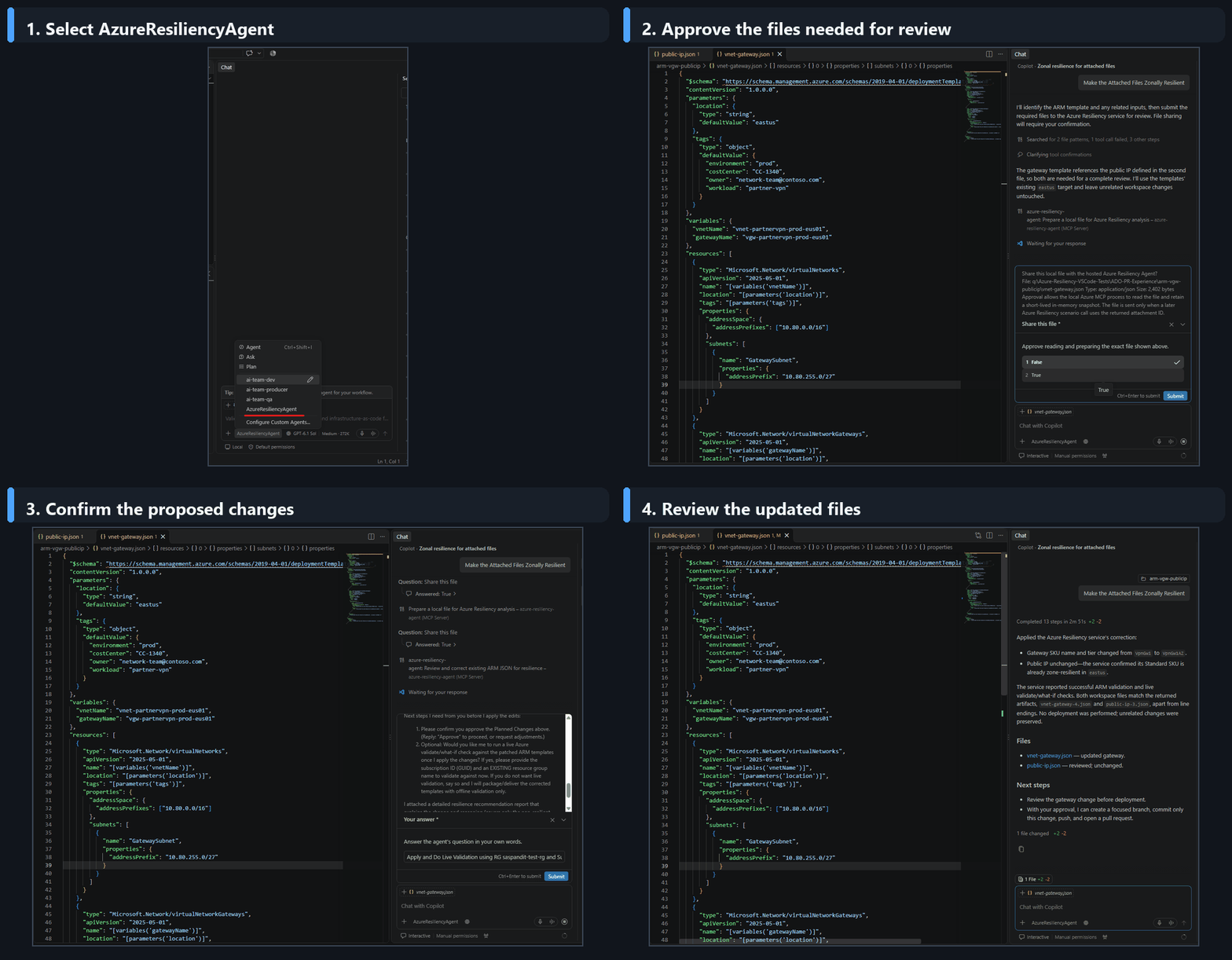
Example prompts for GitHub Copilot
Use these prompts with AzureResiliencyAgent in Visual Studio Code or GitHub Copilot CLI.
Sample prompts:
"How should I begin improving the resiliency of a new Azure application?"
"Use this architecture diagram to identify availability-zone resiliency gaps before deployment."
"Generate resilient Terraform for a web application with App Service and PostgreSQL."
"Review the ARM templates in this folder together and make only the changes required for zonal resilience."
"Correct the attached Terraform while preserving resource addresses, variables, and provider constraints."
Start Resilient — scenarios and sample prompts
The Start Resilient capability helps you design resilient architectures from scratch. The following sections describe key scenarios you can explore, along with sample prompts to get started.
Describe your application and get a resiliency plan
Tell the agent about your application's resources in natural language. The agent analyzes your topology, asks clarifying questions if needed (for example, region, configuration preferences), and generates a resiliency summary with a detailed recommendation report.
Sample prompts:
"My app has a VM, a PostgreSQL database, and a load balancer. Help me start my resilient journey."
"I'm building an application with AKS, Redis, Storage, and Cosmos DB. What should I do to make it resilient?"
"I have a web app with an App Service, SQL Database, and a Front Door. Can you assess the resiliency?"
Generate resilient infrastructure as code
Ask the agent to generate deployment-ready Bicep, ARM JSON, or Terraform for your resources with the recommended resiliency configurations already enabled. Specify the format that you want, or let the agent ask a clarification question before generating the files.
Sample prompts:
"Generate a Bicep template for a zonally resilient VM setup."
"Create an ARM JSON template for a resilient architecture with VMs, AKS, and Storage."
"Generate Terraform for my application with resiliency best practices included."
Larger application architectures
The agent can handle more complex application descriptions with multiple resource types. It produces a consolidated resiliency summary and detailed recommendations across all resources.
Sample prompts:
"My app includes VMs, AKS, Redis, Storage, and Cosmos DB. Help me design a resilient setup."
"Generate infrastructure as code for a zone-resilient architecture with VMs, AKS, and Storage. Ask me whether to use Bicep, ARM JSON, or Terraform."
Get Resilient — Scenarios and Sample Prompts
The Get Resilient capability helps you assess and improve the resiliency of your existing Azure workloads. The following sections describe key scenarios you can explore.
Check resource resiliency
Ask the agent to check whether a specific resource or your entire service group is zonally resilient. The agent returns the current resiliency status along with supporting configuration details.
Sample prompts:
"Is my VM zonally resilient?"
"Check the resiliency of my storage account."
"Get the zonal resiliency posture of my service group."
Check prerequisites for resiliency
Before enabling resiliency, you might need to address certain prerequisites. The agent can identify blocking conditions such as region limitations, permission requirements, or configuration dependencies.
Sample prompts:
"What are the prerequisites to make my VM zonally resilient?"
"What do I need to do before enabling zone redundancy on my database?"
Enable resiliency on your resources
For resources that support in-place conversion (mutable resources), the agent can directly enable zonal resiliency. For resources that require redeployment (such as VMs), the agent provides step-by-step guidance and scripts.
Sample prompts:
"Enable zonal resiliency for my PostgreSQL server."
"Enable zonal resiliency for my VM."
"How do I make my storage account zone-redundant?"
Important
For some resource types, the agent executes the change directly. For others (like VMs), it provides guidance and scripts rather than making changes, since these resources require redeployment.
Generate enablement scripts
The agent can generate scripts to enable or create zonally resilient resources in multiple formats, including PowerShell, Azure CLI, Bicep, Terraform, and ARM templates.
Sample prompts:
"Give me scripts to enable zonal resiliency for my resources."
"Generate scripts to create a zonally resilient storage account."
"Generate scripts for all resources in my service group."
Organize resources into service groups
Use service groups to logically group the Azure resources that make up an application. The agent can help you create service groups, add resources to them, and view their membership.
Sample prompts:
"Create a service group for my application."
"Add my VM and database to the service group."
"Show the resources in my service group."
Set resiliency goals and track compliance
After you create a service group, set resiliency goals and track how your resources comply over time. The agent supports creating goals, checking compliance status, excluding specific resources, and refreshing compliance after changes.
Sample prompts:
"Set a zonal resiliency goal for my service group."
"What is my goal compliance status?"
"Exclude this VM from my resiliency goal."
"Refresh my goal compliance after recent changes."
End-to-end guided workflow
The agent supports multi-turn conversations that progress naturally from assessment to remediation. You can start by checking your posture, then ask for scripts to fix problems, and continue through the full resiliency lifecycle in a single conversation.
Example conversation flow:
- Start with: "Create a service group for my app"
- Then: "Set resiliency goals"
- Then: "Check posture"
- Then: "Fix the problems" or "Give me scripts to fix it"
Tip
The agent maintains context across turns, so each step builds on the previous one. You don't need to repeat resource names or configuration details.
Known limitations
As this feature is in public preview, be aware of the following limitations:
- The agent is optimized for zonal resiliency scenarios. Regional resiliency and other resiliency dimensions will be added in future releases.
- Some operations might take a few moments to complete, especially for larger service groups.