หมายเหตุ
การเข้าถึงหน้านี้ต้องได้รับการอนุญาต คุณสามารถลอง ลงชื่อเข้าใช้หรือเปลี่ยนไดเรกทอรีได้
การเข้าถึงหน้านี้ต้องได้รับการอนุญาต คุณสามารถลองเปลี่ยนไดเรกทอรีได้
The role-tailored experience in Business Central helps users focus on their work. Developers, administrators, and users can customize pages at different layers, as shown in the following figure. Some changes are made in AL extensions. Others are made from the client.
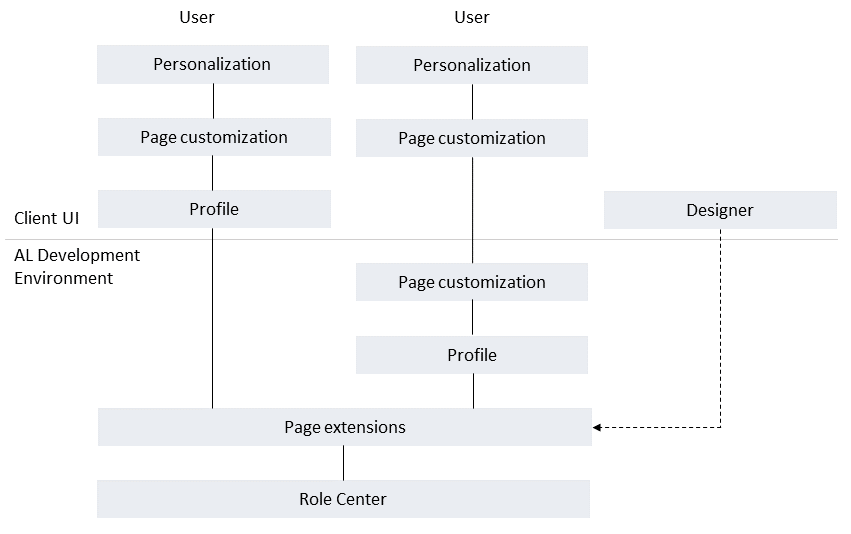
Role centers as a starting point
The role center is the first layer of customization. It's the user's entry point and home page for Business Central. It displays information relevant to the user's role and provides links for viewing data and performing tasks. You can develop different role centers for the profiles of the intended users.
Create a role center in AL by using the RoleCenter page type. Learn more in Designing role centers.
Page extensions and Designer
A page extension object extends a page by adding, moving, or hiding UI elements. Create page extensions in Visual Studio Code or from the client with Designer. Page extensions change the shared page definition in environments where the extension is installed. They're not limited to one profile.
Profiles and page customizations
A profile associates a role center and page customizations with a user role. In the client, profiles are referred to as Roles. Users can switch their role from My Settings. Different profiles can use the same role center. Create profiles in AL extensions or from the client with the appropriate permissions.
On top of the profile are page customizations. These modify the layout of specific pages. For example, you can move or hide actions, fields, list columns, or entire parts. These layout changes are also available through personalization. Profile customizations apply to users assigned to that profile. Create them in AL extensions or from the client. Client-created customizations take precedence over AL profile customizations.
Learn more about profiles and page customization in AL in Designing profiles. Learn more about using the client in Customizing the workspace for profiles (roles).
Personalization for individual users
The last layer is personalization. Users personalize their own workspace in the client. These changes take precedence over profile customizations and apply only to that user. Learn more in Personalizing your workspace.
Related information
Developing extensions
AL development environment
Page object
Page extension object
Page extension properties