優先權式執行可讓使用者指定傳送至 Azure Cosmos DB 的要求優先順序。 如果要求數目超過每秒設定的要求單位 (RU/s) 內可處理的容量,則 Azure Cosmos DB 會調節低優先順序要求,以優先執行高優先順序要求。
此功能可讓使用者在容器的總耗用量超過高負載情節中設定的 RU/秒時執行重大工作,同時延遲較不重要的工作,方法是先實作低優先順序要求的節流量值。 任何使用 SDK 的用戶端應用程式都會根據所設定的重試原則,來重試低優先順序要求。
Note
優先順序型執行功能不保證一律會節流低優先順序要求,而是偏好高優先順序要求。 此系統採用最佳努力原則,且不與功能效能掛鉤的 SLA(服務水平協議)。
使用案例
應用程式對相同容器上執行的工作負載有不同的優先順序時,您可以使用優先順序型執行。 例如,
- 優先設定讀取、寫入或查詢作業。
- 優先設定使用者動作與背景作業,例如
- 預存程序
- 資料內嵌/移轉
入門指南
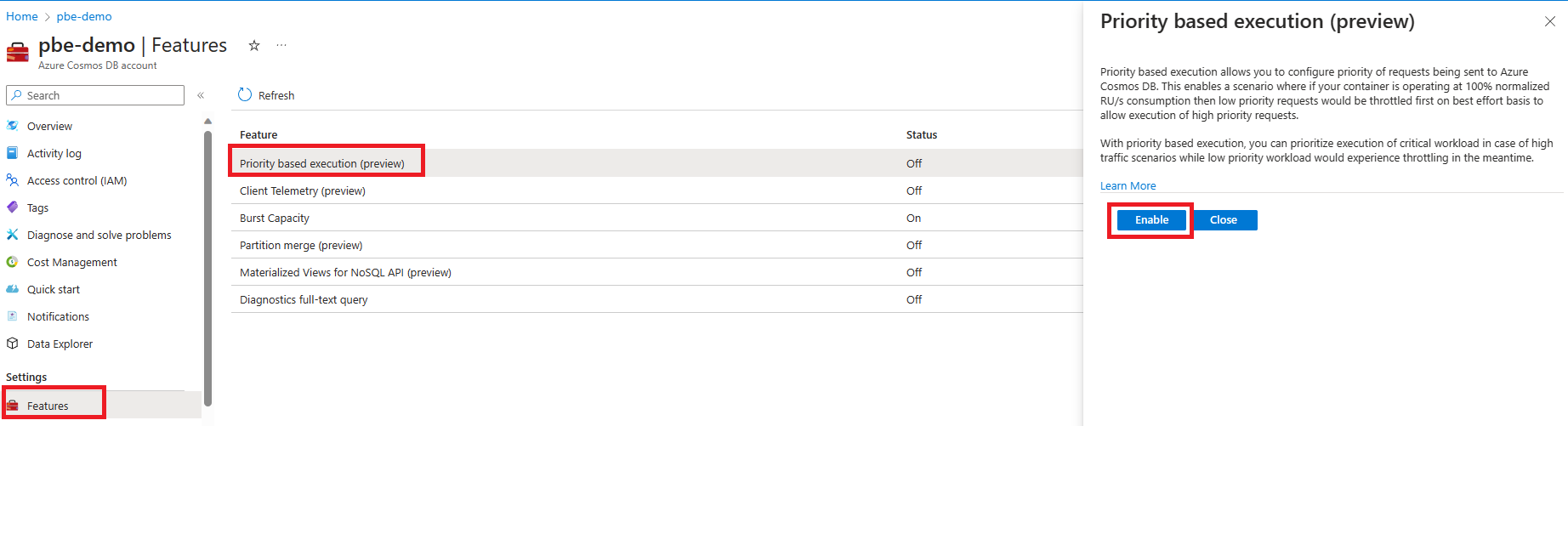
若要開始使用優先順序型執行,請導覽至 Azure Cosmos DB 帳戶中您所在的 [功能] 頁面。 選擇並啟用 基於優先權的執行 功能。
SDK 需求
- .NET v3:v3.38.0 或更新版本
- Java v4:v4.45.0 或更新版本
- Spark 3.2:v4.19.0 或更新版本
- JavaScript v4:v4.0.0 或更新版本
- Python:v4.5.2b2 或更新版本。 僅在預覽版本提供。
程式碼範例
using Microsoft.Azure.Cosmos;

//update products catalog with low priority
RequestOptions catalogRequestOptions = new ItemRequestOptions{PriorityLevel = PriorityLevel.Low};

PartitionKey pk = new PartitionKey(“productId1”);
ItemResponse<Product> catalogResponse = await this.container.CreateItemAsync<Product>(product1, pk, requestOptions);

//Display product information to user with high priority
RequestOptions getProductRequestOptions = new ItemRequestOptions{PriorityLevel = PriorityLevel.High};

string id = “productId2”;
PartitionKey pk = new PartitionKey(id);

ItemResponse<Product> productResponse = await this.container.ReadItemAsync< Product>(id, pk, getProductRequestOptions);
監視優先順序型執行
您可以使用 Azure 入口網站中的 Azure 監視器計量,來監視低和高優先順序要求的行為。 若要進一步了解計量,請參閱 Azure 監視器計量。
變更 Cosmos DB 帳戶的預設優先順序層級
如果啟用優先順序型執行,而且使用者未指定要求的優先順序層級,則所有這類要求都會以「高」優先順序來執行。 您可以使用 Azure CLI,來變更 Azure Cosmos DB 帳戶中要求的預設優先順序層級。
Azure CLI
安裝Azure CLI version 2.81.0或更新版本
# set subscription context
az account set -s $SubscriptionId

# Enable priority-based execution
az cosmosdb update `
  -g <resource-group> `
  -n <account-name> `
  --enable-priority-based-execution true

# change default priority level
az cosmosdb update `
  -g <resource-group> `
  -n <account-name> `
  --default-priority-level low
Azure PowerShell
# Install module Az.CosmosDB 1.19.0 or later

Install-Module -Name Az.CosmosDB -Force

# Login and Set Subscription

Connect-AzAccount
Set-AzContext -Subscription <subscription-id>

# Enable Priority Based Execution

Update-AzCosmosDBAccount `
  -ResourceGroupName "<resource-group>" `
  -Name "<account-name>" `
  -EnablePriorityBasedExecution $true

# Set Default Priority Level

Update-AzCosmosDBAccount `
  -ResourceGroupName "<resource-group>" `
  -Name "<account-name>" `
  -DefaultPriorityLevel "Low"
資料總管優先順序
針對 Cosmos DB 帳戶啟用優先順序型執行時,Azure 入口網站 [資料總管] 中的所有要求都會以「低」優先順序執行。 您可以在 [資料總管] 的 [設定] 功能表中變更優先順序設定,來調整此設定。
Note
此用戶端設定僅適用於相關使用者的資料總管檢視,而且不會影響其他使用者的資料總管優先順序層級或 Cosmos DB 帳戶的預設優先順序層級。

局限性
- 無伺服器資料庫帳戶目前不支援優先順序型執行。
- 優先順序型執行功能的行為對於共用輸送量資料庫容器而言並不具確定性。
- 針對強式和限定過期一致性層級,讀取要求優先順序可能無法有效允許執行低優先順序寫入要求,而不論高優先順序的讀取流量為何。