重要事項
本文中的部分資訊與發行前版本產品有關,在產品正式發行前可能會大幅度修改。 Microsoft 對此處提供的資訊,不提供任何明確或隱含的瑕疵擔保。
純信號偵察員Team Cymru 的 Pure Signal Scout 外掛讓 Security Copilot 客戶能即時收集關於 IP 位址與網域的詳細威脅情報。 Scout 提供無與倫比的速度、準確性與可視性,幫助資安分析師做出更快速且更有根據的決策。 Scout 強大的功能確保資安團隊能領先於不斷演變的網路威脅。 它提供惡意 IP 活動、網域資訊、開放埠口、通訊等資訊的洞見。 透過來自被動DNS和密碼憑證等來源的AI強化資料,它協助資安團隊偵測並阻擋有害IP,簡化調查流程並提升回應時間。
開始之前的須知事項
與 Security Copilot 的整合是透過一個 API 金鑰運作,您必須先取得該金鑰才能使用外掛。 你可以建立新的使用者帳號,或用你現有的帳號來取得金鑰。
請設定您的 Pure Signal Scout 帳號和 API 金鑰
去 Scout Insight 試用 區填寫所需資料。
驗證你的電子郵件並設定密碼。
登入 純信號偵察 兵入口。
前往 API 金鑰頁面。
選取 [建立]。
(可選) 新增金鑰描述。
選擇 建立金鑰 以產生金鑰。
如果「 建立 」按鈕被停用,表示你的組織已達到鍵數上限。 在這種情況下,請依照以下步驟操作:
在舊金鑰旁邊,選擇 撤銷。
選擇 建立金鑰 以開始產生新的金鑰。
使用你現有的帳號並取得你的 API 金鑰
登入 純信號偵察 兵入口。
前往 API 金鑰頁面。
選取 [建立]。
(可選) 新增金鑰描述。
選擇 建立金鑰 以產生金鑰。
如果「 建立 」按鈕被停用,表示你的組織已達到鍵數上限。 在這種情況下,請依照以下步驟操作:
在舊金鑰旁邊,選擇 撤銷。
選擇 建立金鑰 以開始產生新的金鑰。
在 Security Copilot 中設定 Pure Signal Scout 外掛
從提示列選取 外掛程式 按鈕,存取 管理外掛程式。
在 Pure Signal Scout 插件旁,選擇 設定。

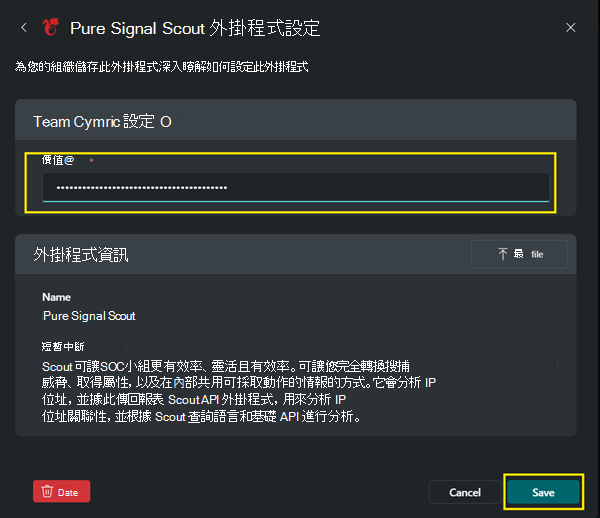
在 Value 欄位,貼上 Pure Signal Scout API 鍵,然後選擇 儲存。
純信號偵察員範例提示
| 功能 | 描述 | 輸入參數 | 範例提示 |
|---|---|---|---|
ScoutFoundationAPI |
接受 IP 位址並支援大規模分析,提供判斷該集合是否包含可疑、惡意或資訊性 IP 的洞見。 童軍基金會的 API 也提供與 IP 位址相關的 AS 資訊、國家代碼及關鍵標籤。 | 要求:最多 10 個 IP 位址 () | - List down the malicious and suspicious IPs from these 8.8.8.8 175.155.2.48 185.220.101.101 192.42.116.175 188.165.200.97 185.220.101.88 178.20.55.182 104.182.36.17 with help of Pure Signal Scout plugin. - Using the Pure Signal Scout plugin, find if the IP Address 185.220.100.240 is malicious ? - List down key tag associated with IP Address 12wd85.220.100.240 using Scout plugin. |
ScoutIPDetailsAPI |
Scout IP Details API 提供特定 IP 位址的完整資訊,涵蓋身份、網路通訊歷史、被動 DNS 資料、開放埠口、X.509 憑證、TLS/SSL 指紋及 WHOIS 紀錄等細節。 此端點讓使用者能透過指定開始與結束日期或選擇日期範圍,取得 IP 位址行為與關係隨時間的完整報告。 | 必修條件: IP AddressOptional: start_datestart_date 從目前日期回溯最多90天 & 結束日前30天 end_date : 不可能在未來 天數:最少1天,最多30天 (相對於以天數相對錯置的 UTC 時間。它不能超過30天的最大範圍。) size:預設值:100,分鐘:1,最大值:1000 (回應規模(以紀錄計算)以回應方式,) sections: identity通訊 PDNS open_ports x509 指紋 WHOIS 摘要proto_by_ip |
- Using Pure Signal Scout to find what open ports are available on this IP address 47.156.224.38? - Are there any unusual communication patterns for this IP address 47.156.224.38? Check with the Pure Signal Scout plugin.- What are the most frequent destinations for this IP address 47.156.224.38? Find using Scout plugin.- Using Scout plugin find what are the connections between this IP address 47.156.224.38 and specific ASNs?- Has this IP address 175.155.2.48 been seen in any honeypot data? Find using Scout.- What are the potential threats associated with this IP address 175.155.2.48?- What are the country/region origins of IPs communicating with this one IP 47.156.224.38? |
ScoutSearchAPI |
Scout Search API 提供詳細的網域資訊,並支援使用 Scout 查詢語言進行進階搜尋查詢。 它會回傳結果,可能包括國家代碼、自主系統 (AS) 資訊、標籤、WHOIS 資料、開放埠口、被動 DNS (PDNS) 、通訊細節、服務資訊、X.509 憑證及指紋等。 此 API 允許使用者使用多種格式建立查詢,包括 IP 位址、網域名稱、網站,或使用特定選擇器 (pdns.domain) 等進階查詢。 關於可用搜尋選擇器的完整細節,請參閱 Scout 文件。 | 必備:查詢 可選: start_date: 從目前日期回溯最多90天 & 結束日前30天end_date: 不可能是未來天數:最小天數:1天,最大天數:30天 (相對於與UTC時間相差的天數。它不能超過最大30天的範圍。) 大小:預設:100,最小:1,最大:5000 (回覆的記錄大小,回覆) |
- Using Pure Signal Scout to find what is the WHOIS information for this domain 10crypto.top ?- Using the Pure Signal Scout plugin can you show me the historical DNS data for this domain akamai.com?- What are the most recent WHOIS updates for this subtitleseeker.com? Use Scout plugin.- Using Scout to find what is the reverse WHOIS information for this domain 10crypto.top?- Use Scout to run the query pdns.domain="*ngrok.io" and give the certificate details about top 10 associated IPs.- What organization is associated with subtitleseeker.com in the WHOIS data? Use Scout. |
排除 Pure Signal Scout 外掛問題
錯誤時有發生
如果你遇到像「無法完成您的請求」這樣的錯誤,請嘗試以下步驟來排查:
開始一個新工作階段來刷新上下文,並在新工作階段再嘗試這個提示。
指定詳細提示:參考 Security Copilot 最佳提示指南,並依據 Pure Signal Scout 外掛的技能與能力製作詳細提示。
調整大小參數:如果問題持續存在,請將提示中的大小參數縮小以控制回應大小,例如「使用大小為10」。這也可以在 IP Details API 或 Scout Search API 中調整,以幫助減少回應負載。
如果問題持續,請登出 Security Copilot,再登入再試一次。
提示沒有呼叫正確的功能
如果提示沒有調用正確的功能,或似乎啟動了不同的外掛,可能是因為其他外掛或自訂外掛提供了類似 Pure Signal Scout 的功能。 例如,如果你有多個外掛提供威脅情報或網域資訊,可能會產生衝突。 要優先處理並特別針對 Pure Signal Scout,建議關閉其他自訂插件。 或者,你也可以在提示中使用產品名稱 Pure Signal Scout ,或指定特定技能。
提供對 Pure Signal Scout 外掛的回饋
如需回饋,請聯絡 Pure Signal Scout。
相關內容
請參考以下 Security Copilot 文章作為指引: