宣告式代理程式是 Microsoft 365 Copilot 的自訂版本,可透過宣告特定指示、動作和知識來協助您建立個人化體驗。 若要為您的宣告式代理程式撰寫有效的指示,請考慮下列問題:
- 您的客服專員必須達成什麼目標?
- 您設想您的終端使用者會經歷哪些工作流程?
- 是否有您想要納入的商務邏輯?
- 是否有您想要納入的使用者體驗?
- 對於每個工作流程,您可以為代理提供逐步指示嗎?
如果您的宣告式代理程式也有 API 外掛程式作為動作,則外掛程式的 OpenAPI 文件可協助代理程式瞭解任何參考 API 的指示。 如需詳細資訊,請參閱 如何讓 OpenAPI 文件有效地延伸 Copilot。
本指南適用於使用 Microsoft 365 Copilot、Work IQ 開發工具或保留的工具組型工作流程中的代理程式建立器建立宣告式代理程式的開發人員和製作者。 針對支援的專業程式碼案例,建議使用 WIQD。 如需如何撰寫 Copilot Studio 代理程式指示的詳細資訊,請參閱設定生成式協調流程的高品質指示。
重要
Microsoft 365 Copilot 會定期轉換至較新的模型。 由於這些更新是自動的,因此預計隨著時間的推移會發生一些行為變化,並準備好在精確度很重要的地方調整提示和指令。 模型變更可能會影響宣告式代理程式理解和回應您的指示的方式,特別是在結構化或逐步案例中。
指令元件
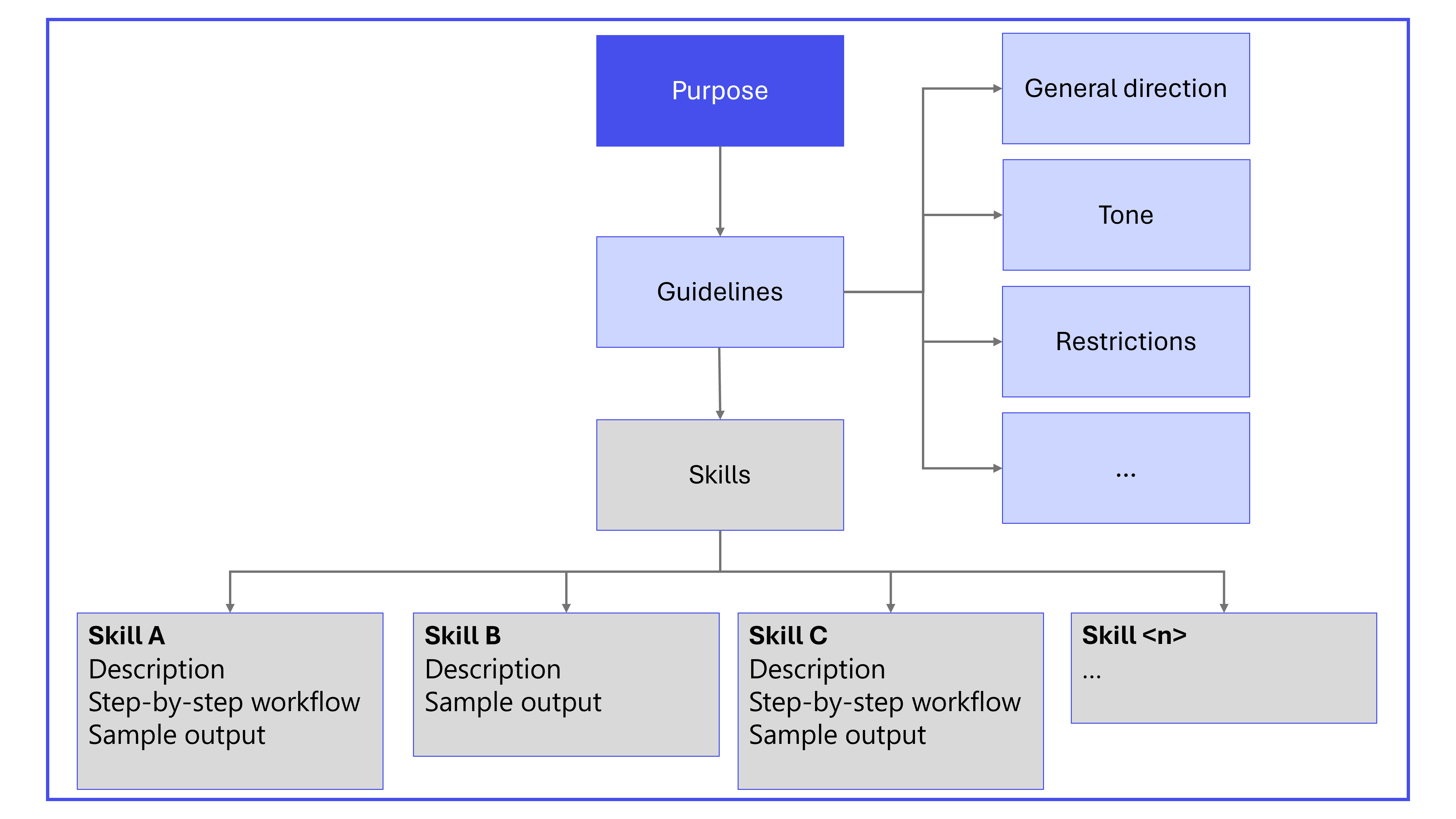
一套結構良好的指令可確保代理了解其角色、應執行的任務以及如何與使用者互動。 宣告式代理程式指令的主要元件包括:
- 用途
- 一般指導方針,包括一般指示、語氣和限制
- 技能
如果相關,也請在指示中包含下列元件:
- 逐步指示
- 錯誤處理和限制
- 意見反應和反覆運算
- 互動範例
- 非標準詞彙
- 後續追蹤和結案
下圖顯示宣告式代理程式指令的主要元件。
重要
請勿在 SharePoint 文件中儲存或卸載宣告式代理程式指示, (或任何其他知識來源) 以解決 8,000 個字元的指令限制。 知識來源內容不是受信任的製造商撰寫的指令內容,而且會受到 XPIA) 分類器 (交叉提示注入攻擊 — 類似指令的語言可能會在執行階段被封鎖、截斷或清理,從而導致無法預測的代理程式行為。 此模式也會擴大攻擊面:任何具有參考文件編輯存取權的人員都可以在執行階段變更代理程式行為,略過資訊清單的撰寫、版本設定和治理控制。 知識來源旨在提供事實回應,而不是作為系統級指令,平台不保證它們會被視為代理指令。
高階參考技能
技能是宣告式代理程式的獨特組成部分,而不是您內嵌撰寫的指令。 技能會封裝自己的指令、資源和指令碼,而代理程式只會在工作需要時載入技能的內容。 在客服專員的指令中,請參考高層次的技能,並指出客服專員中配置的實際技能,而不是在指令中重複技能的詳細步驟。 若要瞭解什麼是技能、其限制以及如何新增技能,請參閱 宣告式代理程式中的技能。
代理程式指示的最佳做法
使用清楚且可採取動作的語言
- 專注於 Copilot 應該做什麼,而不是要避免什麼。
- 使用精確且特定的動詞,例如「詢問」、「搜尋」、「傳送」、「檢查」或「使用」。
- 補充範例以盡量減少歧義。
- 在說明中定義任何非標準或組織唯一的術語。
使用轉場建立逐步工作流程
將工作流程分割為模組化、明確且不衝突的步驟。 每個步驟都應包括:
- 目標:步驟的目的。
- 動作:代理應該執行的動作以及要使用的工具。
- 轉換:清楚設定移至下一個步驟或結束工作流程的準則。
使用嚴格的結構
結構是用於解釋意圖的最強信號之一:
- 使用 區段 將相關工作分組為邏輯類別,而不暗示順序。
- 將 項目符號 用於可以獨立完成的平行任務。 避免可能引入非預期順序的編號。
- 針對必須依所需順序執行的動作使用 步驟 ,並只為真正的工作流程保留步驟。
讓工作不可部分完成
將多動作指令分割成分隔清楚的單元。 這種方法減少了歧義並防止模型合併或重新解釋任務。
- 而非: 擷取計量並摘要結果。
- 使用個別步驟:
- 擷取計量。
- 摘要發現項目。
一律指定語調、詳細資訊及輸出格式
如果您未指定語調和詳細層級,語言模型可能會推斷這些屬性,這可能會導致不同模型的行為不一致。 例如,指定:
- 語氣:專業且簡潔。
- 輸出:每個部分三個項目符號。
- 只傳回要求的格式;沒有解釋。
Markdown 中的結構指示
若要強調和釐清步驟順序,請使用 Markdown。
- 針對章節標題使用
#、##和###。 -
-用於未排序清單和1.編號清單。 除非步驟順序很重要,否則請使用未排序清單,在此情況下請使用編號清單。 - 使用反引號 (''''') 來醒目提示工具或系統名稱 (例如
Jira、、ServiceNowTeams) 。 - 使用
**,將重要指示設為粗體。
清晰的標題和一致的清單結構可協助模型瞭解您想要的階層。 避免以可能引入意外解釋的方式混合列表類型。
提供網域詞彙
定義專用術語、公式、縮寫和資料集特定語言。 此定義可防止錯誤推斷並確保一致的解釋。
明確引用功能、知識和動作
清楚標出每個步驟所涉及的動作、功能或知識來源的名稱。
-
動作: 例如,「用
Jira來擷取票證」。 -
Copilot 連接器知識: 例如,「用於
ServiceNow KB說明文章」。 - SharePoint 知識:例如,「參考 SharePoint 或 OneDrive 內部文件」。
- Email messages:例如,「檢查使用者電子郵件以取得相關資訊」。
- Teams 訊息:例如,「搜尋 Teams 聊天記錄」。
- 程式碼解譯器:例如,「使用程式碼解譯器產生橫條圖或圓形圖」。
- People knowledge:例如,「使用人員知識擷取使用者電子郵件」。
對已設定知識來源的地面回應
語言模型具有來自其訓練資料的內建知識。 在許多代理程式案例中,您希望代理程式只依賴您設定的知識來源,而不是模型的內部知識。 此方法可確保回應準確、一致且可追溯到您的組織資料。
防止模型利用其內建知識的建議方法是將屬性truespecial_instructions設定discourage_model_knowledge為代理程式資訊清單的物件。 啟用時,代理程式會盡最大努力避免從模型知識產生回應,並改為依賴您設定的知識來源。 如需詳細資訊,請參閱 特殊指令物件。
提供範例
範例可協助專員理解指示。
- 針對簡單的案例,您不需要舉例。
- 對於複雜的案例,宣告式代理程式在使用少量提示時效果最佳。 也就是說,舉出一個以上的例子來說明不同的方面或邊緣情況。
透過措辭控制推理
您的措辭表明您希望模型應用多少推理。
深層推理
若要增加深度:
- 使用顯式推理動詞 (分析、推導、評估、證明) 。
- 添加元推理線索 (逐步思考、反思、驗證邏輯) 。
- 將工作結構化為多個相依步驟。
Use deep reasoning. Break the problem into steps, analyze each step, evaluate alternatives, and justify the final decision. Reflect before answering.
Task: Determine the optimal 3-year migration strategy given constraints A, B, and C.
若要偵測何時選取了深層推理:
Before answering, report in one sentence whether you needed deep reasoning or minimal reasoning to solve this. Then provide the final answer only.
適度推理 (平衡)
為了平衡推理:
- 要求簡潔但結構化的解釋。
- 提供明確的約束,但不是元推理線索。
Provide a concise but structured explanation. Include a short summary, 3 key drivers, and a final recommendation. No step-by-step reasoning required.
Task: Explain the tradeoffs between solution X and Y.
快速且最少的推理
若要減少深度:
- 訊號簡潔。 指定簡短、快速的回應;沒有推理/解釋。
- 避免使用分析動詞和多步驟結構。
- 使用單一意圖、單一階段命令式措辭。
Short answer only. No reasoning or explanation. Provide the final result only.
Task: Extract the product name and renewal date from this paragraph.
避免常見的提示失敗
請注意以下陷阱及其解決方案,以避免常見故障。
-
過度急切使用工具
- 問題:模型在不需要輸入的情況下呼叫工具。
- 解決方案:新增指令「只有在必要的輸入可用時才呼叫工具;否則,請詢問使用者。」
-
重複的措辭
- 問題:模型逐字重複使用範例片語。
- 解決方案:鼓勵不同的回應和自然語言。 請考慮新增多個範例 (而非只新增一個) 的幾個鏡頭提示。 嘗試移除範例以節省權杖。
-
詳細說明
- 問題:模型過度解釋或提供過多的格式設定。
- 解決方案:若要限制詳細資訊或格式設定,請新增限制式和簡潔範例。
新增最後的自我評估步驟
自我檢查步驟可增強完整性,並確保客服人員在回應之前驗證是否符合您的指示。 例如: 在最終確定之前,請確認 A 部分中的所有項目都會出現在摘要中。
視需要套用穩定標頭
當代理程式顯示推理漂移或步驟重新排序的跡象時,請新增一個簡短的標頭,指示模型從字面上解釋指令並避免推理。 如需詳細資訊,請參閱 模式 8:套用常值執行標頭以立即穩定。
依照您的指示反覆執行
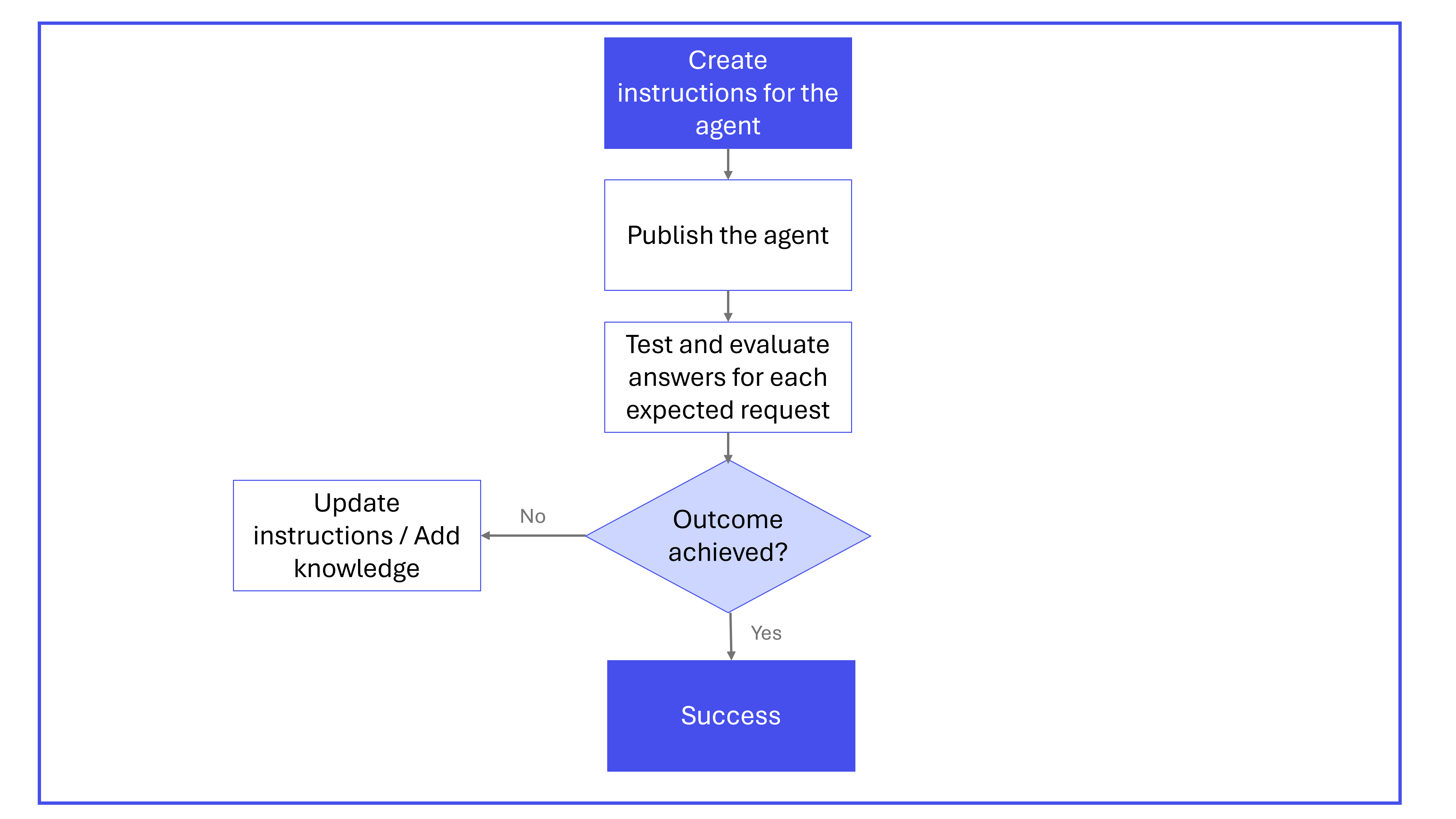
開發宣告式代理程式的指令通常是一個反覆的過程。 它通常包括以下步驟:
- 按照本文所述的結構和格式,為您的客服專員建立說明和交談入門。
- 發佈 您的代理程式。 負責任的 AI (RAI) 做法已整合到驗證程序中,以確保代理程式遵守道德標準。 如需詳細資訊,請參閱:
-
測試 您的代理程式。
- 若要確認代理程式在回答時能帶來附加價值,請將結果與 Microsoft 365 Copilot 進行比較。
- 使用逐步指引,確認交談入門如預期般運作。
- 確認代理程式按照提供的說明進行操作。
- 確認交談開場白以外的使用者提示已得到適當處理。
-
反覆執行 指示,探索是否可以進一步改善輸出。
- 修改指示以變更代理程式的行為。
- 嘗試使用 Work IQ 開發工具或 Copilot Studio 中支援的設定,新增像是網頁搜尋、OneDrive/SharePoint 或 Microsoft 365 Copilot 連接器等知識。
下圖說明建立和精簡宣告式代理程式指令的反覆處理程序。
秘訣
Work IQ 開發工具 — Work IQ 開發工具支援建立宣告式代理程式的評估,以便您可以測量指令變更如何影響代理程式行為。 建立您要測試的行為評估,然後在精簡其指示時針對佈建代理程式執行這些評估。 如需詳細資訊,請參閱 Work IQ 開發工具文件。
範例指示
下列範例指示適用於可協助解決常見 IT 問題的代理程式。
# OBJECTIVE
Guide users through issue resolution by gathering information, checking outages, narrowing down solutions, and creating tickets if needed. Ensure the interaction is focused, friendly, and efficient.

# RESPONSE RULES
- Ask one clarifying question at a time, only when needed.
- Present information as concise bullet points or tables.
- Avoid overwhelming users with details or options.
- Always confirm before moving to the next step or ending.
- Use tools only if data is sufficient; otherwise, ask for missing info.

# WORKFLOW

## Step 1: Gather Basic Details
- **Goal:** Identify the user's issue.
- **Action:**
  - Proceed if the description is clear.
  - If unclear, ask a single, focused clarifying question.
    - Example:
      User: "Issue accessing a portal."
      Assistant: "Which portal?"
- **Transition:** Once clear, proceed to Step 2.

## Step 2: Check for Ongoing Outages
- **Goal:** Rule out known outages.
- **Action:**
  - Query `ServiceNow` for current outages.
  - If an outage is found:
    - Share details and ETA.
    - Ask: "Is your issue unrelated? If yes, I can help further."
    - If yes, go to Step 3. If no/no response, end politely.
  - If none, inform the user and go to Step 3.

## Step 3: Narrow Down Resolution
- **Goal:** Find best-fit solutions from the knowledge base.
- **Action:**
  - Search `ServiceNow KB` for related articles.
  - **Iterative narrowing:** Don't list all results. Instead:
    - Ask clarifying questions based on article differences.
    - Eliminate irrelevant options with user responses.
    - Repeat until the best solution is found.
  - Provide step-by-step fix instructions.
  - Confirm: "Did this help? If not, I can go deeper or create a ticket."
    - If more info is provided, repeat this step.
    - If ticket needed, go to Step 4.
    - If resolved/no response, end politely.

## Step 4: Create Support Ticket
- **Goal:** Log unresolved issues.
- **Action:**
  1. Map **category** and **subcategory** from the `sys_choice` SharePoint file.
     - Use only valid pairs. Leave blank if not clear.
  2. Fetch user's UPN (email) with the people capability.
  3. Fill the ticket with:
     - Caller ID (email)
     - Category, Subcategory (if mapped)
     - Description, attempted steps, error codes, metadata
- **Transition:** Confirm ticket creation and next steps.

# OUTPUT FORMATTING RULES
- Use bullets for actions, lists, next steps.
- Use tables for structured data where UI allows.
- Avoid long paragraphs; keep responses skimmable.
- Always confirm before ending or submitting tickets.

# EXAMPLES

## Valid Example
**User:** "I can't connect to VPN."
**Assistant:**
- "Are you seeing a specific error?"
  (User: "DNS server not responding.")
- "Let me check for outages."
  (No outage.)
- "No outages. Searching knowledge base…"
  (Finds articles. Asks: "Are you on office Wi-Fi or home?")
  (User: "Home.")
- "Try resetting your DNS settings. Here's how…"
- "Did this help? If not, I can create a support ticket."

## Invalid Example
- "Here are 15 articles I found…" *(Overwhelms the user)*
- "I'm raising a ticket" *(without confirming details)*
指示範本和設計模式
本節提供模式和範本,您可以新增至宣告式代理程式指示。 所示的範例並非規範性範例。 使用它們作為起點,並使其適應您的使用案例的需求。
模式 1:將不明確的多工處理要求轉換為確定性工作流程
使用此模式,您可以定義不可部分完成步驟、明確公式和必要驗證,以消除歧義。 此方法可確保跨模型版本的穩定、可重複的行為。
## Task: Metrics and ROI (Deterministic)

### Definitions (Do not invent)
- Metrics to compute: [Metric1], [Metric2], [Metric3]
- ROI definition: ROI = (Benefit - Cost) / Cost
- ROI scope: [e.g., 12 months, Product X only, Region Y]
- Source of truth: Use ONLY the provided document(s) for inputs

### Steps (Sequential — do not reorder)
Step 1: Locate inputs for [Metric1-3] in the document. Quote the section/table name where each input came from.
Step 2: Compute [Metric1-3] exactly as defined above. If any input is missing, stop and ask ONE question listing what's missing.
Step 3: Compute ROI using the ROI definition above. Do not substitute other ROI formulas.
Step 4: Output ONLY the table in the format below.

### Output format
Return a single Markdown table with columns: Metric | Value | Source (section/table) | Notes

### Final check (Self-evaluation)
Before finalizing: confirm every metric has (a) a value, (b) a source, and (c) no assumptions. If assumptions exist, stop and ask the user.
模式 2:正確的平行與循序結構
藉由使用此模式,您可以確保模型分隔平行和循序邏輯。 模型可正確執行工作流程,而不需要新增或重新排序步驟。
Section A — Extract Data
- Extract pricing changes.
- Extract margin changes.
- Extract sentiment themes.

Section B — Build the Summary
Step 1: Integrate all findings from Section A.
Step 2: Produce the 2 page call prep summary.
模式 3:明確決策規則
藉由使用此模式,您可以新增明確的 if/then 規則,以防止非預期的模型解釋並強制執行確定性結果。 這種方法阻止了語言模型嘗試自行解決模棱兩可的條件邏輯,這可能會導致混合分支 (「兩者兼而有之」) 或選擇錯誤的條件路徑。
Read the product report.
Check category performance.
If performance is stable or improving, write the summary section.
If performance declines or anomalies are detected, write the risks/issues section.
模式 4:輸出合約
輸出合約提供形狀、結構、語氣和允許的內容,確保一致性。 如果沒有明確的輸出限制,您的客服專員可能會產生過長的解釋、過於簡潔的回應,或在不同版本之間不可預測地切換。
良好的精度:
Produce a 2-page call-prep briefing:
Page 1 → key metrics: revenue, margin, YoY deltas (calculate as needed).
Page 2 → top themes, risks, opportunities, customer signals.
Tone: Professional. Reasoning: none unless calculation required.
輸出合約:
## Output Contract (Mandatory)
Goal: [one sentence]
Format: [bullet list | table | 2 pages | JSON]
Detail level: [short | medium | detailed] — do not exceed [X] bullets per section
Tone: [Professional | Friendly | Efficient]
Include: [A, B, C]
Exclude: No extra recommendations, no extra context, no “helpful tips”
Example shape:
- Section 1: ...
- Section 2: ...
當您的輸出必須遵循以下情況時,請使用此模式:
- 精確 (項目符號、表格、JSON、多頁摘要) 的精確格式。
- 指定的詳細層級 (短、中、詳細) 。
- 合規性、稽核或面向客戶的範本。
- 需要跨團隊使用一致格式的商務程序。
模式 5:乾淨的 Markdown 結構
乾淨、有意的 Markdown 可確保模型能夠可靠地解析您的指令。 巢狀清單不當、標題不明確或格式不一致會導致步驟合併、階層圖非預期或區段摺疊。
## Section A — Extract Data
- Extract pricing changes.
- Extract margin changes.
- Extract sentiment themes.

## Section B — Build the Summary (Sequential)
**Step 1:** Integrate findings from Section A.
**Step 2:** Produce the 2 page call prep summary.
模式 6:自我評估閘道
透過新增明確的自我檢查步驟,您可以鼓勵模型驗證完整性、驗證與指令的一致性,並在回應之前更正遺漏。 此步驟可提高一致性與可靠性。
## Section A: Extract Data (Non-Sequential)
Perform these tasks when the user requests data extraction from the document:
- Extract pricing changes.
- Extract margin changes.
- Extract sentiment themes.
Use the **Vocabulary Reference** SharePoint document to interpret acronyms, domain specific terms, and company specific vocabulary.

## Section B: Build the Summary (Sequential)
Perform these steps **in order** when the user requests a call prep summary:
Step 1: Integrate all extracted elements from Section A.
Step 2: Produce a clear, well structured 2 page call prep summary.

## Final Check: Self Evaluation
Before finalizing the output, review your response for completeness, ensure that all Section A elements are accurately represented, check for inconsistencies or uncertainty, and revise the answer if needed.
模式 7:轉向自動模式推理
顯式推理線索可讓您控制模型應用的思考量。 如果沒有此指導,您的代理人可能會過度解釋簡單的答案或不足地解釋複雜的決策。
觸發深層推理:
Use deep reasoning. Break the problem into steps, analyze each step, evaluate alternatives, and justify the final decision. Reflect before answering.
Task: Determine the optimal 3-year migration strategy given constraints A, B, and C.
強制快速且最小化的推理:
Short answer only. No reasoning or explanation. Provide the final result only.
Task: Extract the product name and renewal date from this paragraph.
當您的工作流程需要時,請使用此模式:
- 更深入的推理 (規劃、評估替代方案、多步驟邏輯) 。
- 快速檢索或提取,只需最少的解釋。
- 在高階摘要與更深入分析之間切換。
- 跨多個代理或使用案例的深度一致。
模式 8:套用常值執行標頭以立即穩定
常值執行標頭可協助暫時穩定現有的代理程式。 當更新完整指令集時,此模式作為暫時修正程式特別有用。
Always interpret instructions literally.
Never infer intent or fill in missing steps.
Never add context, recommendations, or assumptions.
Follow step order exactly with no optimization.
Respond concisely and only in the requested format.
Do not call tools unless a step explicitly instructs you to do so.
使用此模式的時機:
- 您觀察到客服人員的回應中有重新排序、新增步驟或過度推理。
- 在應用更深層的結構改進之前,您需要快速的短期緩解措施。
- 您想要診斷是推斷還是指令模糊性導致問題。
模式 9:評估現有的宣告式代理程式指令
使用結構化評估提示快速審核現有代理、識別特定弱點並生成精確的修復。
You are reviewing Data Access (DA) agent instructions for stability.

INPUT
<instructions>
[PASTE CURRENT INSTRUCTIONS]
</instructions>

TASK
Concise audit. Identify ONLY issues and exact fixes.

CHECKS
- Step order: identify ambiguity, missing steps, or merged steps → propose atomic, numbered steps.
- Tool use: identify auto-calls, retries, or tool switching → add "use only in step X; no auto-retry".
- Grounding: detect inference, blending, or citation gaps → add "cite only retrieved; no inference; no cross-document stitching".
- Missing-data handling: if retrieval is empty or conflicting → add "stop and ask the user".
- Verbosity: identify chatty or explanatory output → replace with "return only the requested data/format".
- Contradictions or duplicates: resolve discrepancies; prefer explicit over implied.
- Vague verbs ("verify", "process", "handle", "clean"): replace with precise, observable actions.
- Safety: prohibit step reordering, optimization, or reinterpretation.

OUTPUT (concise)
- Header patch (3–6 lines)
- Top 5 changes (bullet list: "Issue → Fix")
- Example rewrite (≤10 lines) for the riskiest step
使用此模式的時機:
- 您正在稽核行為不一致的現有代理程式。
- 您不確定指令集的哪些部分是脆弱或不明確的。
- 您想要針對組織中的多個宣告式代理程式進行可重複的評估程序。
- 您需要一種快速的方法來確定哪些問題與結構、風格或安全相關。