本文說明如何加速 Windows 單一執行個體應用程式的快速啟動。 瞭解如何註冊執行中的程序執行個體,以便在啟動發生時直接收到通知,避免與完整啟動流程相關聯的額外負荷。 這種方法透過消除整合已執行個體的中介程序來減少整體延遲。
今天的典型流程:

加速啟動:
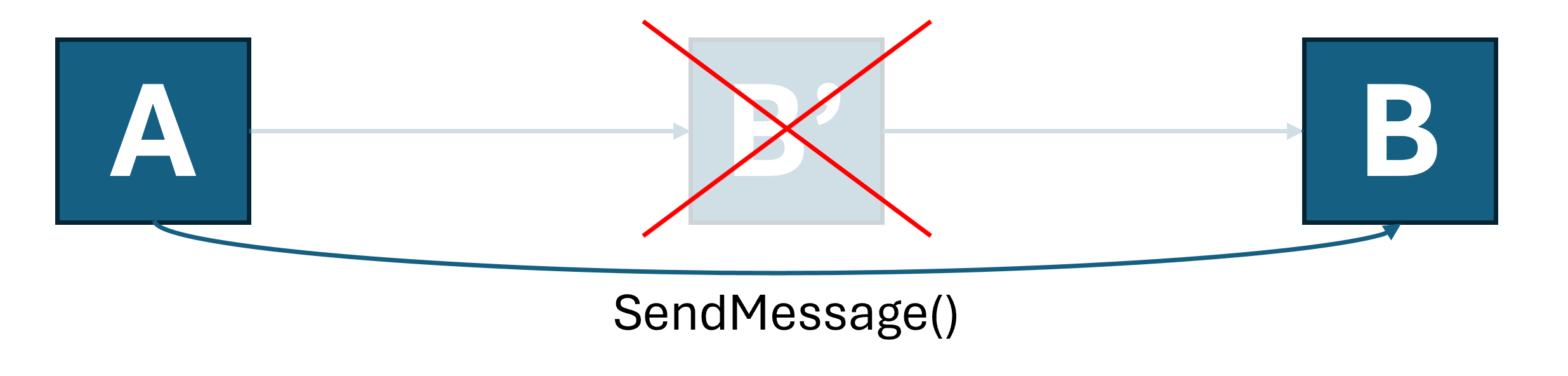
此加速啟動功能並未涵蓋每個版本 Windows 上每個來源應用程式的每種啟動類型。 因此,您的應用程式仍必須維護自己的單一執行個體實作 (如需其中一種方法,請參閱使用 應用程式生命週期 API 進行應用程式執行個體 化)。
本文的其餘部分會逐步解說如何建立簡單的 C++ WinUI 3 應用程式,以支援加速的暖啟動功能表和通訊協定啟動。
這很重要
加速啟動 API 屬於有限存取功能(參見 LimitedAccessFeatures 類別)。 欲了解更多資訊或申請解鎖代幣,請使用 LAF Access代幣申請表。
建立一個新 project
在 Visual Studio 裡,建立一個新 project。 在這個範例中,建立新的 project對話框,將語言過濾器設為 C++,project 類型設為 WinUI,然後選擇 WinUI 空白應用程式(Packaged)。 如果你沒看到這個範本,請確保你在 Visual Studio 安裝程式中安裝了 WinUI 應用程式開發 工作負載。
實作單一實例化
您可以使用您選擇的任何技術,在應用程式內實現單一實例化。 在這個例子中,請使用 Windows 應用程式 SDK 的應用程式生命週期 API。
void App::OnLaunched([[maybe_unused]] LaunchActivatedEventArgs const& e)
{
    AppInstance mainInstance = AppInstance::FindOrRegisterForKey(L"SingleInstance");
    if (mainInstance.IsCurrent())
    {
        // We're the main instance. Register to receive redirected launches.
        EventHandler<AppActivationArguments> handler(this, &App::OnRedirectedActivation);
        g_activatedRevoker = mainInstance.Activated(winrt::auto_revoke, handler);
        // Proceed with creating the main window.
        window = make<MainWindow>();
        window.Activate();

        window.SetMessage(L"Launched normally");
    }
    else
    {
        // We are a secondary instance. Redirect to the main instance and terminate when we're done.
        wil::unique_event redirectionComplete;
        redirectionComplete.create();

        auto redirectionOperation = mainInstance.RedirectActivationToAsync(mainInstance.GetActivatedEventArgs());
        redirectionOperation.Completed([&redirectionComplete](auto&&, auto&&)
        {
            redirectionComplete.SetEvent();
        });

        DWORD indexIgnored{};
        CoWaitForMultipleObjects(CWMO_DEFAULT, INFINITE, 1, redirectionComplete.addressof(), &indexIgnored);
        App::Exit();
    }
}

winrt::fire_and_forget App::OnRedirectedActivation(const IInspectable&, const AppActivationArguments& args)
{
    co_await wil::resume_foreground(window.DispatcherQueue());
    ::SwitchToThisWindow(GetWindowFromWindowId(window.AppWindow().Id()), TRUE);

    window.SetMessage(L"Launched via redirection");
}
新增應用程式的通訊協定關聯
如要接收加速通訊協定啟動,您的應用程式必須是通訊協定註冊的預設目標。 在此範例中,使用封裝註冊。 如需詳細瞭解如何註冊為 URI 預設處理常式,請參閱 處理 URI 啟用。
在您的 Package.appxmanifest中,新增通訊協定的關聯項目:
<Applications>
  <Application Id="App" … />
    …
    <Extensions>
      <uap:Extension Category="windows.protocol">
        <uap:Protocol Name="acceleratedlaunchsample"/>
      </uap:Extension>
    </Extensions>
  </Application>
</Applications>
您的應用程式現在可以透過 [開始] 功能表中的磚或在 [執行] 對話方塊中輸入 acceleratedlaunchsample: 來啟動。 在這兩種情況下,中介程序都會啟動並重新導向至已執行的執行個體。
註冊加速啟動
現在應用程式已準備好啟用優化功能。
加速啟動訊息會以視窗訊息的形式傳遞至程序內的 HWND。 您可以使用由 實IExperimentalAPIInvoker作的介面CLSID_ExperimentalAPIInvoker告訴系統哪個視窗應該接收訊息,以及您要使用哪些訊息。
IExperimentalAPIInvoker 和 CLSID_ExperimentalAPIInvoker 被定義如下:
[uuid("6fb3e48c-ba77-4f80-b9c9-77635a08a7f8")]
interface DECLSPEC_NOVTABLE IExperimentalAPIInvoker : public IUnknown
{
    IFACEMETHOD(IsSupported)(PCWSTR methodName, BOOL* isSupported) = 0;
    IFACEMETHOD(Invoke)(PCWSTR methodName, INamedPropertyStore* args, BOOL* isSupported) = 0;
};

DEFINE_GUID(CLSID_ExperimentalAPIInvoker, 0x81AF2611, 0xE262, 0x4090, 0xA1, 0x5B, 0xC0, 0x88, 0x95, 0xB1, 0xA0, 0xF0);
IExperimentalAPIInvoker 可讓您以名稱呼叫方法,並使用封裝在具名屬性存放區內的引數。 加速啟動的方法有:
方法:「RegisterAcceleratedUriLaunch」
註冊以接收通訊協定啟動,透過 WM_COPYDATA 傳遞至目標 HWND,以 Null 結尾的 UTF-16 字串(PCWSTR)。 此訊息的 WPARAM 是呼叫者的程序 ID(若有的話)。
每個 IExperimentalAPIInvoker 物件執行個體只能呼叫此方法一次。 註冊後,在取消註冊之前不要釋放物件。
| 參數名稱 | 類型 | Description |
|---|---|---|
"targetWindow" |
VT_I8 |
HWND 投射成已簽署的 LONGLONG,當你的應用程式啟動註冊 URI 方案時,會收到 WM_COPYDATA 視窗訊息。 |
"copyDataFormatId" |
VT_UI4 |
傳遞 URI 字串時以 COPYDATASTRUCT.dwData 形式傳遞的值。 |
"schemes" |
VT_LPWSTR \| VT_VECTOR |
要註冊的 URI 方案清單。 只有當呼叫處理程序是預設處理常式時,相關的程序才會被加速。 |
方法:「UnregisterAcceleratedUriLaunch」
取消從 URI 啟動的註冊。 沒有爭論。 必須在先前註冊的相同對象上執行呼叫。
方法:「RegisterAcceleratedTileLaunch」
註冊以選定視窗訊息傳遞的磁磚啟動事件。 此訊息的 WPARAM 是呼叫者的程序 ID(若有的話)。
您只能針對每個 IExperimentalAPIInvoker 物件實例呼叫此方法一次。 註冊之後,在取消註冊之前,請勿釋放物件。
| 參數名稱 | 類型 | Description |
|---|---|---|
"targetWindow" |
VT_I8 |
HWND 會投射成有簽名的 LONG,當你的應用程式啟動時,會在開始選單或工作列的主要磁貼中收到視窗訊息。 |
"messageId" |
VT_UI4 |
發送至指定目標視窗的視窗訊息 ID。 |
方法:「UnregisterAcceleratedTileLaunch」
從磁貼啟動取消註冊。 這個方法不採用引數。 您必須在先前註冊的相同物件上呼叫它。
全部整合
為了簡化前述步驟,特別是對於無法輕易access現有視窗程序的應用程式,本範例提供了一個自成一體的輔助工具,負責管理工作視窗並註冊以加速啟動。 您必須在具有作用中訊息幫浦的執行緒上建立此物件 (,例如 WinUI 應用程式的 UI 執行程) 。
首先,將以下程式碼複製到你的 project 標頭檔中:
#pragma once
#include <propsys.h>
#include <propvarutil.h>
#include <initguid.h>
#include <vector>
#include <functional>
#include <wil/result.h>
#include <wil/resource.h>

[uuid("6fb3e48c-ba77-4f80-b9c9-77635a08a7f8")]
interface DECLSPEC_NOVTABLE IExperimentalAPIInvoker : public IUnknown
{
    IFACEMETHOD(IsSupported)(PCWSTR methodName, BOOL* isSupported) = 0;
    IFACEMETHOD(Invoke)(PCWSTR methodName, INamedPropertyStore* args, BOOL* isSupported) = 0;
};

DEFINE_GUID(CLSID_ExperimentalAPIInvoker, 0x81AF2611, 0xE262, 0x4090, 0xA1, 0x5B, 0xC0, 0x88, 0x95, 0xB1, 0xA0, 0xF0);

class AcceleratedLaunchHelper
{
public:
    ~AcceleratedLaunchHelper()
    {
        if (m_hwnd != nullptr)
        {
            FAIL_FAST_IF(::GetWindowThreadProcessId(m_hwnd, nullptr) != ::GetCurrentThreadId());

            if (m_tileLaunchCallback)
            {
                BOOL isSupported;
                m_invoker->Invoke(L"UnregisterAcceleratedTileLaunch", nullptr, &isSupported);
            }

            if (m_uriLaunchCallback)
            {
                BOOL isSupported;
                m_invoker->Invoke(L"UnregisterAcceleratedUriLaunch", nullptr, &isSupported);
            }

            ::DestroyWindow(m_hwnd);
        }
    }

    inline bool TryRegisterForUris(
        const std::vector<PCWSTR>& uris, std::function<void(PCWSTR)> callback)
    {
        EnsureWorkerWindow();

        if (!m_invoker)
        {
            return false;
        }

        winrt::com_ptr<INamedPropertyStore> args;
        THROW_IF_FAILED(PSCreateMemoryPropertyStore(IID_PPV_ARGS(&args)));

        wil::unique_prop_variant targetWindowParam;
        THROW_IF_FAILED(InitPropVariantFromInt64(reinterpret_cast<LONGLONG>(m_hwnd), targetWindowParam.reset_and_addressof()));
        args->SetNamedValue(L"targetWindow", targetWindowParam);

        wil::unique_prop_variant copyDataFormatIdParam;
        THROW_IF_FAILED(InitPropVariantFromUInt32(0,
            copyDataFormatIdParam.reset_and_addressof()));
        args->SetNamedValue(L"copyDataFormatId", copyDataFormatIdParam);

        wil::unique_prop_variant schemesParam;
        THROW_IF_FAILED(InitPropVariantFromStringVector(
            const_cast<PCWSTR*>(uris.data()), uris.size(), schemesParam.reset_and_addressof()));
        THROW_IF_FAILED(args->SetNamedValue(L"schemes", schemesParam));

        BOOL isSupported{ FALSE };
        THROW_IF_FAILED(m_invoker->Invoke(L"RegisterAcceleratedUriLaunch", args.get(),
            &isSupported));

        if (isSupported)
        {
            m_uriLaunchCallback = callback;
            m_uriSchemes = uris;
        }

        return isSupported;
    }

    inline bool TryRegisterForTileLaunch(std::function<void()> callback)
    {
        EnsureWorkerWindow();

        if (!m_invoker)
        {
            return false;
        }

        winrt::com_ptr<INamedPropertyStore> args;
        THROW_IF_FAILED(PSCreateMemoryPropertyStore(IID_PPV_ARGS(&args)));

        wil::unique_prop_variant targetWindowParam;
        THROW_IF_FAILED(InitPropVariantFromInt64(reinterpret_cast<LONGLONG>(m_hwnd), targetWindowParam.reset_and_addressof()));
        args->SetNamedValue(L"targetWindow", targetWindowParam);

        wil::unique_prop_variant tileLaunchMessageIdParam;
        THROW_IF_FAILED(InitPropVariantFromUInt32(WM_USER,
            tileLaunchMessageIdParam.reset_and_addressof()));
        THROW_IF_FAILED(args->SetNamedValue(L"messageId", tileLaunchMessageIdParam));

        BOOL isSupported{ FALSE };
        THROW_IF_FAILED(m_invoker->Invoke(L"RegisterAcceleratedTileLaunch", args.get(),
            &isSupported));

        if (isSupported)
        {
            m_tileLaunchCallback = callback;
        }

        return isSupported;
    }

private:
    static inline LRESULT s_WorkerWndProc(HWND hwnd, UINT msg, WPARAM wParam, LPARAM lParam)
    {
        switch (msg)
        {
        case WM_NCCREATE:
        {
            auto pThis = reinterpret_cast<AcceleratedLaunchHelper*>(
                (reinterpret_cast<CREATESTRUCT*>(lParam))->lpCreateParams);
            if (pThis)
            {
                ::SetWindowLongPtr(hwnd, 0, reinterpret_cast<LONG_PTR>(pThis));
            }
            break;
        }
        }

        auto pThis = reinterpret_cast<AcceleratedLaunchHelper*>(GetWindowLongPtr(hwnd, 0));
        if (pThis)
        {
            return pThis->WorkerWndProc(hwnd, msg, wParam, lParam);
        }

        return 0;
    }

    inline LRESULT WorkerWndProc(HWND hwnd, UINT msg, WPARAM wParam, LPARAM lParam)
    {
        switch (msg)
        {
        case WM_COPYDATA:
        {
            const auto copyData = reinterpret_cast<COPYDATASTRUCT*>(lParam);
            if (copyData->dwData == 0)
            {
                const auto uri = reinterpret_cast<PCWSTR>(copyData->lpData);
                if (m_uriLaunchCallback)
                {
                    m_uriLaunchCallback(uri);
                }
            }
        }
        break;

        case WM_USER:
            if (m_tileLaunchCallback)
            {
                m_tileLaunchCallback();
            }
            break;
        }
        return DefWindowProc(hwnd, msg, wParam, lParam);
    }

    inline void EnsureWorkerWindow()
    {
        if (m_hwnd != nullptr)
        {
            return;
        }

        // Best-effort: Try to acquire the IExperimentalAPIInvoker.
        // If we can't, the OS does not currently support the feature.
        if (FAILED(CoCreateInstance(CLSID_ExperimentalAPIInvoker, nullptr, CLSCTX_INPROC_SERVER,
            IID_PPV_ARGS(&m_invoker)))
        {
            return;
        }

        WNDCLASSEX wcex{ sizeof(wcex) };
        wcex.lpszClassName = L"AcceleratedLaunchWorkerClass";
        wcex.cbWndExtra = sizeof(this);
        wcex.lpfnWndProc = s_WorkerWndProc;
        wcex.hInstance = GetModuleHandle(nullptr);
        ::RegisterClassEx(&wcex);

        m_hwnd = ::CreateWindowEx(0, wcex.lpszClassName, nullptr, 0, 0, 0, 0, 0,
            HWND_MESSAGE, 0, wcex.hInstance, this);

        FAIL_FAST_LAST_ERROR_IF_NULL(m_hwnd);
    }

    // Worker window for receiving notifications
    HWND m_hwnd{ nullptr };

    // Entry point for registration & unregistration
    winrt::com_ptr<IExperimentalAPIInvoker> m_invoker;

    // Callbacks
    std::function<void()> m_tileLaunchCallback;
    std::function<void(PCWSTR)> m_uriLaunchCallback;

    // Registered URI schemes
    std::vector<PCWSTR> m_uriSchemes;
};
現在您可以將此程式碼整合到您的應用程式中:
void App::OnLaunched([[maybe_unused]] LaunchActivatedEventArgs const& e)
{
    …
    if (mainInstance.IsCurrent())
    {
        …

        m_acceleratedLaunchHelper = std::make_unique<AcceleratedLaunchHelper>();
        m_acceleratedLaunchHelper->TryRegisterForTileLaunch(
            [this]() { OnAcceleratedTileLaunch(); });

        std::vector<PCWSTR> schemes = { L"acceleratedlaunchsample" };
        m_acceleratedLaunchHelper->TryRegisterForUris(schemes,
            [this](PCWSTR uri) { OnAcceleratedUriLaunch(uri); });
    }
    …
}

void App::OnAcceleratedTileLaunch()
{
    ::SwitchToThisWindow(GetWindowFromWindowId(window.AppWindow().Id()), TRUE);

    window.SetMessage(L"Launched via accelerated tile launch.");
}

void App::OnAcceleratedUriLaunch(PCWSTR uri)
{
    ::SwitchToThisWindow(GetWindowFromWindowId(window.AppWindow().Id()), TRUE);

    std::wstring message = L"Launched via accelerated URI launch: ";
    message += uri;
    window.SetMessage(message);
}
使用此程式碼,您的應用程式可受益於支援此功能的作業系統版本上的加速啟動。
